Brother Printers
 WhiteBoard
 IP PBXs





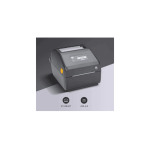
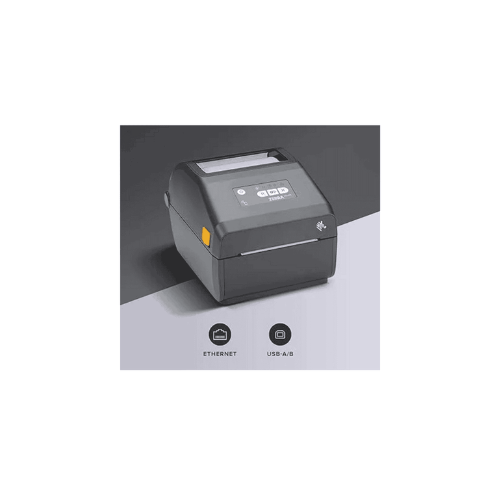

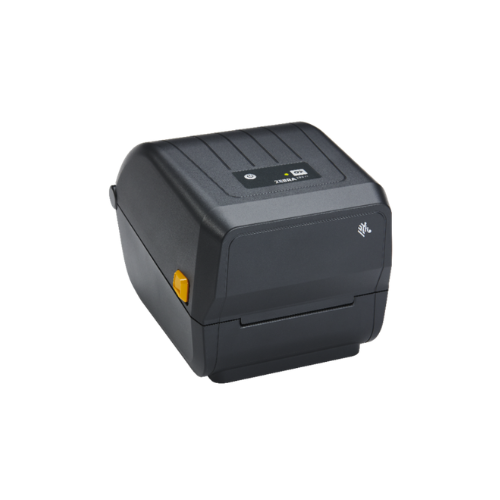
ZEBRA ZD421D Barcode Label Direct Thermal Printer
Key Features
Brand: ZEBRA
Printing Technology: Direct Thermal (no ribbon required)
Print Resolution: 203 dpi (8 dots/mm) standard; 300 dpi optional
Maximum Print Width: 4.09 in (104 mm)
Maximum Print Speed: 6 in/sec (152 mm/sec)
Media Handling:
Media width: 0.75 in (19 mm) to 4.65 in (118 mm)
Roll diameter: up to 5 in (127 mm)
Core diameter: 1 in (25.4 mm)
Connectivity Options:
Standard: USB 2.0, USB Host
Optional: Ethernet, Serial, Wi-Fi, Bluetooth Classic
Bluetooth Low Energy (BLE) for setup via mobile app (Android/iOS)
Programming Languages: ZPL II®, EPL2™, XML
Ease of Use:
Clamshell design with OpenACCESS™ for quick media loading
Intuitive 5-button interface with LED indicators
Real-Time Clock (RTC) included
Dimensions: 8.69 in × 6.98 in × 5.93 in (221 mm × 177 mm × 151 mm)
Weight: Approx. 3.5 lbs (1.6 kg)
1 Year Warranty
Ultimate Guide to Zebra ZD421d Direct Thermal Desktop Barcode Label Printer
The Zebra ZD421d (Model: ZD4A042-D01E00EZ) is an advanced, high-velocity 4-inch direct thermal desktop label printer engineered for retail, healthcare, logistics, and light manufacturing workflows. Advancing the classic design of the legacy GK420d series, this compact printing system delivers a powerful architecture that handles demanding daily tasks without ink, toner, or ribbon. It provides a reliable, low-maintenance hardware framework that accelerates shipping log generation, product labeling, and asset tracking.
Key Features and Specifications
This commercial-grade label printer balances high-capacity media handling with an easy-to-use structural profile.
- Direct Thermal Printing Engine : Creates sharp barcodes and text using heat-activated media, completely eliminating ink, toner, and ribbon expenses.
- 4-Inch Standard Print Width : Supports a versatile print area up to 4.09 inches (104 mm) wide for universal shipping and inventory layouts.
- 203 DPI Printing Resolution : Outputs crisp text and high-contrast 1D and 2D barcodes to guarantee error-free scanner processing.
- 6 IPS High-Velocity Throughput : Accelerates desktop productivity by processing media lines at speeds up to 6 inches (152 mm) per second.
- Five Intuitive Status LED Icons : Features clear visual indicators for data, media, status, pause, and wireless link to simplify real-time diagnostics.
- Modular Interface Core : Ships standard with high-speed USB and USB Host connectivity, supporting modular field-installable network expansions.
- Link-OS Enterprise Management : Utilizes an advanced internal operating system for remote fleet tracking, configuration updates, and encryption security.
Direct Thermal Efficiency and Operational Range
The Zebra ZD421d addresses label processing slowdowns by utilizing an aggressive fixed-head direct thermal printing core . Traditional thermal transfer units require careful alignment of a secondary ink ribbon roll, which can wrinkle, tear, and create unnecessary plastic waste.
This model applies targeted electrical heat directly to specialized top-coated paper or synthetic stocks, creating text and graphics in milliseconds. Its movable multi-position media sensor reads black marks, gaps, notches, and continuous rolls, allowing users to swap out media types and print varying label lengths naturally without stopping their workflow. [
Simple Plug-and-Play USB Setup Steps
Deploying your desktop direct thermal printer into your active workspace takes only a few quick moments.
Physical Media and Power Installation
- Press the twin yellow Release tabs on the sides of the printer frame forward to unlock and swing open the clamshell lid.
- Spread the spring-loaded yellow media hangers open and drop in your roll of direct thermal labels, ensuring the printing surface faces straight up.
- Feed the front edge of the label roll beneath the adjustable yellow media guides, pulling the stock slightly out past the front tear bar.
- Press the printer lid firmly down until the internal side locks snap shut, then connect the external power supply cord to a standard wall outlet.
Host Software Matching
- Download and install the official Zebra Setup Utilities application onto your Windows desktop computer.
- Connect the packaged high-speed USB data cable into the rear interface slot of the printer and an open port on your computer tower.
- Turn on the printer power switch located next to the data ports; the system will illuminate its status panel during self-testing.
- Open the Zebra Setup Utilities tool to automatically pair the driver architecture, allowing you to configure custom label width variables and print a high-contrast test layout page.
Dynamic Software Customization and Controls
The system features useful software tuning options to streamline enterprise-wide deployments.
- ZebraDesigner Blueprint Tool : Use the free bundled design application to draw customized layout parameters, insert commercial graphic logos, and embed active numbering lines into your local label templates.
- One-Touch Printhead Optimization : Adjust the internal burning dark values, print speed thresholds, or printhead pressure metrics inside the system menu to prolong the physical lifespan of your heating elements.
Frequently Asked Questions
Can the Zebra ZD421d print colored images or logos?
No, direct thermal printers create text and graphics strictly through a localized thermal reaction on heat-sensitive media coatings, resulting in monochromatic black-and-white layouts. If your inventory system requires vivid full-color branding or outdoor-grade chemical warning labels, look into specialized color ink-jet label printers.
What is the primary operational upgrade over the legacy GK420d model?
The legacy GK420d used an older processing structure that limited data transfer speeds and remote management capabilities. The upgraded ZD421d provides over 700 percent more memory capacity, an advanced three-button interface array with five status indicators, a field-upgradable network interface core, and deep compatibility with Link-OS software.
Is this direct thermal model suitable for printing pharmaceutical labels?
Yes, the precision 203 DPI thermal printhead easily satisfies standard compliance tracking rules for clinical sample tubes, prescription bottles, and laboratory tracking folders. If your medical team must pack dense tracking details or multi-language warnings onto tiny miniature tags, consider ordering the high-resolution 300 DPI model variant.
Can I run this desktop printer on a mobile cart without a wall outlet?
Yes, Zebra offers a dedicated, field-installable desktop battery base accessory for this model family. Attaching the high-capacity battery pack underneath the printer chassis allows your logistics or warehousing team to operate completely untethered, processing shipping labels directly at receiving docks or inside warehouse aisles