Brother Printers
 WhiteBoard
 IP PBXs





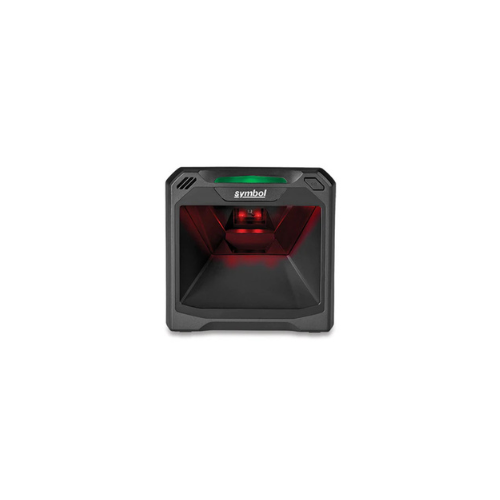

Zebra DS 7708 Vertical Barcode Scanner (DS 7708-SR4U2100ZCW)
Key Features
Brand: ZEBRA
Fixed bar code reader Black
>
Scanner type: 1D/2D Sensor type: LED
>
Codabar, Code 11, Code 128, Code 39, Code 93, EAN-13, Interleaved 2 of 5, MSI, Plessey, U.P.C. Aztec Code, Composite Codes, Data Matrix, Han Xin, MaxiCode, Micro QR Code, MicroPDF417, PDF417, QR Code, TLC-39
>
Tilt reading angle: 0 – 360°
>
Wired Standard interfaces: USB, RS-232, RS-485, Keyboard wedge
>
Power source type: USB
1 Year Warranty
Ultimate Guide to Zebra DS7708 Vertical Slot Barcode Scanner
The Zebra DS7708 (Model: DS7708-SR4U2100ZCW) is a high-performance, on-counter 2D presentation vertical slot scanner. Engineered specifically for high-volume retail environments, grocery checkout lanes, and busy convenience stores, this stationary imager effortlessly captures dense transactional data. It provides a rugged, hands-free hardware framework that processes printed tags and digital screen layouts to maximize customer throughput.
Key Features and Specifications
This commercial-grade slot scanner balances extreme motion tolerance with a space-saving on-counter footprint.
- Omni-Directional 2D Imager : Captures 1D, 2D, QR codes, Data Matrix, and PDF417 from any physical angle without precise orientation alignment.
- Extreme Swipe Speeds : Decodes barcodes smoothly at velocity thresholds up to 100 inches (2.5 meters) per second.
- Expanded Field of View : Features a window aperture over 50 percent larger than competing on-counter devices to eliminate missed passes.
- PRZM Intelligent Imaging : Utilizes specialized digital algorithms to instant-parse torn, crinkled, faded, or poorly printed barcodes. [
- Recessed Scan Window : Features a deep-set tempered glass panel to prevent micro-abrasions and scratches from degrading optical clarity.
- Water Spill Protection : Houses all core electronic components in the top section of the chassis to safeguard operations from bottom counter spills.
- Auxiliary Scanner Passthrough : Includes an integrated USB downstream interface port to easily attach a secondary handheld helper scanner.
Optic Performance and Operational Efficiency
eliminates checkout slowdowns through its specialized “swipe-and-go” presentation architecture . Traditional checkout lines bottleneck when cashiers must carefully flip and square up items with a rigid laser trajectory.
This model projects a broad digital image array that decodes labels instantly the millisecond they pass the aperture. The internal illumination relies on two deeply recessed red LEDs . This design creates a virtually invisible lighting environment that prevents annoying visual flicker or eye strain for cashiers and customers alike.
Simple Plug-and-Play USB Setup Steps
Deploying your vertical slot scanner into an active point-of-sale register or host system takes only a few quick moments.
Physical Installation Process
- Unpack the slot scanner frame and position it on a flat countertop area, or attach the matching table mount kit bracket array.
- Locate the specialized host interface slot recessed beneath the protective base of the scanner housing.
- Insert the primary shielded USB cable into the main socket until the mechanical alignment clip snaps locked.
- Plug the opposite standard USB type-A connector directly into an open high-current port on your point-of-sale cash dock or computer tower.
- Watch the three bi-color status LEDs ignite , signaling that the host auto-detect cable system has successfully configured the active protocol.
Validating Interface Connection
- Launch a standard word processing file or blank spreadsheet form on your connected POS desktop monitor.
- Glide a standard consumer retail barcode horizontally past the vertical glass panel face.
- Verify the text digits populate onto the field screen ; out of the box, the internal microchips default to USB HID Keyboard Emulation mode . [
Programming an Automatic Enter Key (Suffix)
To ensure that processed item transactions automatically update line rows without requiring cashiers to hit the keyboard “Enter” button, apply this scanning sequence using your official [Zebra 123Scan software client](2.1.5, 2.3.1) or your paper setup booklet:
1. Scan the "Scan Options" Barcode
2. Scan the "Data Suffix" Barcode
3. Scan the "Enter" (Carriage Return) Barcode
This configuration rule instructs the device’s logic module to inject a carriage return suffix instantly following every barcode validation, advancing your point-of-sale inventory fields systematically.
Frequently Asked Questions
Can the Zebra DS7708 capture document images and driver’s licenses?
Yes, because the unit utilizes an advanced 1.2-megapixel area imager array instead of traditional laser mirrors, it functions as a basic document camera. Employees can capture crisp grayscale image files of bank checks, paper coupons, signatures, or official driver’s licenses to comply instantly with internal verification or corporate compliance regulations.
What happens if a customer spills a drink directly on the counter space?
The device features an specialized spill-resistant structural design . Because the vital motherboard circuitry and data chips are isolated inside the uppermost canopy section of the midnight-black frame, liquids pooling or flowing across the base counter tray will pass by harmlessly without causing electrical shorts.
Does the system support automatic electronic article surveillance deactivation?
Yes, selected configurations of this model feature integrated Checkpoint EAS antenna loops . This hardware connection lets the cashier read the product’s barcode and deactivate the security tag on the item in a single, fluid sweeping motion, preventing embarrassing accidental security door alarms when the customer exits the storefront.
How do I modify parameters if the scanner speaker is too loud for my workspace?
You can easily toggle the physical audio output variables without scanning paperwork templates. Press and release the twin-function Volume/Tone configuration button located on the front face profile repeatedly until the speaker cycles to your preferred high, medium, or low chime setting.