Brother Printers
 WhiteBoard
 IP PBXs





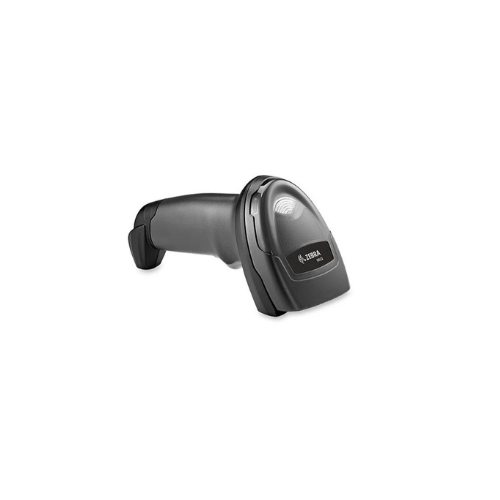
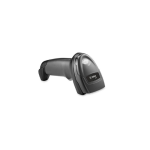

ZEBRA DS2208 Barcode Scanner (USB Kit)
Key Features
Brand: ZEBRA
Model: Zebra DS2208 Barcode Scanner USB Kit (DS2208-SR7U2100SGW)
Type: Handheld Barcode Scanner / 1D/2D Imager
Scanning Capability: Reads all 1D and 2D barcodes (printed, damaged, mobile)
Scanning Feature: Omni-directional scanning
Connectivity: USB Kit (Wired, Plug-and-Play)
Versatility: Handheld and hands-free (with stand, if included in kit)
Durability: Built for everyday use, drop resistant
1 Year Warranty
Ultimate Guide to Zebra DS2208 2D Handheld Barcode Scanner USB Kit
The Zebra DS2208 Barcode Scanner USB Kit (Model: DS2208-SR7U2100AZW) is an affordable, high-velocity 2D area imager engineered for retail points-of-sale, hospitality desks, and light logistics . Combining advanced digital imaging sensors with out-of-the-box plug-and-play USB configuration, this handheld scanner decodes traditional printed labels and digital formats on smartphone screens. It provides a reliable, low-maintenance hardware framework that accelerates customer checkouts and prevents workplace downtime.
Key Features and Specifications
This commercial-grade 2D imager balances high-resolution optic tracking with a highly durable, lightweight frame.
- 2D Area Imager Core : Decodes 1D, 2D, QR codes, Data Matrix, and PDF417 from any physical angle without precise orientation alignment.
- Screen Data Capture : Reads digital barcodes effortlessly off reflective smartphone and tablet displays for mobile couponing and loyalty profiles
- PRZM Intelligent Imaging : Utilizes specialized software algorithms to instant-parse torn, crinkled, faded, or poorly printed barcodes.
- Omni-Directional Scanning : Features a broad digital sweep layout to eliminate the need to align a rigid laser line with product labels.
- Intuitive Aiming Line : Projects a crisp, linear laser-style aiming strip to help cashiers target barcodes smoothly from optimal distances.
- Auto-Host Detecting Cable : Self-identifies the target point-of-sale host terminal to instantly apply appropriate interface parameters
- Hands-Free Stand Integration : Pairs with an optional presentation gooseneck cradle to switch automatically from manual trigger pulls to automatic desktop scanning.
Imager Performance and Operational Range
The Zebra DS2208 overcomes checkout bottlenecking by utilizing an aggressive point-and-shoot optical engine . Traditional linear laser scanners force employees to align labels carefully and cannot read modern multi-dimensional barcodes or matrix codes.
This model captures a full digital image slice instantly. It features a versatile 0.5-inch to 14.5-inch reading depth of field on standard retail UPC tags, allowing cashiers to verify items naturally without slowing down their workflow or misreading identical labels.
Simple Plug-and-Play USB Setup Steps
Deploying your handheld imager into an active point-of-sale register or computer desk takes only a few quick moments.
Physical Cable Installation
- Unpack the hardware kit and locate the standard 7-foot heavy-duty shielded USB data line.
- Insert the modular RJ45 terminal plug into the socket recess at the base of the scanner handle until it clicks.
- Plug the opposite standard USB type-A connector directly into an open port on your computer tower or cash dock.
- Listen for the rapid startup tone sequence , signaling that the host interface auto-detection system is initialized.
Setting the Host Interface
- Open any text editing application (like Notepad, Word, or a blank web form spreadsheet) on your workstation screen.
- Locate the official programming reference guide sheet packed inside your retail product box.
- Scan the “Set Factory Defaults” programming barcode found in the booklet to normalize all internal logic.
- Pull the trigger to test scan a product label ; out of the box, the unit defaults to USB HID Keyboard Emulation mode , entering text straight to your active cursor line.
Programming an Automatic Enter Key (Suffix)
To prevent your checkout clerks from manually tapping the “Enter” key on the keyboard after every single scan, execute this programming sequence using your setup barcode sheet:
1. Scan the "Scan Options" Barcode
2. Scan the "Data Suffix" Barcode
3. Scan the "Enter" (Carriage Return) Barcode
This sequence instructs the internal firmware to append a carriage return suffix instantly. This automatically drops your blinking cursor down to the next text row after each barcode read, speeding up high-volume inventories.
Frequently Asked Questions
Can the Zebra DS2208 parse data on official driver’s licenses?
Yes, certain targeted variants of this series (such as the DS2208-DL model) include specialized hardware firmware built explicitly to parse the PDF417 matrix codes printed on government ID cards. This splits birthdates, full names, and addresses into discrete form entries automatically to simplify customer age checks.
What is the primary operational difference between the legacy LS2208 and the DS2208?
The legacy LS2208 uses traditional physical moving mirrors to throw a single 1D laser beam, which cannot read matrix QR codes or reflect off glossy smartphone touchscreens. The upgraded DS2208 features a solid-state digital camera area sensor that reads all 1D/2D layouts across both physical and digital media seamlessly.
Is this scanner built to survive accidental counter drops?
Yes, the rugged structural casing is engineered with integrated shock protection to withstand repeated drops onto solid concrete from standard counter heights of up to 5 feet (1.5 meters). The internal electronic components are shock-isolated to safeguard critical optics from operational vibrations.
Can I build advanced custom configuration rules over a computer?
Yes, you can download the free Zebra 123Scan Utility application onto any desktop computer. Connecting your scanner via USB lets you build custom configuration profile files, add specific letters or symbols as prefixes/suffixes, block specific barcode formats, and push rapid firmware updates.