Brother Printers
 WhiteBoard
 IP PBXs





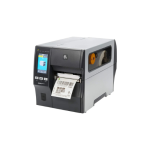
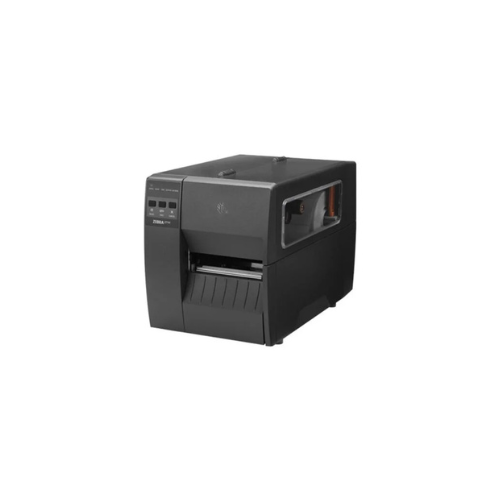

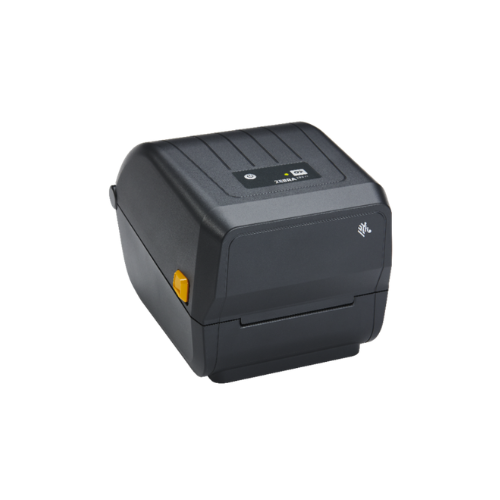
Zebra ZT111 Barcode Label Thermal Printer(ZT11142-T0E000FZ)
Key Features
Brand: ZEBRA
Print Method: Thermal Transfer (also supports Direct Thermal)
Print Resolution: 203 dpi (8 dots/mm)
Maximum Print Speed: 10 inches per second (254 mm/s)
Maximum Print Width: 4.09 inches (104 mm)
Media Handling: Tear-off mode
Construction: Metal frame with plastic enclosures
User Interface: Three-button keypad with five LED status indicators
Connectivity: USB 2.0, RS-232 Serial, 10/100 Ethernet, USB Host, Bluetooth Low Energy (BTLE)
Memory: 256 MB SDRAM, 256 MB Flash
Sensors: Adjustable transmissive and reflective media sensors
1 Year Warranty
Ultimate Guide to Zebra ZT111 Entry-Tier Industrial Barcode Printer
The Zebra ZT111 (Model: ZT11142-T01000FZ) is an entry-tier industrial 4-inch thermal transfer label printer engineered specifically for growing manufacturing, logistics, warehousing, and retail operations. Serving as Zebra’s most budget-friendly industrial desktop option, this printing engine balances a compact, space-saving footprint with rugged durability. It provides a heavy-duty, low-maintenance hardware ecosystem built to handle demanding multi-label printing runs without breaking operational budgets.
Key Features and Specifications
This value-tier industrial printer pairs durable components with a highly streamlined user interface.
-
- Dual Printing Capability: Supports both thermal transfer (utilizing an ink ribbon for long-lasting prints) and direct thermal (ribbonless) methods.
- Compact, Space-Saving Footprint: Features a slim mechanical architecture and a bi-fold media door that opens vertically to save desk space.
- 3-Button Graphical Interface: Replaces complex screen menus with intuitive, highly visible LED icons for status, pause, data, media, and network diagnostics.
- 203 DPI Printing Resolution: Outputs sharp text patterns and high-contrast 1D and 2D barcodes to guarantee immediate optical scanner parsing.
- 10 IPS Reliable Throughput: Accelerates mid-volume workflows by processing label lines at speeds up to 10 inches (254 mm) per second.
- Massive 450-Meter Ribbon Capacity: Accommodates extra-long industrial ink ribbons to drastically reduce user downtime and roll-change frequency.
- Out-of-the-Box Connectivity: Ships standard with built-in high-speed USB, Serial, and 10/100 wired Ethernet ports to ease network integration.
Industrial Durability and Media Versatility
The Zebra ZT111 addresses the high replacement costs of standard desktop printers forced to run intensive inventory or logistics cycles. Standard desktop frames use lighter plastic mechanics that wear down under sustained multi-label outputs, leading to misalignment and overheating errors.
This model features a rugged internal metal frame and print mechanism paired with a highly accurate transmissive and reflective sensor grid. It applies calibrated, uniform heat to melt wax, hybrid wax/resin, or pure chemical resin carbon ribbons onto specialized paper or synthetic stocks. This process creates high-contrast images that endure tough warehouse handling, freight scraping, and changing environmental conditions.
Simple Plug-and-Play Network Setup Steps
Deploying your entry-tier industrial printer onto your facility network or local computer terminal takes only a few quick moments.
Physical Ribbon and Media Installation
-
- Lift the side bi-fold door upwards to expose the internal structural media bay area.
- Slide a roll of raw thermal transfer ribbons onto the gold ribbon supply spindle, threading the ribbon backing film down beneath the printhead to the take-up spindle.
- Slide your label roll onto the heavy-duty media hanger arm, guiding the stock underneath the media guide bars and over the black drive roller.
- Rotate the yellow printhead toggle lever counter-clockwise to lock the printhead assembly down tightly against the fed label stock.
- Close the side access hatch and plug the integrated power cable into a standard grounded electrical wall outlet.
Host Software Matching
-
- Download and install the official Zebra Setup Utilities software application onto your Windows desktop computer.
- Connect the unit to your network router using a standard RJ45 Ethernet cable, or link directly to your PC tower via the high-speed USB data line.
- Flip on the primary power rocker switch located on the back panel of the chassis frame.
- Press and hold the physical Pause and Feed buttons simultaneously for two seconds to execute an automatic media calibration loop.
- Open the Zebra Setup Utilities tool on your PC to auto-discover the network IP address or USB driver line, completing your deployment with a high-contrast test layout page.
Software Customization and Controls
The system features useful software tuning options to streamline enterprise-wide deployments.
-
- ZebraDesigner Blueprint Tool: Use the free bundled design application to draw customized layout parameters, insert commercial graphic logos, and embed active numbering lines into your local label templates.
- Link-OS Basic Framework: Utilizes an streamlined operational firmware core that allows IT administrators to deploy, configure, and manage printer setting profiles via simple centralized management web utilities.
Frequently Asked Questions
What is the primary difference between the Zebra ZT111 and the ZT231?
The ZT111 serves as Zebra’s value-tier industrial option, trading the ZT231’s 4.3-inch full-color touchscreen and 12 IPS maximum speed for a simplified 3-button LED status interface and a reliable 10 IPS print speed. This allows businesses to acquire full-capacity 450-meter industrial ribbon mechanisms at a significantly lower entry cost.
How do I choose between using wax, wax/resin, or pure resin ribbons?
Standard wax ribbons are ideal for standard paper shipping labels where basic smudge protection is needed. Wax/resin ribbons balance cost and durability, offering excellent resistance to chemicals and moisture on satin or glossy papers. Pure resin ribbons offer the highest grade of protection, engineering an indestructible bond on synthetic materials to survive outdoor weather, solvent washings, and cryogenic freezers.
Can I upgrade the connection ports or add Wi-Fi to the ZT111 later?
Yes, the ZT111 features a modular internal electronic layout that supports field-upgradable expansions. If your warehouse floor rearranges and requires cordless operation or specific workflow handling, you can easily install a factory-approved internal Wi-Fi/Bluetooth wireless module or an automatic label peeler/cutter accessory.
Can I run direct thermal labels without buying or installing an ink ribbon?
Yes, the printer is completely dual-mode capable out of the box. If you choose to run heat-sensitive, chemically top-coated direct thermal labels, you can completely omit the ink ribbon step; the printer will use raw printhead heat to generate your text layouts cleanly.