Brother Printers
 WhiteBoard
 IP PBXs





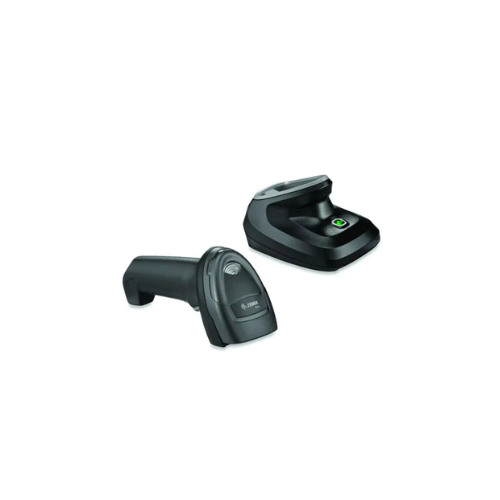
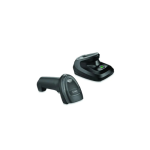

Zebra DS2278 2D Wireless Handheld Barcode Scanner (DS2278- SR7U2100 PRW)
Key Features
Brand: ZEBRA
Type: Cordless Barcode Scanner / 1D/2D Imager
Connectivity: Bluetooth Wireless, USB Kit (includes cradle)
Scanning Capability: Reads all 1D and 2D barcodes (printed, damaged, mobile)
Scanning Feature: Omni-directional scanning
Freedom: Wireless operation for enhanced mobility
Kit Includes: Charging Cradle/Presentation Stand
Durability: Built for everyday use, drop resistant
Key Features: Wireless 2D Scanner, Bluetooth Barcode Reader, POS Scanner, Retail Scanner, Mobile Barcode Compatible, Zebra DS2278, Cordless Imager
1 Year Warranty
Ultimate Guide to Zebra DS2278 Cordless 1D/2D Handheld Barcode Scanner
The Zebra DS2278 Cordless Barcode Scanner (Model: DS2278-SR7U2100PRW) is an affordable, high-velocity 2D area imager designed to provide complete wireless freedom at retail points-of-sale, hospitality desks, and light logistics lines. Powered by Bluetooth 4.0 with proprietary Wi-Fi Friendly Mode, this cordless model eliminates cable clutter while reading both printed and digital barcodes. It delivers a highly flexible, low-maintenance hardware framework that accelerates customer checkouts, speeds up stockroom inventory tracking, and avoids operational downtime.
Key Features and Specifications
This commercial-grade cordless imager pairs advanced wireless mobility with high-resolution digital optic tracking.
-
- Cordless Bluetooth 4.0 Connectivity: Provides a reliable wireless roaming radius up to 33 feet (10 meters) away from the presentation cradle base.
- 2D Area Imager Core: Decodes 1D, 2D, QR codes, Data Matrix, and PDF417 from any physical angle without precise orientation alignment.
- Long-Lasting 2400 mAh Battery: Delivers up to 100,000 continuous scans or 84 hours of operating life on a single charge cycle.
- Zebra Wi-Fi Friendly Mode: Prevents wireless channel overlapping by ensuring Bluetooth transmissions do not interfere with your store’s local Wi-Fi networks.
- PRZM Intelligent Imaging: Utilizes advanced software algorithms to instant-parse torn, crinkled, faded, or poorly printed barcodes.
- Presentation Cradle Base: Functions simultaneously as an automatic high-speed battery charger and a stable desktop presentation scanner.
- Micro-USB Direct Charging: Features an integrated base port to charge the scanner gun directly using a standard micro-USB cable when away from the cradle.
Wireless Freedom and Charging Economics
The Zebra DS2278 solves the physical limitations of corded devices by providing reliable cordless desktop integration. Cashiers running standard corded scanners frequently struggle to scan large, heavy, or bulky items resting at the bottom of deep shopping carts, creating physical strain and slowing down transaction lanes.
This model allows cashiers to lift the scanner gun out of its dock and walk directly to the item. The internal battery relies on advanced Lithium-Ion chemistry. Dropping the device into the cradle activates fast-charging pins, keeping the scanner topped up during brief pauses between customers to ensure it remains ready for long all-day shifts.
Simple Plug-and-Play USB Cradle Setup Steps
Deploying your cordless imager into an active point-of-sale register or computer desk takes only a few quick moments.
Physical Cable Installation
-
- Unpack the cordless kit and position the combination presentation cradle base on a flat countertop workspace.
- Insert the RJ45 terminal plug of the standard shielded USB cable into the recessed socket beneath the cradle base until it clicks.
- Plug the opposite standard USB type-A connector directly into an open high-current port on your point-of-sale cash dock or computer tower.
- Listen for the startup tone sequence from the base, signaling that the host interface auto-detection system is initialized.
Bluetooth Hardware Pairing
-
- Pick up the cordless DS2278 scanner gun and press the physical trigger to wake up the internal optic lens.
- Scan the specialized pairing barcode printed directly on the front plastic face label of the presentation cradle base.
- Wait for a short, high-low-high beep sequence from the scanner handle, which confirms that the Bluetooth wireless link is securely locked.
- Open a standard text editing application (like Notepad or Word) on your PC screen and scan a consumer retail tag to verify text layout output.
Programming an Automatic Enter Key (Suffix)
To prevent your checkout clerks from manually tapping the “Enter” key on the keyboard after every single scan, execute this programming sequence using your setup barcode sheet:
1. Scan the "Scan Options" Barcode
2. Scan the "Data Suffix" Barcode
3. Scan the "Enter" (Carriage Return) Barcode
This sequence instructs the internal firmware to append a carriage return suffix instantly. This automatically drops your blinking cursor down to the next text row after each barcode read, speeding up high-volume inventories.
Frequently Asked Questions
Can the Zebra DS2278 read barcodes displayed on glossy smartphone screens?
Yes, because the unit utilizes an advanced solid-state area imager sensor instead of traditional laser mirrors, it reads data across varying physical and digital mediums. It captures digital coupons, mobile loyalty profile cards, and electronic boarding passes smoothly off reflective smartphone and tablet displays.
How do I know when the cordless scanner battery is running low?
The top cap of the scanner handle features an integrated multi-segment LED battery status bar. When you pull the trigger, a solid green light indicates a healthy charge. A flashing red light warns that battery levels have dropped below critical thresholds, signaling the device should be placed back onto the cradle pins immediately.
What happens if the scanner travels outside the 33-foot Bluetooth boundary?
If a worker carries the scanner past its wireless communication threshold, it will emit a distinct error tone to warn that data transmission has dropped out. If configured through the Zebra 123Scan Utility, the unit can operate in batch mode, storing scanned digits inside its internal memory cache and uploading them automatically once it reconnects with the cradle base.
Is the internal battery user-replaceable on this model?
Yes, unlike competing cordless devices that require complete replacement or factory intervention when a battery fails, the DS2278 features an accessible handle design. You can easily slide off the lower grip panel to install a fresh replacement battery pack at your workspace without using specialized tools.