Brother Printers
 WhiteBoard
 IP PBXs





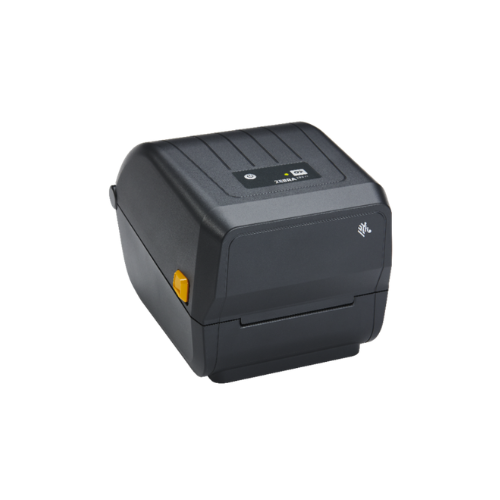

Zebra ZD220D Barcode Label Direct Thermal Printer (ZD22042-D0EG00EZ)
Key Features
Brand: ZEBRA
Print Technology: Thermal Transfer (Requires ribbon for durable labels)
Print Resolution: 203 dpi (dots per inch)
Connectivity: USB, Ethernet
Durability: Produces long-lasting, scratch- and fade-resistant labels
Applications: Asset tagging, inventory, shipping, retail, product ID
Key Features: Barcode Label Printer, Thermal Transfer Printer, Desktop Label Printer, Zebra ZD230, Durable Label Printing, Compact Printer, Cost-Effective Labeling
1 Year Warranty
Ultimate Guide to Zebra ZD220d Direct Thermal Desktop Barcode Label Printer
The Zebra ZD220d (Model: ZD22042-D01G00EZ) is an essential, budget-friendly 4-inch desktop direct thermal label printer engineered for retail, logistics, e-commerce, and office administrative workflows. Serving as Zebra’s core entry-level desktop option, this value-tier printing system balances reliable construction with low acquisition costs. It provides a highly efficient, streamlined hardware framework that generates high-contrast shipping labels, product tags, asset identifiers, and wristbands without ink, toner, or thermal ribbon expenses.
Key Features and Specifications
This compact desktop printer pairs essential direct thermal engineering with an easy-to-use structural profile.
- Direct Thermal Printing Core : Creates crisp text layouts and barcodes using heat-activated media, completely eliminating ink, toner, and ribbon costs.
- 4-Inch Standard Print Width : Supports a versatile media print area up to 4.09 inches (104 mm) wide for universal shipping and inventory layouts.
- 203 DPI Printing Resolution : Outputs sharp text patterns and high-contrast 1D and 2D barcodes to guarantee error-free optical scanner processing.
- 4 IPS Reliable Throughput : Delivers steady desktop performance by processing labels at speeds up to 4 inches (102 mm) per second.
- Single LED Status Indicator : Streamlines system diagnostics using an intuitive, multi-color physical indicator button for power and error tracking.
- Dual Clamshell Design : Features an OpenAccess structural layout that lets users open the device and swap out label rolls effortlessly.
- Basic USB Connectivity : Ships standard with a high-speed USB interface to establish stable, hardwired plug-and-play desktop connections.
Direct Thermal Efficiency and Material Handling
The Zebra ZD220d addresses everyday label processing needs by utilizing a highly efficient fixed-head direct thermal printing engine . Because it applies targeted electrical heat directly to specialized top-coated paper or synthetic stocks, it completely removes the need to buy, align, or replace secondary carbon ink ribbons.
The hardware houses a fixed transmissive sensor that reads gaps, notches, and roll markings naturally. This allows small businesses and shipping desks to swap out media styles and print varying label lengths quickly without wasting time or encountering system faults.
Simple Plug-and-Play USB Setup Steps
Deploying your entry-level direct thermal printer into your active workspace takes only a few quick moments.
Physical Media and Power Installation
- Pull the twin yellow release levers on the sides of the printer frame forward to unlock and swing open the clamshell lid.
- Spread the spring-loaded yellow media hangers open and drop in your roll of direct thermal labels, ensuring the printing surface faces straight up.
- Feed the front edge of the label roll beneath the fixed media guides, pulling the stock slightly out past the front tear bar.
- Press the printer lid firmly down until the side locks snap shut, then connect the external power supply cord to a standard wall outlet.
Host Software Matching
- Download and install the official Zebra Setup Utilities application onto your Windows desktop computer.
- Connect the packaged high-speed USB data cable into the rear interface slot of the printer and an open port on your computer tower.
- Turn on the printer power switch located next to the data port; the system will illuminate its status panel during self-testing.
- Open the Zebra Setup Utilities tool to automatically pair the driver architecture, allowing you to configure custom label width variables and print a high-contrast test layout page
Software Customization and Controls
The system features useful software tuning options to streamline basic label rollouts.
- ZebraDesigner Blueprint Tool : Use the free bundled design application to draw customized layout parameters, insert commercial graphic logos, and embed active numbering lines into your local label templates.
- One-Touch Printhead Optimization : Adjust the internal burning dark values or print speed thresholds inside the Zebra Setup Utilities menu to prolong the physical lifespan of your heating elements.
Frequently Asked Questions
What is the primary operational difference between the Zebra ZD220d and the ZD230d?
The ZD220d is Zebra’s base model, featuring a steady print speed of 4 IPS and offering strictly USB connectivity. The upgraded ZD230d increases printing throughput to a faster 5 IPS, can accommodate a factory-installed Ethernet card configuration, supports massive 300-meter industrial ribbon rolls (in its transfer variant), and can accept advanced internal peeling or cutting modular accessories.
Can the Zebra ZD220d print highly durable labels for outdoor use?
No, direct thermal printers create text and graphics strictly through a localized thermal reaction on heat-sensitive media coatings, resulting in monochromatic black-and-white layouts. These labels are sensitive to heat, moisture, and heavy sunlight friction over time. If your inventory system requires outdoor-grade weatherability or chemical resistance, look into thermal transfer printers like the Zebra ZD220t or ZD421t which utilize resin ink ribbons.
Is this direct thermal printer compatible with Mac computers?
Yes, while the specialized Zebra Setup Utilities software is built specifically for Windows platforms, the ZD220d is fully compatible with macOS environments. You can easily add the printer through the standard Mac CUPS printing framework or run it natively inside professional macOS-supported label software by using standard ZPL programming drivers.
Can I upgrade the connection ports or add Wi-Fi to this device later?
No, the ZD220 series features a fixed, non-upgradable hardware chassis design to keep manufacturing costs as low as possible. If your business infrastructure expands and requires a wired network connection or wireless Wi-Fi/Bluetooth deployments, you should evaluate the modular, field-upgradable Zebra ZD421 series instead.