Power Banks


 Brother Printers


 IP PBXs



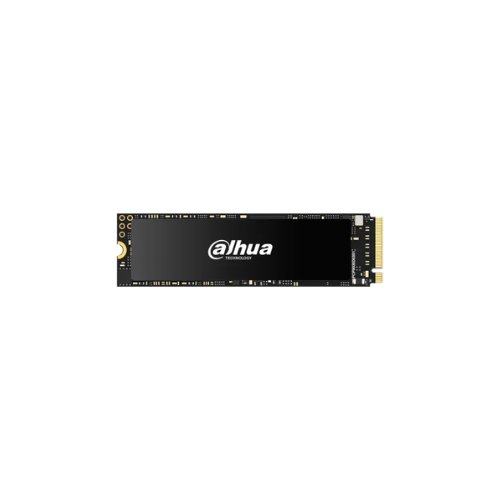

Dahua 2TB NVMe M.2 PCIe Gen 4×4 2280 SSD – Read Speed 7000MB/s write speed 6290 MB/s
Key Features
Brand: Dahua
Model: Dahua DHI-SSD-C970VN2TB
Capacity: 2TB
Form Factor: M.2 2280
Interface: NVMe PCIe Gen4×4
Read Speed: Up to 7000 MB/s
Write Speed: Up to 6290 MB/s
Storage Type: Solid State Drive (NVMe SSD)
1 Year Warranty
Dahua 2TB NVMe M.2 PCIe Gen 4×4 2280 SSD (DHI-SSD-C970VN2TB): Ultimate High-Speed Professional Guide
The Dahua 2TB NVMe M.2 PCIe Gen 4×4 2280 SSD (DHI-SSD-C970VN2TB) is a powerhouse in the professional enterprise storage, high-tier gaming, and data acceleration market. This high-efficiency solid-state drive completely eliminates standard PCIe Gen 3 and SATA controller bottlenecks, delivering an ultra-responsive computing pipeline for modern workstations, rendering rigs, and small form factor PCs. It serves as a reliable, heavy-duty solution designed to streamline massive data compilation, high-resolution 4K/8K video editing, and complex multi-threaded calculations for data infrastructures of all sizes. By utilizing advanced multi-layer NAND flash architecture and high-velocity Gen 4.0 data lanes, this flexible machine helps companies boost daily productivity, slash creative export timelines, and maintain a highly dependable storage matrix.
Creative professionals, hardcore gamers, and enterprise IT managers rely on this hardware to eliminate data access latencies and automate demanding read/write operations without experiencing performance drops. Its robust solid-state construction ensures it handles brutal, high-volume transfer cycles cleanly without the mechanical vulnerabilities common with traditional hard drives. Performance-oriented system builders looking to scale their computing or virtual caching infrastructure find this device to be an indispensable asset for daily computing production.
This comprehensive guide covers everything you need to optimize this top-tier Gen 4×4 storage device for your business workflow.
Key Technical Specifications
Understanding your hardware capabilities helps you maximize your storage investment. The drive balances elite data throughput with advanced error management.
-
- Model Registry: Officially cataloged under the commercial serial identifie
- Form Factor: Standardized M.2 2280 architecture footprint measuring 22mm x 80mm × 2.25mm.
- Bus Interface: High-speed PCIe Gen 4.0 x4 lanes utilizing the NVMe 1.4 protocol.
- Storage Capacity: Massive 2TB volume optimized for large-scale media libraries and boot partitions.
- Sequential Read Velocities: Extreme tracking speeds reaching up to 7,000 MB/s.
- Sequential Write Velocities: Quick data writing mechanics processing up to 6,290 MB/s.
- NAND Flash Memory: Premium multi-layer original 3D NAND Flash memory chips.
- Endurance & Reliability: Rated at a heavy-duty 1200 TBW (Total Bytes Written) paired with an extensive 1,500,000-hour MTBF tracking standard.
Top Features and Business Benefits
Elite PCIe Gen 4×4 Data Throughput
The advanced Gen 4 storage controller technology means you never experience the processing lag or transfer stutters common with legacy drives. It processes massive parallel data pipelines, opens complex developer environments, and drops boot sequences down to a matter of seconds, keeping your enterprise pipeline moving without delay
Advanced 3D NAND and DRAM-less Thermal Efficiency
The built-in energy-efficient sub-routines optimize operational voltage scales directly within the drive firmware. Because its DRAM-less high-performance SLC cache architecture generates significantly less heat dissipation, it minimizes thermal throttling and preserves battery lifecycles inside performance-focused laptops.
High Endurance for Intensive Workloads
With a structural rating of 1,200 Total Bytes Written, the drive easily handles high-frequency daily read/write cycles. This is ideal for supporting high-volume database modifications, scratch disk tasks, and active server caches without showing premature cellular performance drops.
Advanced Data Security and Health Protection
Using specific 4K LDPC (Low-Density Parity-Check) error correction technology, the drive automatically detects and corrects data bit formatting errors. This acts as a protective shield for proprietary data libraries, preventing system corruption and tracking drive structural health cleanly through S.M.A.R.T. register paths.
Simple Step-by-Step Setup Guide
Follow these steps to get your internal M.2 NVMe solid-state drive installed and configured quickly.
Step 1: Unpack and Prepare the System
Turn off your computer workstation completely, disconnect the main AC electrical line, and remove your system side chassis or laptop bottom panel access lid safely.
Step 2: Slot the Drive Into the Motherboard M.2 Channel
Locate the primary M.2 PCIe Gen 4 slot on the computer board circuit deck. Insert the gold contact finger pins of the Dahua SSD at a slight 30-degree angle directly into the terminal housing until it seats firmly.
Step 3: Fasten the Structural Retention Screw
Gently press the rear edge of the drive card down flat against the onboard standoff anchor. Use a precise screwdriver to lock the structural mounting screw firmly into place to prevent any accidental physical displacement during transport.
Step 4: Configure Operating System Initialization
Boot your machine and open your native system disk management software panel application dashboard. Initialize the newly detected partition, designate your drive volume, and perform a quick format using your target file system layout to complete the device recognition process.