Power Banks


 Brother Printers


 IP PBXs



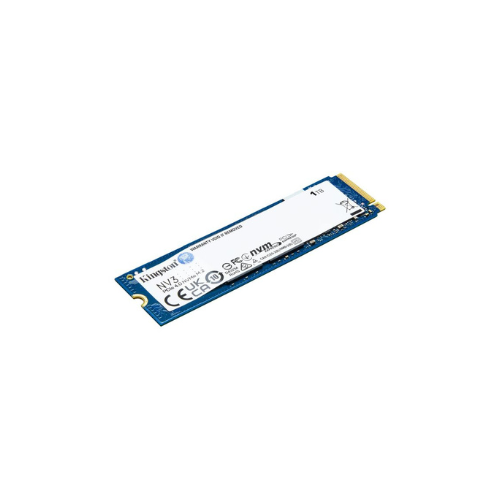
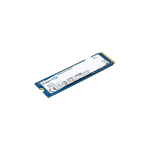

KINGSTON SNV3S 1TB NVMe M.2 PCIe Gen 4×4 2280 SSD – Up to 6000 MB/s
Key Features
Brand: Dahua
Model: Dahua DHI-SSD-C910N256G
Gen 4×4 NVMe PCIe performance
Up to 6,000MB/s read, 4,000MB/s write
PCIe 4.0 x4 NVMe Interface
3D NAND Technology
1 Year Warranty
Kingston NV3 1TB NVMe M.2 PCIe Gen 4×4 2280 SSD (SNV3S/1000G): Ultimate High-Speed Professional Guide
The Kingston NV3 1TB NVMe M.2 PCIe Gen 4×4 2280 SSD (SNV3S/1000G) is a powerhouse in the professional next-generation storage, system optimization, and high-performance data infrastructure market. This high-efficiency solid-state drive eliminates PCIe Gen 3 interface boundaries while delivering crisp, clean data indexing speeds for modern ultrabooks, small form factor PCs, and demanding computing stations. It serves as a reliable, heavy-duty solution designed to streamline professional media layout scratch disks, rapid operating system boot sequences, and massive application load pipelines for configurations of all sizes. By utilizing advanced high-density 3D NAND flash memory cells and an agile, DRAM-less controller setup, this flexible machine helps users boost daily processing productivity, minimize software compilation downtime, and maintain a highly responsive storage architecture.
Content creators, remote enterprise operators, and tech enthusiasts rely on this hardware to eliminate data access latencies and automate heavy file transmission pipelines without experiencing thermal performance drops. Its robust, single-sided physical build quality ensures it handles rigorous data reading and writing tasks while operating at lower power thresholds. System builders looking to scale their computing or virtual caching infrastructure find this device to be an indispensable asset for daily computing production.
This comprehensive guide covers everything you need to optimize this high-speed NVMe storage device for your business workflow.
Key Technical Specifications
Understanding your hardware capabilities helps you maximize your storage investment. The drive balances elite Gen 4×4 data throughput with efficient power draw metrics.
-
- Model Identifier: Officially registered under the Kingston inventory part number
- Form Factor: Standardized M.2 2280 architecture footprint measuring 22mm x 80mm.
- Bus Interface: High-speed PCIe Gen 4.0 x4 lanes utilizing the NVMe protocol.
- Storage Capacity: 1TB optimized volume for massive system boot partitions and rapid local storage.
- Sequential Read Velocities: Extreme tracking speeds reaching up to 6,000 MB/s.
- Sequential Write Velocities: Quick data writing mechanics processing up to 4,000 MB/s.
- NAND Engineering: Advanced multi-layer 3D NAND flash technology.
- Endurance & Reliability: Rated at a heavy-duty 320 TBW (Total Bytes Written) with an extensive 2,000,000-hour MTBF tracking standard.
- Software Bundle: Includes a dedicated license for Acronis True Image for Kingston data cloning utility.
Top Features and Business Benefits
High-Velocity PCIe Gen 4×4 Performance
The advanced Gen 4 storage controller technology means you never experience the processing lag common with legacy SATA or entry-level NVMe drives. It compiles software building blocks, renders high-resolution video streams, and launches complex operating environments at lightning speeds, keeping your professional pipeline moving without delay.
Low Power Consumption and Reduced Heat
The built-in power management sub-routines optimize operational voltage scales directly within the drive firmware. Because it generates significantly less heat dissipation, it runs cleanly without causing thermal throttling, maximizing the device battery lifecycle inside thin, high-performance laptops.
Slim Single-Sided M.2 2280 Layout
Integrate the machine seamlessly into cramped layout constraints, ultra-thin notebook frames, and compact small form factor (SFF) computer enclosures. Its single-sided hardware card structure mounts flat on the circuit deck, completely removing the necessity for space-consuming data cable paths or auxiliary mounting trays.
Complimentary Acronis Cloning Ecosystem
Using the specific complimentary Acronis True Image software bundle, migrating your entire workspace layout is entirely painless. This tool copies operating system files, user registry trees, and localized applications instantly, highlighting critical infrastructure conversion efficiency Simple Step-by-Step Setup Guide
Follow these steps to get your internal M.2 NVMe solid-state drive installed and configured quickly.
Step 1: Unpack and Prepare the System
Turn off your computer terminal completely, disconnect the main AC electrical line, and remove your system side chassis or laptop bottom panel access lid safely.
Step 2: Slot the Drive Into the Motherboard M.2 Channel
Locate the primary M.2 PCIe Gen 4 slot on the computer board circuit deck. Insert the gold contact finger pins of the Kingston SSD at a slight 30-degree angle directly into the terminal housing until it seats firmly.