Brother Printers
 WhiteBoard
 IP PBXs





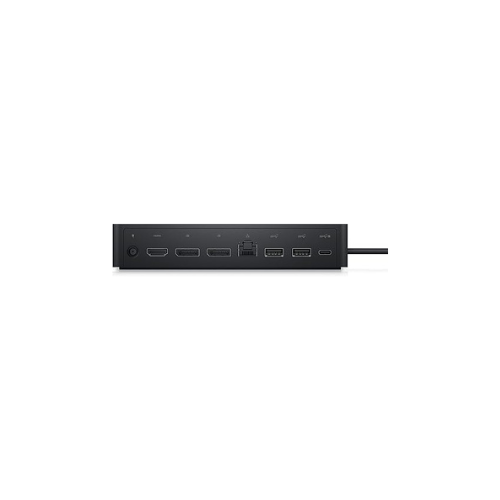
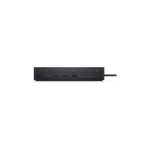

Dell UD22 USB-C Docking Station
Key Features
Brand: Dell
Hardware Interface DisplayPort, Ethernet, HDMI, USB Type C
Compatible Devices All USB-C Laptops
Total USB Ports 6
Product Dimensions 3.5″L x 1.1″W x 8.1″H
Number of Ports 10
Item Weight 16 ounces
Total HDMI Ports 1
Wattage 96 watts
1 Year Warranty
Dell UD22 Universal USB-C Docking Station: Centralized Enterprise Workstation Ecosystem
The Dell UD22 Universal USB-C docking station delivers an elite, high-performance connectivity hub engineered for heterogeneous corporate fleet deployments . Built on a universal design philosophy, this docking station provides seamless compatibility across any laptop brand featuring an active USB-C or Thunderbolt port. Choosing this professional enterprise dock ensures massive display expansion, high-speed network connectivity, and reliable power delivery, streamlining hot-desking and hybrid workspace management.
Key Specifications and Features
- Host Connection: Universal USB Type-C cable with power delivery
- Video Interfaces: 2 x DisplayPort 1.4, 1 x HDMI 2.0
- Data Interfaces: 4 x USB-A 3.2 Gen 2 ports, 1 x USB-C 3.2 Gen 2 port
- Network Interface: 1 x RJ45 Gigabit Ethernet port (10/100/1000 Mbps)
- Power Delivery: Supplies up to 96W of power pass-through to the host laptop
- Display Engine: Integrated DisplayLink chipset for multi-monitor acceleration
- System Management: Supports MAC Address Pass-Through, PXE Boot, and Wake-on-LAN
Enterprise Benefits of the Dell UD22 Dock
Universal Mixed-Fleet Compatibility
Unlike brand-locked hardware, the UD22 leverages the DisplayLink driver architecture. This allows IT departments to deploy a single docking station model across a diverse workforce utilizing Dell Latitude, Lenovo ThinkPad, HP EliteBook, and Apple MacBook hardware seamlessly
Expanded Quad-Display Infrastructure
The internal display engine bypasses native laptop graphics limitations, allowing users to run up to four external monitors simultaneously. It supports up to four 4K displays at 60Hz or a mix of high-resolution monitors to maximize productivity for data-intensive workflo
High-Wattage Unified Charging
Equipped with a high-capacity power delivery matrix, the dock feeds up to 96W of continuous electrical current directly through the host USB-C connection. This charges demanding business laptops efficiently while eliminating the need for standalone travel power bricks at the desk.
Secure Network Administration Tools
The integrated Gigabit Ethernet controller supports advanced remote corporate IT management protocols. Network administrators can execute remote operating system deployments via PXE Boot, wake sleeping machines via Wake-on-LAN, and maintain physical security auditing using MAC Address Pass-Through
Target Industries and Use Cases
Corporate Hot-Desking and Shared Workspaces
Organizations utilize the UD22 as a standard anchor point for open-office hoteling desks, allowing any employee to connect their preferred corporate laptop to a multi-monitor layout with a single cable plug.
Financial Analysis and Data Engineering
Traders, analysts, and software developers leverage the expansive quad-display support to stretch complex spreadsheets, live tracking metrics, and development environments across multiple screens concurrently
Creative Studios and Media Production
Marketing teams and content creators connect high-speed external storage drives to the 10 Gbps USB Gen 2 ports while running dual high-fidelity 4K editing monitors.
Workstation Installation and Deployment Setup
- Driver Initialization: Download and install the latest DisplayLink core software drivers on the host laptop operating system to enable multi-monitor mapping.
- Power Alignment: Plug the factory-included external power brick into the rear barrel port of the dock and connect the wall plug to a surge protector.
- Single Cable Link: Insert the integrated USB-C host cable directly into a data and power-enabled Type-C or Thunderbolt port on your laptop chassis.
Frequently Asked Questions
What is the primary difference between the Dell UD22 and WD19S docks?
The WD19S series relies on native USB-C Alt Mode graphics, which limits multi-display support based on your laptop processing chip. The UD22 uses DisplayLink technology, processing video via software to support up to four monitors on almost any computer brand
Does the UD22 dock work on Apple MacBook laptops?
Yes. Thanks to the integrated DisplayLink chipset architecture, the UD22 successfully bypasses the external single-monitor restriction inherent to standard M-series base Apple MacBook hardware.
Can I charge my laptop through this dock if it requires a 130W charger?
The UD22 caps maximum power delivery output at 96W. Laptops requiring higher wattage will still function and charge during typical office workflows, but they may charge slower or require their original power brick during extreme system stress.
What should I do if my external monitors are blank after connecting?
The most common cause is a missing DisplayLink driver interface. Ensure the software driver is actively running on your laptop operating system, and verify that the monitors are switched to the correct input channel.
Can the host USB-C connection cable be replaced if it gets damaged?
No. The host USB-C interface line is built directly into the structural frame of the dock chassis to maintain maximum shielding and data signal integrity