Brother Printers
 WhiteBoard
 IP PBXs





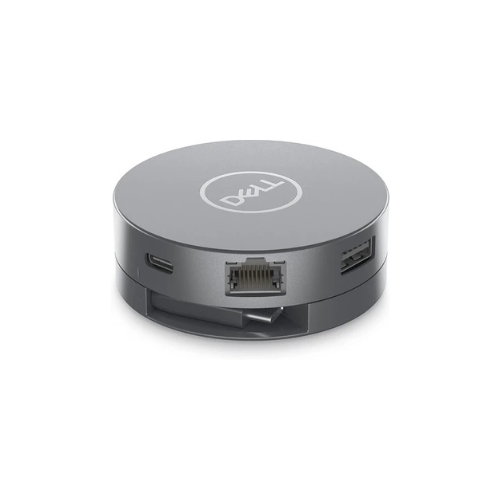
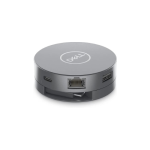

Dell DA305 USB-C 6-in-1 Multiport Adapter
Key Features
Brand: Dell
Hardware Interface: USB Type C, Ethernet, HDMI, USB 3.0, USB 2.0
Compatible Devices: Dell Precision 5510
Total USB Ports: 2
Product Dimensions: 2.75″L x 2.75″W x 0.96″H
Number of Ports: 6
1 Year Warranty
Dell DA305 6-in-1 USB-C Multiport Adapter: Compact Mobile Connectivity Hub
The Dell DA305 6-in-1 USB-C multiport adapter delivers an elite, portable connectivity solution tailored for modern mobile professionals . Featuring a unique, compact puck design with an integrated retractable cable, this adapter easily bridges the gap between ultra-thin laptops and essential workspace peripherals. Choosing this professional enterprise accessory ensures crisp video outputs, reliable data transfers, and seamless integration with existing network structures.
Key Specifications and Features
- Form Factor: Round puck chassis with an integrated twist-to-retract USB-C cable
- Video Interfaces: 1 x HDMI 2.0 (Up to 4K at 60Hz), 1 x DisplayPort 1.4 (Up to 4K at 60Hz), 1 x VGA port
- Data Interfaces: 2 x USB-A 3.2 Gen 2 ports (Up to 10 Gbps throughput)
- Network Interface: 1 x RJ45 Gigabit Ethernet port (10/100/1000 Mbps)
- Power Delivery: Supports USB-C power pass-through up to 90W
- System Management: Supports MAC Address Pass-Through, PXE Boot, and Wake-on-LAN
- Host Requirement: Data-enabled USB-C or Thunderbolt port supporting DisplayPort Alt Mode
Enterprise Benefits of the Dell DA305 Hub
Smooth 4K Visual Performance
Unlike budget travel hubs that limit refresh rates to a choppy 30Hz, the DA305 supports 4K resolution at a fluid 60Hz via its HDMI 2.0 and DisplayPort 1.4 ports. This allows users to connect to modern high-resolution displays with zero lag or motion blur
SuperSpeed 10 Gbps Data Pipeline
The dual USB-A ports operate on the USB 3.2 Gen 2 standard, moving data at speeds up to 10 Gbps. This fast architecture lets professionals transfer large database backups, presentations, and media assets in a fraction of the time required by older USB 3.0 hubs.
Secure Wired Enterprise Management
The built-in Gigabit Ethernet controller integrates cleanly with corporate IT management protocols. Network administrators can seamlessly deploy operating systems via PXE Boot, wake machines remotely using Wake-on-LAN, and maintain hardware auditing with MAC Address Pass-Through.
Flexible Power Pass-Through
The adapter features a smart power distribution matrix. When a USB-C power brick is connected to the adapter input, it passes up to 90W of charging power directly to the host laptop, keeping your device charged while running multiple peripherals.
Target Industries and Use Cases
Hybrid Corporate Workforces
Organizations supply the DA305 to remote and hybrid workers, giving them a single, lightweight tool to immediately unlock access to external monitors, keyboards, and wired networks at any office hot-desk.
Corporate Travel and Presentations
Mobile professionals carry this compact puck to guarantee immediate compatibility with legacy VGA conference room projectors or modern 4K digital displays without packing a confusing tangled mess of single-purpose dongles.
Secured Data Environments
Financial and government personnel requiring reliable wired network security use the integrated RJ45 port to establish stable, hardwired server links on ultra-thin laptops that lack native network ports.
Hardware Configuration and Deployment Setup
- Cable Extension: Gently rotate the top cover of the puck adapter to extend the hidden USB-C cable, then insert the male plug directly into an active laptop port.
- Display Selection: Connect a single monitor to your chosen video port; the adapter is engineered to process one active display stream at a time.
- Cable Retraction: Twist the top cover counter-clockwise when your workspace session concludes to safely store the cable back inside the protective housing
Frequently Asked Questions
What is the primary difference between the Dell DA305 and the DA310?
The DA310 is a 7-in-1 adapter that includes an extra downstream USB-C data port. The DA305 is a 6-in-1 model featuring the exact same video, network, and dual USB-A configurations but without that additional USB-C data interface
Can I run multiple external monitors at the same time using this adapter?
No. While the DA305 provides three distinct video output ports (HDMI, DisplayPort, and VGA), its internal chipset supports only a single active display monitor at a time.
Does this adapter require manual driver installations?
No. The hub uses standard plug-and-play architecture. It is instantly recognized by modern installations of Windows, macOS, ChromeOS, and Linux operating systems without needing administrative permissions
Will the network connection drop if I unplug the charging cable?
The DA305 features Fast Role Swap technology. If the external power supply is suddenly disconnected, the adapter preserves a continuous data and network link with the host laptop, preventing active cloud sessions from dropping.
Can the integrated USB-C cable be replaced if it gets damaged?
No. The retractable host cable is built directly into the core mechanical frame of the puck chassis to maximize structural strength and keep the travel footprint as small as possible.