Power Banks


 Brother Printers


 IP PBXs



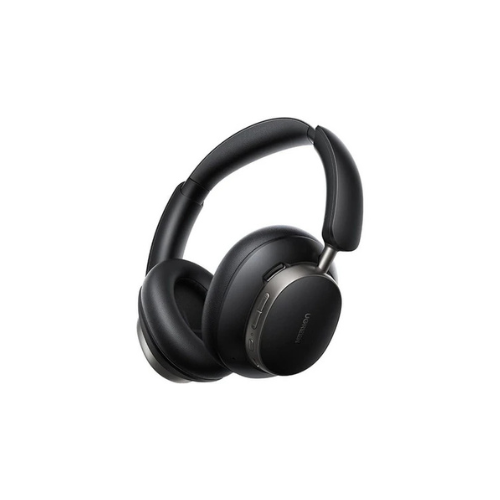
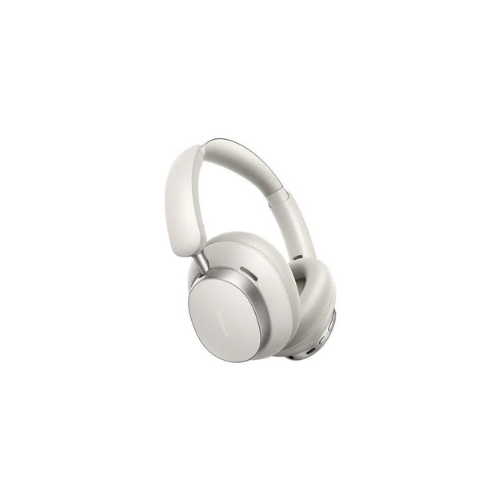


UGREEN Studio Pro Hybrid Active Noise-Cancelling Headphones HP206
Key Features
Brand:Logitech
Hybrid adaptive ANC up to 45dB
Up to 80 hours playback without ANC
Hi-Res LDAC for studio-quality audio
Bluetooth 5.4 with multi-point pairing
40mm composite drivers and app EQ
1 Year Warranty
UGREEN Studio Pro Hybrid Active Noise-Cancelling Headphones: Ultimate High-Speed Professional Guide
The UGREEN Studio Pro Hybrid Active Noise-Cancelling Headphones are a powerhouse in the professional audio monitoring, remote corporate communication, and high-fidelity streaming market. This high-efficiency over-ear headset eliminates surrounding workspace distractions while delivering crisp, clean studio-resolution sound for virtual meetings, content production, and deep concentration pipelines. It serves as a reliable, heavy-duty solution designed to streamline visual communication data, remote office interactions, and mobile audio tracking for businesses of all sizes. By utilizing advanced acoustic engineering, this flexible machine helps users boost daily productivity, reduce ambient environment downtime, and maintain a highly organized workflow. Modern professionals rely on this hardware to eliminate disruptive audio bottlenecks and automate call clarity isolation tasks. Its robust build quality ensures it handles high-volume playback cycles without cracking or experiencing performance drops. Commuters and remote operators looking to scale their digital mobile infrastructure find this device to be an indispensable asset for daily computing production.
This UGREEN Studiocomprehensive guide covers everything you need to optimize this device for your business workflow.
Key Technical Specifications
Understanding the hardware capabilities helps you maximize your investment. The device balances raw playback speed with diverse audio signal management options.
-
- Acoustic Driver Set: Premium quad-driver coaxial setup featuring a 40mm woofer and 12mm tweeter per earcup
- Noise Filtering: Hybrid Adaptive ANC technology cutting external ambient interference by up to 48 decibels
- Wireless Protocol: Advanced Bluetooth 6.0 system featuring multi-point dual-device connection
- Streaming Codecs: Full playback integration for high-definition LDAC, AAC, and SBC formatting
- Microphone Matrix: Five integrated pickup microphones augmented with artificial intelligence noise reduction
- Battery Endurance: Massive 820mAh capacity yielding up to 120 hours with filtering off or 80 hours with ANC active
Top Features and Business Benefits
Deep Hybrid Adaptive Noise Suppression
The UGREEN Studio advanced adaptive multi-mic sensor technology means you never experience disruptive office murmurs, traffic rumble, or aircraft engine hums during deep concentration. It automatically analyzes and blocks external noise at lightning speeds, keeping your editing or corporate communication pipeline moving without delays.
Premium Dual Hi-Res Quad-Speaker Performance
The built-in dual-driver system in each earcup splits frequencies between dedicated woofers and tweeters to provide true high-bitrate LDAC clarity. You can analyze critical video timelines, execute spatial audio tracking, or monitor acoustic voiceovers accurately without losing subtle frequency details or experiencing compression distortion.
Intelligent Dual Device Audio Switching
Integrate the machine seamlessly into any office environment. Desktop operators and mobile professionals can share the headset matrix across a computer workstation and a personal phone line simultaneously. Seamless audio redirection is fully supported through automatic hardware sensing when a call arrives.
Smart Application Interface Customization
Using specific companion hardware control applications, you can assign specialized digital sound equalizers directly to the headset processor. This is ideal for highlighting critical frequency bands, verifying communication profiles, toggling four distinct noise-cancelling depth modes, or activating low-latency game tracking modes on the fly.
Simple Step-by-Step Setup Guide
Follow these steps to get your professional audio headphones running quickly.
Step 1: Unpack and Verify Power Status
Remove all protective coverings and travel security labels from the foldable headphone frame. Connect a high-speed USB-C charging cable to the ear shell port to verify the battery cell contains an adequate starting charge.
Step 2: Initialize Wireless Pairing Mode
Press and hold the primary power utility button layout for several seconds until the status indicator light flashes rapidly. This triggers the internal wireless transceiver card to broadcast an open pairing identification beacon.
Step 3: Link Your Computer Workstation
Open the system connection panel on your smartphone, tablet, or host computer terminal. Search the available network tree, select the corresponding Studio Pro HP206 device name, and confirm the authorization code to complete pairing.
Step 4: Configure Advanced Software Controls
Download the official digital device management software package on your device operating system. Launch the interface to complete device recognition, toggle the dual-device connectivity switch, adjust ambient transparency levels, and apply the latest audio algorithm firmware revisions.
Effective Troubleshooting and Maintenance
Keep your machine operating at peak performance with basic maintenance habits.
Resolving Connection Sync Jams
Turn off the power immediately if your wireless signal clips or drops during transition changes. Clear the saved peripheral history from your computer operating system and initiate a fresh device pairing handshake to clear the driver buffer.