Power Banks


 Brother Printers


 IP PBXs



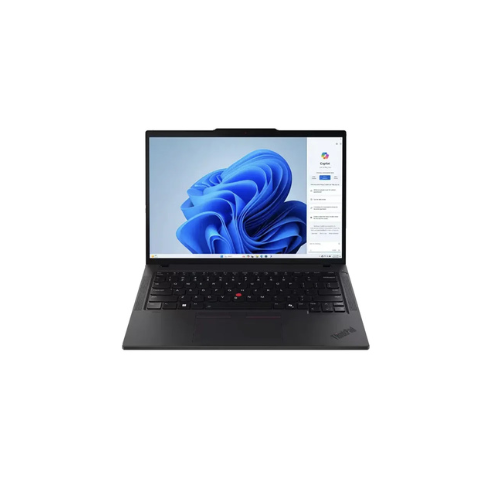

Lenovo ThinkPad L14 Gen 6, Intel Ultra 7 255U, 16GB DDR5 5600 (Up to 64GB Support), 512GB SSD M.2 2280 PCIe 4.0×4 NVMe Opal 2.0, No OS, 14″ WUXGA Screen (21S6004RUE)
Key Features
Brand~Lenovo
Model: Lenovo ThinkPad L14 Gen 6
Part Number: 21S6004RUE
Processor: Intel Core Ultra 7 255U
AI Capability: Intel AI Boost NPU
Graphics: Integrated Intel Graphics
Memory Installed: 16GB DDR5 5600MHz
Maximum Memory Support: Up to 64GB DDR5
Memory Slots: Dual SODIMM Slots
Storage: 512GB M.2 2280 PCIe 4.0×4 NVMe SSD
SSD Security: Opal 2.0 Encryption Support
Operating System: No OS
Display Size: 14 Inches
Display Resolution: 1920 x 1200 WUXGA
1 Year Warranty
Lenovo ThinkPad L14 Gen 6 21S6004RUE Review: A Professional High-Scalability Workstation
The Lenovo ThinkPad L14 Gen 6 model 21S6004RUE delivers a balance of processing power, display clarity, and hardware scalability. Equipped with an Intel Core Ultra 7 processor, a 14-inch display, and an upgradeable memory architecture, this laptop handles heavy data analysis, spreadsheet management, and multitasking workloads efficiently.
What makes this specific configuration a powerful computing asset is its future-proof component layout. It integrates an cutting-edge processor architecture alongside standard modular slots designed to prevent hardware obsolescence. This structural flexibility means the system can grow to meet expanding data processing requirements, converting a compact enterprise notebook into a powerful mobile data workstation.
This review evaluates the hardware profile for managing demanding professional tasks, local databases, and enterprise software configurations.
Key Hardware Specifications
-
- Processor: Intel Core Ultra 7 255U with integrated Intel Graphics and AI processing capabilities
- Memory: 16GB DDR5 5600MHz RAM upgradeable up to 64GB total via two open slots
- Storage: 512GB SSD M.2 2280 PCIe 4.0×4 NVMe Opal 2.0
- Operating System: No OS Allows for clean, custom operating system installation
- Display: 14-inch WUXGA 1920 x 1200 IPS, Anti-glare, 16:10 Aspect Ratio
- Model Number: 21S6004RUE
Hardware Analysis for Advanced Professional Workflows
Complex data tracking and enterprise resource management require specific hardware capabilities to prevent performance slowdowns during multi-tab operations.
Processing Efficiency
The Intel Core Ultra 7 255U processor utilizes a modern architecture featuring dedicated computing zones for graphics, raw processing, and artificial intelligence workloads. The performance cores handle resource-heavy operations like executing technical system calculations or running local database environments. The efficient cores manage background processes and routine applications to optimize power consumption.
Expandable Memory Capacity
Model 21S6004RUE includes 16GB of high-speed DDR5 5600MHz RAM. The motherboard features dual slots supporting a maximum 64GB capacity upgrade. This high memory ceiling allows users to run multiple local servers, analytics suites, and virtual machines concurrently without interface lag.
PCIe 4.0 NVMe Storage
The 512GB M.2 2280 solid-state drive operates on the PCIe 4.0×4 NVMe standard. This standard size hardware interface ensures fast read and write speeds alongside easy drive replacement options. It accelerates system boot times, large file transfers for system backups, and database loading speeds during offline testing.
Productive 16:10 Display
The 14-inch screen features a WUXGA resolution with a 16:10 aspect ratio. This taller format increases vertical screen real estate, displaying more data rows in spreadsheets despite the compact chassis size. It improves visibility when reviewing long-form documents, analyzing complex graphs, and tracking dense data configurations.
Optimizing the Environment for Peak Performance
Shipping with No OS allows technical users to deploy a clean software environment free of pre-installed factory bloatware or background trial applications.
Clean Operating System Deployment
Installing a clean copy of Windows 11 Pro or a preferred Linux distribution ensures that 100 percent of system resources are allocated to production work. The absence of manufacturer telemetry scripts and background security software increases overall processing efficiency.
Browser Optimization for Web Applications
Modern web applications use heavy JavaScript to process real-time analytics reporting within administrative interfaces. For optimal performance:
-
- Use Chromium Engines: Google Chrome, Brave, or Microsoft Edge offer the best compatibility with modern web applications.
- Enable Hardware Acceleration: Activating this setting allows the integrated Intel graphics chip to render complex visual data charts smoothly.
- Activate Tab Discarding: Utilize native browser memory management features to hibernate inactive tabs and conserve system RAM.
Local Server Environment Configuration
When using local development stacks to test software configurations, this hardware platform serves as a stable host. Upgrading the system RAM past the base 16GB allows users to allocate significant memory directly to local development environments to execute database queries quickly.