Brother Printers
 WhiteBoard
 IP PBXs







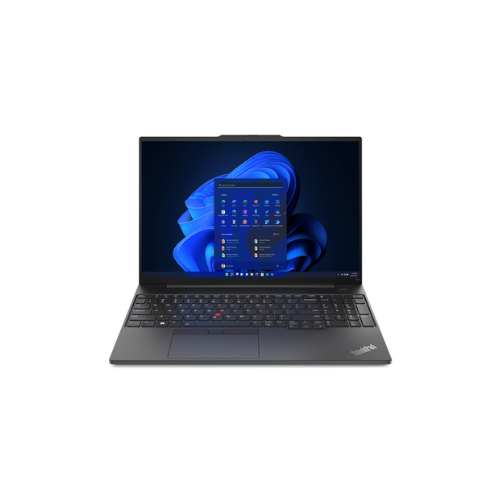



Lenovo ThinkPad E16 Gen 1 Laptop- Intel Core i5 1335U, 8GB DDR4 3200 (Up to 40GB Support), 512GB SSD M.2 2242 PCIe 4.0×4 NVMe Opal 2.0, No OS, 16″ WUXGA – 21JN0010UE
Key Features
Brand~Lenovo
Processor: Intel® Core™ i5-1335U
Memory: 8GB Soldered DDR4-3200
Graphics: Integrated Intel® Iris® Xe Graphics Functions as UHD Graphics
Storage: 512GB SSD M.2 2242 PCIe® 4.0×4 NVMe® Opal 2.0
Operating System: NO OS
Display: 16″ WUXGA (1920×1200) IPS 300nits Anti-glare, 45% NTSC
1 Year Warranty
Lenovo ThinkPad E16 Gen 1 21JN0010UE Review: A Professional Content Optimization Workstation
The Lenovo ThinkPad E16 Gen 1 model 21JN0010UE balances processing power, display area, and hardware scalability. Equipped with an Intel Core i5 processor, a 16-inch display, and an upgradeable memory architecture, this laptop handles data analysis and content editing workloads efficiently.
This review evaluates the hardware profile for managing data workflows, website audits, and content management systems like WordPress.
Key Hardware Specifications
- Processor: Intel Core i5 1335U 13th Generation, up to 4.60 GHz, 10 Cores, 12 Threads
- Memory: 8GB DDR4 3200MHz RAM Soldered, upgradeable up to 40GB total
- Storage: 512GB SSD M.2 2242 PCIe 4.0×4 NVMe Opal 2.0
- Operating System: No OS Allows for clean, custom operating system installation
- Display: 16-inch WUXGA 1920 x 1200 IPS, Anti-glare, 16:10 Aspect Ratio
- Model Number: 21JN0010UE
Hardware Analysis for Advanced Content Workflows
Web data tracking and enterprise content management require specific hardware capabilities to prevent performance slowdowns during multi-tab operations.
Processing Efficiency
The Intel Core i5 1335U processor utilizes a hybrid architecture featuring 2 Performance cores and 8 Efficient cores. The performance cores handle resource-heavy operations like executing website technical audits or running local database environments. The efficient cores manage background processes and routine applications to optimize power consumption.
Expandable Memory Capacity
Model 21JN0010UE includes 8GB of soldered DDR4 3200MHz RAM. The motherboard features an open memory slot supporting an additional 32GB RAM module to reach a maximum 40GB capacity. This high memory ceiling allows users to run multiple WordPress dashboards, analytics suites, and tracking tools concurrently without interface lag.
PCIe 4.0 NVMe Storage
The 512GB M.2 solid-state drive operates on the PCIe 4.0×4 NVMe standard. This hardware interface ensures fast read and write speeds. It accelerates system boot times, large file transfers for site backups, and database loading speeds during offline testing.
Productive 16:10 Display
The 16-inch screen features a WUXGA resolution with a 16:10 aspect ratio. This taller format increases vertical screen real estate, displaying more data rows in spreadsheets. It improves visibility when reviewing long-form documents, analyzing traffic graphs, and tracking Rank Math on-page configuration scores.
Optimizing the Environment for WordPress and Rank Math
Shipping with No OS allows technical users to deploy a clean software environment free of pre-installed factory bloatware or background trial applications.
Clean Operating System Deployment
Installing a clean copy of Windows 11 Pro or a preferred Linux distribution ensures that 100 percent of system resources are allocated to production work. The absence of manufacturer telemetry scripts and background security software increases overall processing efficiency.
Browser Optimization for Rank Math
- Use Chromium Engines: Google Chrome, Brave, or Microsoft Edge offer the best compatibility with the Rank Math Content AI interface.
- Enable Hardware Acceleration: Activating this setting allows the integrated Intel graphics chip to render complex visual data charts smoothly.
- Activate Tab Discarding: Utilize native browser memory management features to hibernate inactive tabs and conserve system RAM.
When using local development stacks like LocalWP or DevKinsta to test Rank Math configurations, this hardware platform serves as a stable host. Upgrading the system RAM past the base 8GB allows users to allocate 4GB or more of memory directly to the local PHP environment to execute database queries quickly.