Brother Printers
 WhiteBoard
 IP PBXs





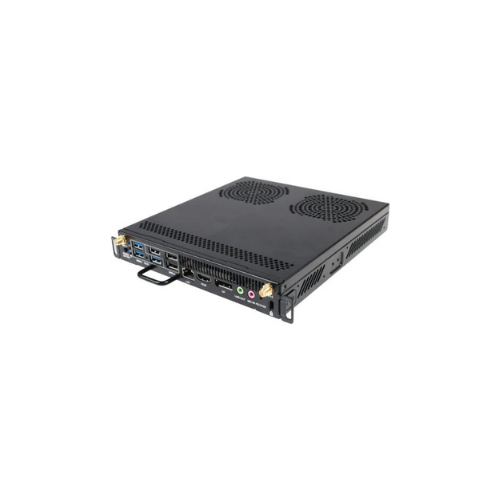
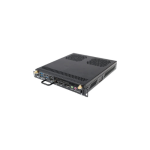

HUAWEI OPS W021 Z OPS,I5-12400,DDR4 8GB,256GB SSD,Windows11 IOT Enterprise SAC 0619003
Key Features
Brand: Huawei
Intel Core i5-12400 Processor – Delivers fast, reliable performance for business and smart display applications.
8GB DDR4 RAM – Ensures smooth multitasking and efficient system operation.
256GB SSD Storage – Provides fast boot times, quick data access, and reliable storage performance.
Windows 11 IoT Enterprise SAC – Optimized for secure, stable, and long-term enterprise use.
OPS Form Factor Design – Seamless integration with compatible smart displays and interactive panels.
Stable Business Performance – Built for continuous operation in professional environments.
Efficient Power Management – Optimized for low power consumption and high efficiency.
Reliable Connectivity Support – Ensures smooth integration with business display systems.
Compact & Space-Saving Build – Designed to fit neatly inside OPS-compatible devices.
Enterprise-Grade Stability – I
1 Year Warranty
Ultimate Guide to HUAWEI OPS W021 Z PC Module (06190037)
The HUAWEI OPS W021 Z (Part Number: s a commercial-grade, slot-in computing module designed according to the Intel OPS-C (Open Pluggable Specification) standards. It is engineered primarily to upgrade thea nd other compatible interactive panels into a powerfuloperating on a desktop-class processor and specialized enterprise software, it delivers reliable, low-latency performance required for digital classrooms, corporate huddle spaces, and video conferencing boardrooms.
Core Technical Specifications
The module integrates a full desktop architecture inside a slim, tool-less pluggable casing.
- Desktop Processor : Powered by a 12th Generation Intel Core i5-12400 processor (6 cores / 12 threads, up to 4.4 GHz).
- System Memory : Outfitted with 8GB DDR4 RAM configured in high-bandwidth dual channels (2 × 4GB).
- Solid-State Storage : Equipped with a 256GB M.2 SSD for fast boot times and high-speed local data caching.
- Graphics Architecture : Uses integrated Intel UHD Graphics 730 driven by the Intel H610 chipset.
- Enterprise OS Partition : Pre-loaded with Windows 11 IoT Enterprise SAC (Semi-Annual Channel).
- Wireless Framework : Features built-in high-speed Wi-Fi 6 (802.11ax) and Bluetooth 5.2 connectivity.
- Physical Proportions : Standard compact chassis measuring 195mm × 180mm × 30mm.
Enterprise IoT Software and Processing Efficiency
The HUAWEI W021 Z addresses the performance and software limitations of standard smart displays. Standard interactive screens function primarily on mobile operating systems, which restrict the execution of native legacy programs, enterprise security clients, and heavy data modeling software.
By bridging your screen into a native Windows workspace, your team can run full-feature applications smoothly. The system features Windows 11 IoT Enterprise SAC , an operating system tailored for mission-critical stability and long-term security lifecycle support.
Additionally, the native hardware includes a one-click system backup and restoration utility embedded inside the chip layer. This allows IT managers to roll back configurations or clear systemic crashes directly from the dashboard without needing external diagnostic storage tokens.
Centralized Interface and Connectivity Ports
The physical structure features an expansive input/output layout paired with a standard rear interface bus.
External I/O Array
- Three USB 3.0 Ports : Positioned on the front edge for high-speed data migration from physical flash media.
- Three USB 2.0 Ports : Dedicated slots optimized for connecting external peripherals like mice, keyboards, or pointer remotes.
- One Native HDMI 1.4 Port : Supports standard external desktop display output setups.
- Dual Audio Jacks : Separate dedicated slots for standard 3.5mm physical Microphone-In and Line-Out channels.
Internal JAE 80-Pin Core Connector
- Direct Signal Passthrough : Routes native HDMI 2.0 video (4K at 60Hz) directly to the interactive display panel without external cable arrays.
- Unified Power Link : Draws all necessary operating current directly from the display host, keeping the environment free of power cords.
Step-by-Step Mechanical Slot-In and Activation Guide
Deploying the computing module into your interactive panel takes less than a minute and requires no advanced technical tools.
Physical Hardware Slide-In
- Flip the primary power switch to off on the base of your display panel and disconnect the AC power line from the wall outlet.
- Locate the vertical OPS slot track cover plate on the side or rear structural section of the display frame.
- Loosen the thumb retention screws counter-clockwise to lift away the protective metal slot gate.
- Align the guide ribs of the OPS card with the internal tracking slots and slide the unit firmly inward.
- Press the locking ejector clips down flat to securely connect the JAE 80-pin bus, then tighten the retaining screws clockwise.
Digital System Initialization
- Reconnect the display power line and boot up the main interactive panel interface.
- Select the Windows or PC input option from the display’s floating configuration tray layout.
- Follow the on-screen Windows setup wizard to configure regional criteria, map Wi-Fi access links, and input administrative credentials.
- Install your preferred enterprise tools or collaborative video platforms like Zoom or Microsoft Teams to complete the deployment.
Frequently Asked Questions
Can I insert or remove the module while the interactive panel is turned on?
No, pulling the module out while the system is running can cause structural short-circuits or corrupt critical operating system data files. Always power down the interactive display host completely before unlocking the mounting assembly to remove the card.
What is the advantage of the desktop-class i5-12400 over mobile processors?
Mobile processors are throttled to lower electrical thresholds to preserve battery life, which limits performance during heavy multi-tasking. The desktop-class Core i5-12400 operates at full wattage capacity, allowing it to process massive spreadsheet calculations, rendering tasks, and high-definition video encoding effortlessly.
Does the system support automated maintenance scheduling?
Yes, the pre-installed Windows 11 IoT Enterprise system is built specifically for corporate domain management. Network administrators can easily enforce group policies, push automated silent security updates, and schedule regular off-hours maintenance cycles remotely.
What happens if the interactive board runs out of storage space?
The module features a high-speed internal solid-state hard drive. If your local workflow requires more room, you can connect an external hard drive to the front-facing USB 3.0 ports, or use corporate cloud networks to map shared virtual workspace drives. [1