Brother Printers
 WhiteBoard
 IP PBXs





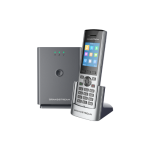
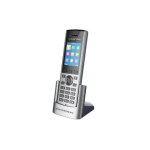
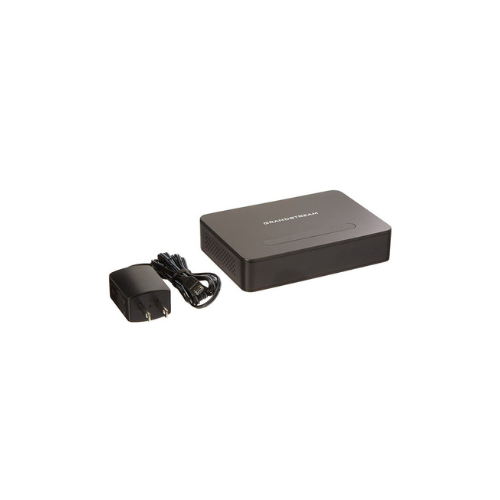
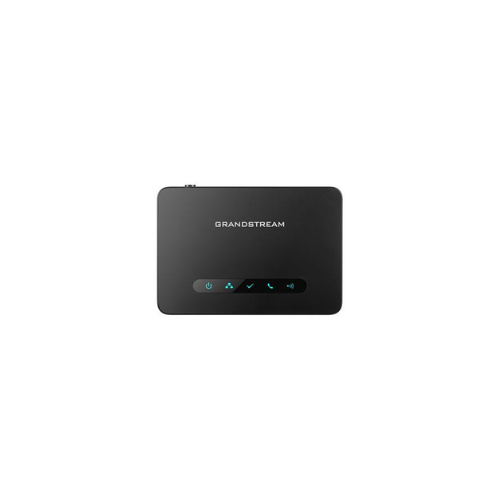

Grandstream DP750 DECT VoIP Base Station Long-range
Key Features
Brand:Grandstream
Up to 10 SIP accounts per system; up to 10 lines per handset
DECT authentication & encryption technology to protect calls & account
3-way audio conferencing for easy conference calls
Supports push-to-talk
Automated provisioning options include TR-069 and XML config files
Use with Grandstream’s UCM series of IP PBXsfor Zero Config provisioning
HD audio to maximize audio quality and clarity; full duplex speakerphone
1 Year Warranty
Grandstream Long-range DECT VoIP Base Station DP750: Ultimate High-Speed Professional Guide
The Grandstream Long-range DECT VoIP Base Station DP750 is a powerhouse in the professional enterprise telecommunications, hospitality, and busy office workspace market. This high-performance voice-over-IP gateway eliminates communication barriers while delivering crisp, clean digital audio for corporate telephone systems, administrative centers, and collaborative operations. Grandstream serves as a reliable, heavy-duty solution designed to streamline digital communication data, multi-line voice tracking, and high-frequency calling networks for businesses of all sizes. By utilizing Grandstream advanced enterprise-grade radio frequency engineering, this flexible machine helps companies boost daily productivity, reduce communication downtime, and maintain a highly organized workspace. Modern workplaces rely on this hardware to eliminate communication bottlenecks and automate wireless deployment tasks. Its robust build quality ensures it handles high-volume communication cycles without dropping signals or experiencing performance drops. Businesses looking to scale their wireless communication infrastructure find this device to be an indispensable asset for daily processing production.
This comprehensive guide covers everything you need to optimize this device for your business workflow.
Key Technical Specifications
Understanding the hardware capabilities helps you maximize your investment. The device balances expansive radio network coverage with intelligent power systems.
-
- Handset Integration: Pairs with up to 5 individual Grandstream DP series DECT handsets simultaneously
- Call Capacity: Supports up to 10 distinct SIP accounts and 4 concurrent high-definition voice calls
- Radio Range: Coverage spans up to 300 meters outdoors and 50 meters indoors from the base unit
- Power Architecture: Integrated Power over Ethernet capability alongside a standard micro-USB power slot
- Audio Engineering: Advanced acoustic codecs including full support for high-definition G722 and Opus formatting
- Network Security: Enhanced security protocols featuring TLS, SRTP, and HTTPS automated provisioning pathways
Top Features and Business Benefits
Expansive Long-Range Wireless Connectivity
The advanced DECT radio frequency technology means you never experience weak signal degradation or audio drops while moving across large offices. It translates digital radio frequencies and processes voice packets at lightning speeds, keeping your communication or administrative pipeline moving without delays.
Multi-Account Flexibility
The built-in SIP management system allows you to host up to 10 unique telephone numbers on a single physical base unit. You can assign individual extensions to separate handsets or group them into shared call rings without being tethered to separate telephone lines.
Flexible Power over Ethernet Layout
Integrate the machine seamlessly into any structural architecture without requiring close proximity to standard electrical sockets. The integrated hardware supports raw data and power delivery through a single network cable, simplifying remote overhead wall and shelf mounting setups.
Zero-Touch Automated Provisioning
Using specific automated registration pathways, the hardware downloads its account settings directly from cloud configuration files. This is ideal for highlighting critical infrastructure efficiency, scaling corporate office phone deployments quickly, and reducing technical installation labor hours.
Simple Step-by-Step Setup Guide
Follow these steps to get your professional VoIP base station running quickly.
Step 1: Unpack and Choose Placement
Remove all protective packaging wraps and cable ties from the product box. Choose a clean installation location that sits central to your office floor plan to maximize the wireless coverage footprint.
Step 2: Establish a Network and Power Connection
Plug a Power over Ethernet network cable from your office switch into the rear LAN interface, or use the included alternative micro-USB power brick. Verify that the power indicator light activates securely.
Step 3: Access the Web Configuration Panel
Open a web browser on a computer connected to the same local network. Enter the IP address of the base station into the search bar, log in using the factory administrative credentials, and input your SIP provider account details.
Step 4: Initialize Handset Registration
Press and hold the physical radio pairing button on the back of the base station until the wireless indicator light begins to flash. Follow the on-screen menu prompts on your DP handset to finalize the device recognition process.
Effective Troubleshooting and Maintenance
Keep your machine operating at peak performance with basic maintenance habits.
Resolving Device Registry Jams
Turn off the power or cycle the network line immediately if your SIP server fails to register the base station. Verify your network firewall rules and refresh your provider server settings within the configuration panel to clear frozen system driver blocks.
Fixing Handset Connection Drops
If your cordless handsets experience unexpected signal dropouts, inspect your deployment layout. Keep the base station isolated away from thick concrete columns, heavy metal server cages, or high-power wireless routers that disrupt DECT radio bands.
Cleaning the Hardware Case
Poor physical cleanliness, heavy dust accumulation, or ventilation smudges indicate a dirty chassis shell. Disconnect the power line completely and wipe the smooth plastic surfaces gently using a dry microfiber cloth without applying abrasive chemical solvents or water.