Brother Printers
 WhiteBoard
 IP PBXs





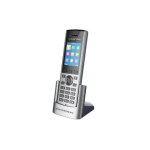
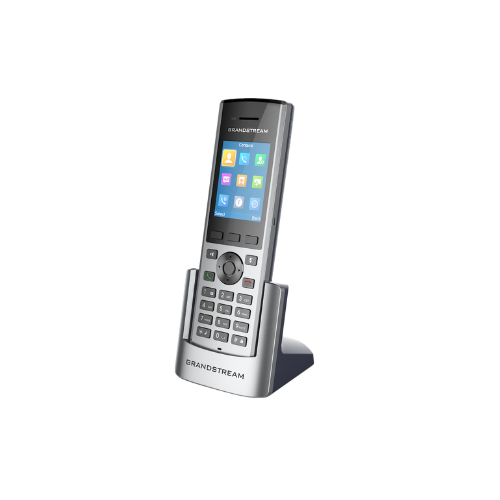

Grandstream DP730 Wireless SIP DECT Cordless Handset
Key Features
Brand:Grandstream
Supports a range of up to 400 meters outdoors and 50 meters indoors when used with the DP752 (300 meters outdoors when used with DP750)
2.4 inch (240×320) color LCD with 3 programmable soft keys
40-hours talk time and 500-hours standby time
Supports up to 10 SIP accounts and 10 lines per handset as well as 3-way conferencing
Dedicated push-to-talk button, built-in proximity and accelerometer sensors for gesture control and alert notification
HD audio on the speakerphone, handset, and headset jack
Seamless 1-touch door control with Grandstream’s GDS series of Facility Access devices
Software and firmware updates over-the-air
1 Year Warranty
Grandstream DP730 Wireless SIP DECT Cordless Handset: Ultimate High-Speed Professional Guide
The Grandstream DP730 Wireless SIP DECT Cordless Handset is a powerhouse in the professional enterprise telecommunications, hospitality, healthcare, and demanding warehouse market . This high-performance mobile telephone eliminates physical workspace boundaries while delivering crisp, clean digital audio for corporate operations, on-the-go floor management, and collaborative tasks. It serves as a reliable, heavy-duty solution designed to streamline digital communication data, multi-line voice tracking, and high-frequency active mobility for organizations of all sizes. By utilizing Grandstream advanced enterprise-grade radio frequency engineering, this flexible machine helps companies boost daily productivity, reduce communication downtime, and maintain a highly responsive workforce. Modern workplaces rely on this hardware to eliminate communication bottlenecks and automate wireless deployment tasks. Grandstream robust build quality ensures it handles high-volume communication cycles without dropping signals or experiencing performance drops. Businesses looking to scale their wireless communication infrastructure find this device to be an indispensable asset for daily processing production.
This comprehensive guide covers everything you need to optimize this device for your business workflow.
Key Technical Specifications
Understanding the hardware capabilities helps you maximize your investment. The device balances expansive radio network coverage with long-lasting battery power.
- Display Panel : Premium 2.4-inch color liquid-crystal display screen with user-friendly menu navigation
- Call Management : Supports up to 10 distinct SIP accounts and 10 lines per handset device
- Radio Range : Elite range coverage up to 400 meters outdoors and 50 meters indoors from the base station
- Battery Longevity : Advanced power cell yielding up to 40 hours of talk time and 500 hours of standby time
- Acoustic Engineering : Dedicated speakerphone option paired with high-definition G722 and Opus audio formatting
- Hardware Sensors : Integrated proximity sensor, accelerometer, and custom panic button for security compliance
Top Features and Business Benefits
Long-Range Enterprise Mobility
The advanced DECT radio frequency technology means you never experience weak signal degradation or audio drops while moving across expansive facilities. It translates digital radio frequencies and processes voice packets at lightning speeds, keeping your communication or administrative pipeline moving without delays.
Advanced High-Definition Sound Architecture
The built-in acoustic drivers allow you to monitor business discussions with crystal-clear vocal precision. You can hold critical voice calls or utilize the full-duplex hands-free speakerphone option comfortably without missing key instructions or experiencing muffled compression distortion.
Built-In Workplace Safety Features
Integrate the machine seamlessly into secure enterprise environments. The built-in panic button can be configured to trigger automated emergency calls or broadcast text alerts instantly. Multi-tier proximity tracking is fully supported through integrated internal sensor chips.
Heavy-Duty Battery Endurance
Using specific battery optimization microchips, the hardware stretches operational life to cover back-to-back work shifts seamlessly. This is ideal for highlighting critical field efficiency, keeping warehouse supervisors connected for days without recharging, and minimizing hardware downcycles.
Simple Step-by-Step Setup Guide
Follow these steps to get your professional cordless handset running quickly.
Step 1: Unpack and Install the Battery
Remove all protective packaging wraps and screen shields from the product box. Open the rear battery door cover, insert the rechargeable lithium-ion battery pack matching the metallic alignment nodes, and snap the cover back into place.
Step 2: Power and Charge the Handset
Plug the charging cradle power adapter cable into a standard wall electrical outlet. Drop the handset vertically into the charging seat slot and let the battery cell charge completely until the display indicator shows full capacity.
Step 3: Initialize Base Station Pairing
Press and hold the physical radio pairing button on your Grandstream DP series host base station until the wireless connection indicator light begins to flash rapidly to signal open pairing mode.
Step 4: Complete Device Recognition Handshake
Turn on the handset screen and open the system menu layout. Navigate directly to the registration settings tab, select an open handset slot, and confirm the subscription command to sync with the host base station.
Effective Troubleshooting and Maintenance
Keep your machine operating at peak performance with basic maintenance habits.
Resolving Registration Timeout Jams
Turn off the power or restart the handset immediately if the display panel indicates an unassigned or unregistered state. Bring the device closer to the host base station and verify that your local network IP pathways are clear to refresh the system buffer.