Brother Printers
 WhiteBoard
 IP PBXs





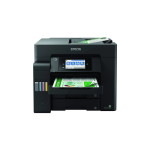
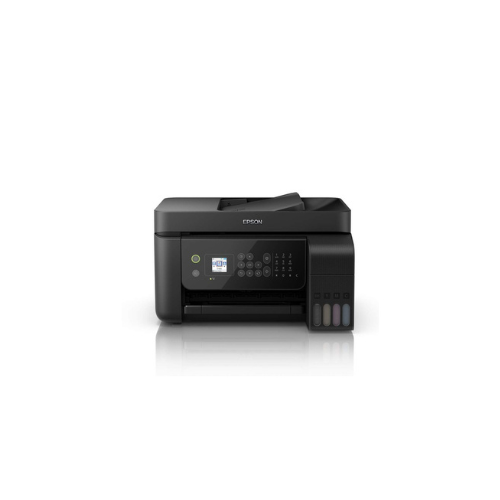

Epson EcoTank L5290 Ink tank Printer
Key Features
Brand: Epson
Printing Technology: PrecisionCore Heat-Free Technology
Functions: Print, Scan, Copy
Duplex Printing: Automatic
Scanner Type: Flatbed color image scanner
Connectivity: Wi-Fi, USB, Wi-Fi Direct
Maximum Paper Size: A4
Operating Systems: Windows, macOS
Mobile Printing: Epson iPrint, Apple AirPrint, Mopria Print Service
1 Year Warranty
Epson EcoTank L5290 A4 Wi-Fi All-in-One Ink Tank Printer Product Overview
The Epson EcoTank L5290 is a comprehensive, four-in-one multi-function business printer designed to streamline document workflows for small offices and busy home workspaces. This efficient machine combines high-speed inkjet printing, scanning, standalone copying, and faxing into a compact footprint. Utilizing an integrated, high-capacity refillable ink tank system, it delivers an ultra-low total cost of ownership while eliminating the reliance on traditional, expensive ink cartridges.
Advanced Connectivity and Mobile Printing Economy
The EcoTank L5290 is engineered to integrate seamlessly into modern, connected business environments.
-
- Diverse Networking Protocols: Features built-in Wi-Fi and Wi-Fi Direct, allowing multiple team members to connect without complex router configurations. An integrated Ethernet port provides a stable wired network connection
- Epson Smart Panel App: Users can control print, copy, scan, and maintenance tasks directly from smartphones or tablets. The app provides intuitive step-by-step setup guides and real-time ink monitoring.
- Broad Mobile Ecosystem Support: Fully compatible with Apple AirPrint, Mopria Print Service, and Epson Connect features like Remote Print Driver and Scan-to-Cloud.
High Productivity and Smart Paper Handling
This business-class printer includes targeted hardware enhancements to eliminate productivity bottlenecks during large document runs.
-
- Automatic Document Feeder: Incorporates a 30-sheet Automatic Document Feeder (ADF) to easily automate multi-page scanning, copying, and faxing workflows
- Heat-Free Technology: Powered by Epson PrecisionCore Heat-Free technology, the printer requires zero warm-up time when waking from sleep mode. This ensures fast first-page-out times and lower overall energy consumption.
- Generous Paper Capacity: Houses a 100-sheet rear paper tray capable of handling various media weights, including plain paper, envelopes, and premium glossy photo sheets.
Mess-Free Maintenance and Low Running Costs
-
- Key-Lock Ink Bottle Design: The genuine Epson ink bottles feature unique mechanical nozzles that fit exclusively into their corresponding color tanks. This prevents accidental mixing of cyan, magenta, yellow, or black inks
- Spill-Free Auto-Stop Mechanism: The ink bottles operate on an automatic fill cutoff. You simply invert the bottle onto the tank neck, and the ink flow cuts off cleanly when full without compressing the bottle.
- High Yield Inks Included: Ships with a full set of high-yield ink bottles capable of printing up to 4,500 black-and-white pages and 7,500 color pages, minimizing immediate replenishment expenseS
Technical Specifications Summary
| Feature | Specification |
|---|---|
| Functions | Print, Scan, Copy, Fax |
| Printer Type | Inkjet Ink Tank System |
| Print Resolution | Up to 5760 x 1440 DPI |
| Print Speed (Draft) | Up to 33 ppm (Black) / 15 ppm (Colour) |
| Paper Input Capacity | 100-Sheet Rear Slot + 30-Sheet ADF |
| Connectivity | Wi-Fi, Wi-Fi Direct, Ethernet, USB 2.0 |
| User Interface | 3.7 cm (1.44-inch) Colour LCD Screen |
Frequently Asked Questions
Does the Epson EcoTank L5290 support automatic double-sided printing?
No, the L5290 supports manual duplex printing. The computer software driver will display visual instructions on your screen prompting you to rotate the pages manually to print on the second side
No, the L5290 supports manual duplex printing. The computer software driver will display visual instructions on your screen prompting you to rotate the pages manually to print on the second side
Can this machine execute double-sided scanning automatically through the ADF?
No, the built-in 30-sheet Automatic Document Feeder (ADF) is a simplex scanning module. It captures one side of a document per pass. To copy or scan two-sided documents, you will need to turn the pages over manually on the flatbed scanner glass or run them through the ADF a second time
No, the built-in 30-sheet Automatic Document Feeder (ADF) is a simplex scanning module. It captures one side of a document per pass. To copy or scan two-sided documents, you will need to turn the pages over manually on the flatbed scanner glass or run them through the ADF a second time
What is the difference between the Epson L3250 and the EcoTank L5290?
The L3250 is a 3-in-1 printer (Print, Scan, Copy) focused on standard home use with basic Wi-Fi connectivity and a button interface. The EcoTank L5290 is a comprehensive 4-in-1 business model that adds standalone faxing, an Ethernet port, a 30-sheet ADF for bulk document handling, and a 1.44-inch color LCD display for easier menu navigation
The L3250 is a 3-in-1 printer (Print, Scan, Copy) focused on standard home use with basic Wi-Fi connectivity and a button interface. The EcoTank L5290 is a comprehensive 4-in-1 business model that adds standalone faxing, an Ethernet port, a 30-sheet ADF for bulk document handling, and a 1.44-inch color LCD display for easier menu navigation
Can I use sublimation ink in the L5290 out of the box?
While Epson EcoTank models are physically popular for aftermarket modifications, using non-genuine or sublimation ink inside a standard factory-warranted L5290 will void the official manufacturer’s warranty and can damage the microscopic printhead nozzles. Genuine dye-based ink is recommended for office longevity.
While Epson EcoTank models are physically popular for aftermarket modifications, using non-genuine or sublimation ink inside a standard factory-warranted L5290 will void the official manufacturer’s warranty and can damage the microscopic printhead nozzles. Genuine dye-based ink is recommended for office longevity.
How do I send a standalone fax without using my laptop?
The printer features a physical navigation panel surrounding the color screen. You can insert your document into the top ADF, select the Fax function on the LCD panel, enter the recipient’s phone number using the on-screen keypad, and press the Start button
The printer features a physical navigation panel surrounding the color screen. You can insert your document into the top ADF, select the Fax function on the LCD panel, enter the recipient’s phone number using the on-screen keypad, and press the Start button