Power Banks


 Brother Printers


 IP PBXs



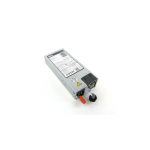
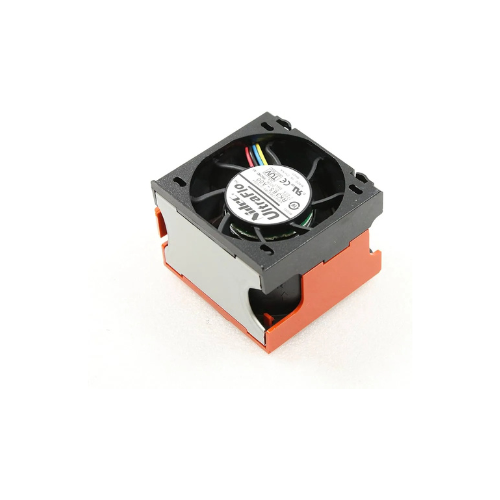


Dell R710 Cooling Fan (090XRN)
Key Features
Brand: Dell
Product: Dell R710 Cooling Fan
Part Number: 090XRN (90XRN)
Compatibility: Dell PowerEdge R710
Efficient Cooling: Ensures optimal server performance with enhanced airflow
Noise Level: Quiet operation
1 Year Warranty
Dell PowerEdge R710 Cooling Fan 090XRN Review: OEM Server Cooling
The Dell PowerEdge R710 Cooling Fan 090XRN delivers heavy-duty thermal regulation engineered specifically for enterprise server environments. This original equipment manufacturer hot-swappable replacement module restores structural airflow, providing clean high-velocity cooling to protect critical internal processors, memory modules, and storage drives from catastrophic heat failure.
Executive Overview and Premium Design Philosophy
The Dell 090XRN cooling fan represents a vital standard in data center hardware reliability for high-availability enterprise computing infrastructure. It transitions organizations from generic, unreliable cooling components to a tested factory ecosystem. Designed for deployment in high-density server room racks, continuous corporate cloud arrays, and mission-critical database centers, this original equipment component safeguards enterprise server assets against thermal degradation.
Engineered for Elite Professional Workflows
Continuous server uptime is an absolute requirement for modern corporate networks and virtual machine hosts. This high-efficiency cooling fan facilitates this necessity by maintaining a regulated microclimate inside the dense server chassis. Enterprise processors can run high-compute database scripts and handling intense user traffic loads without experiencing thermal throttling, sudden system reboots, or hardware crashes. The specialized dual-turbine architecture maintains steady static pressure, supporting long operations without performance drops.
Structural Integrity and Premium Aesthetics
Constructed with a heavy-duty polymer casing and dual industrial-grade ball bearing assemblies, this unit features a compact form factor that drops seamlessly into the PowerEdge internal fan bracket bank. Unlike low-grade aftermarket fans that rattle or warp under intense heat, this premium replacement assembly features an integrated vibration-dampening housing frame. The industrial design manages internal airflow paths efficiently, keeping your rack infrastructure operating securely and smoothly.
Key Technical Specifications
-
- Manufacturer Part Numbers: 090XRN, 90XRN, GY096, or NH493
- Compatible Server Models: Dell PowerEdge R710 Rackmount Server Generation
- Module Form Factor: Dual-turbine hot-swappable modular design layout
- Power Interface Pin Configuration: Specialized proprietary 4pin slide-in motherboard connector
- Bearing Construction Style: High-durability dual industrial ball bearing system
- Chassis Retention Mechanism: Toolless plastic release retention clips
- Operational Power Rating: 12 Volts direct current power delivery path
Top Benefits of the Dell R710 090XRN Cooling Fan
Seamless Hot-Swappable Modular Deployment
The module features a specialized toolless plug-and-play architecture that enables live data center maintenance. If an internal fan fails, IT technicians can pull the damaged module out and insert the new one directly into the running server chassis without shutting down the operating system, preserving continuous business uptime.
High-Static Pressure Dual-Turbine Core
The internal mechanism houses two independent blade sets spinning in counter-rotating directions. This specialized industrial configuration generates immense static pressure, forcing cooling air directly through dense memory channels and heavy metal copper processor heatsinks to evacuate trapped heat energy rapidly.
Intelligent Pulse Width Modulation Control
The fan electronics connect directly to the server motherboard sensor array using pulse width modulation tracking. The system management architecture dynamically ramps fan speeds up or down based on active computing workloads, keeping energy consumption low during off-peak hours while providing maximum airflow during heavy processing.
Integrated Visual Fault Alert Indicator
Engineered to work alongside the Dell OpenManage system interface, the module communicates its health metrics in real time. If a fan bearing slows down below safe operating limits, the motherboard detects the failure instantly, triggering an orange alert light on the server front panel to guide technicians to the exact slot.
Internal Cooling Fan Array Configuration Matrix
| Server Load Status | Active Fan Count Required | Redundancy Validation | Operational Behavior |
|---|---|---|---|
| Standard Configuration | 5 Active Fan Modules | Full N+1 Redundancy Met | Remaining Fans Compensate If One Module Fails |
| Dual Processor Layout | 5 Active Fan Modules | Full N+1 Redundancy Met | Airflow Directed Uniformly Across Both Sockets |
Step-by-Step Hot-Swap Installation Instructions
-
- Access the Server Chassis: Pull the server forward on its rack rails and remove the top metallic security access panel.
- Locate the Damaged Module: Identify the failed fan assembly by checking the diagnostic motherboard LED lights or physical orientation.
- Remove the Old Hardware: Pinch the orange plastic retention clips firmly and pull the module straight up out of the bracket bay.
- Insert the New Cooling Fan: Align the new 090XRN module over the empty slot guide paths, ensuring the power connector faces down.
- Seat and Verify Operation: Press down firmly until the orange clips click into place, and verify the fan spins up to speed immediately.
Frequently Asked Questions
Can this cooling fan module fit inside a PowerEdge R610 server?
No. This specific 090XRN cooling module is custom dimensioned to match the 2U chassis height and structural mounting cage layout of the PowerEdge R710. The PowerEdge R610 is a slimmer 1U server that utilizes a completely different, smaller set of cooling fan modules.
Does the server need to be turned off during installation?
No. This component is fully hot-swappable. As long as your secondary cooling fans are functioning properly, you can safely remove a single failed module and slide the new replacement unit into place while the server is powered on and running live user workloads.
Why does the new fan run at maximum speed immediately after installation?
When a cooling fan is replaced or fails, the integrated system management controller temporarily drives the remaining fans at full speed as a failsafe thermal protection step. Within a few moments of seating the new module, the controller will read the stable health metrics and return the speed profile to normal levels.