Power Banks


 Brother Printers


 IP PBXs



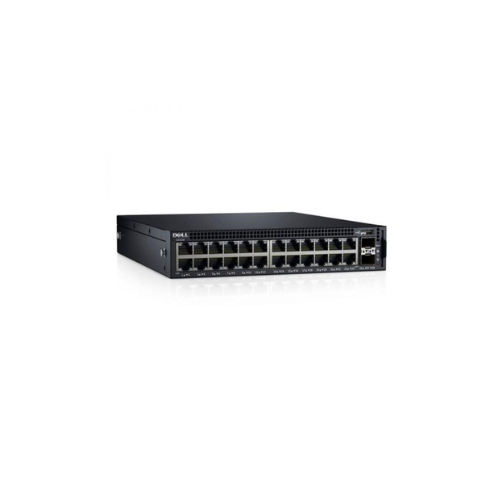


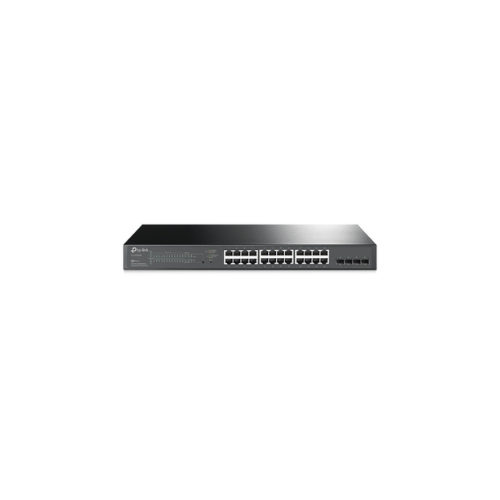
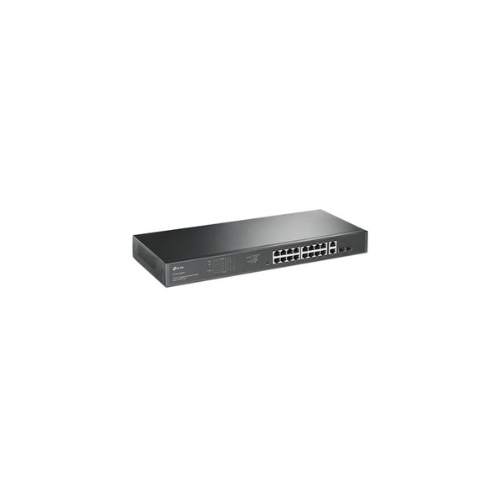
Dell 0X1026 X-Series X1026P 24-Port PoE + 2 x SFP+ Ports 1U Switch
Key Features
Brand: Dell
Rapidly configure and tune network
Optimize traffic with automation
Gain visibility with a detailed dashboard
Skip the learning curve
1 Year Warranty
Dell Networking X1026P PoE Smart Managed Switch Review: Enterprise Connectivity
The Dell Networking X-Series X1026P PoE Smart Managed Switch delivers high-performance Gigabit Ethernet connectivity and intelligent power delivery engineered for modern corporate networks. This compact enterprise-class switch features 24 Gigabit Power over Ethernet ports alongside 2 dedicated fiber uplink ports to optimize hardware integration, expand data bandwidth, and simplify localized network management.
Executive Overview and Premium Design Philosophy
The Dell X1026P represents a significant evolution in edge-network infrastructure for expanding business operations. It transitions organizational networks from complex command-line routing configurations to an accessible, smart-managed visual interface ecosystem. Designed for deployment in high-density office layouts, remote retail branch offices, and commercial surveillance centers, this premium power-delivery switch safeguards critical business communication channels.
Engineered for Elite Professional Workflows
Continuous high-speed data transmission is an absolute requirement for modern corporate tasks. The X1026P facilitates this necessity by delivering non-blocking wire-speed switching architecture across all copper interfaces. VolP phone assemblies, desktop workstations, and high-definition video conferencing equipment can stream huge concurrent data packets without experiencing network latency or packet drops. The specialized management layout maintains steady data prioritizations, supporting continuous operations without performance degradation
Structural Integrity and Premium Aesthetics
Constructed with a heavy-duty metallic rackmount chassis, this unit features a compact form factor that mounts easily inside standard server racks or sits discreetly on office utility shelving. Unlike low-grade desktop network hubs that tangle lines, this premium assembly features clean port alignments and clear diagnostic LED indicator matrix pathways. The industrial design handles internal thermal loads via smart cooling fans, keeping your central equipment closet running cool and quietly.
Key Technical Specifications
-
- Primary Port Configuration: 24 RJ45 Ports running at 10, 100, and 1000 Megabits per second
- Uplink Port Interfaces: 2 dedicated 1 Gigabit Small Form Factor Pluggable fiber transceiver ports
- Power over Ethernet Capacity: 24 Ports matching PoE and PoE Plus industrial standards
- Total Switch Fabric Capacity: Up to 52 Gigabits per second non-blocking throughput
- Total Forwarding Performance Rate: 38.7 Million packets per second delivery speed
- Total PoE Power Budget: 360 Watts available for power allocation
- Management Web Interface: Dashboard graphical tool with basic command-line configuration support
Top Benefits of the Dell X1026P Network Switch
High Capacity Power over Ethernet Plus Channels
The switch delivers up to 30 Watts of continuous power per port across its substantial power budget pool. This advanced integration allows you to run high-draw network devices like motorized security cameras, dual-band wireless access points, and multimedia video phones directly through your data cables, eliminating the cost of separate electrical runs.
Simplified Smart Visual Management Tool
IT administrators can customize the entire network infrastructure without needing complex terminal programming knowledge. The embedded graphical browser interface provides visual charts, port status maps, and single-click traffic configuration steps. This allows you to set up virtual networks, mirror diagnostic ports, and monitor hardware statistics easily
Advanced Quality of Service Traffic Prioritization
The internal software engine features advanced traffic prioritization algorithms to prevent call drops and stuttering video streams. It automatically detects and isolates real-time voice and video data packets, placing them at the front of the transmission line even during heavy background file transfers or network data backups.
Comprehensive Network Edge Defense Protocols
The internal security firmware contains active screening mechanisms to protect your corporate network from data breaches and unauthorized access. It supports secure network access controls, automated storm prevention, and visual port security monitoring. This stops malicious devices or rogue connections from compromising your storage drives and databases.
Network Connection Port Allocation Matrix
| Interface Connection Style | Available Port Count | Maximum Bandwidth Capacity | Primary Hardware Purpose |
|---|---|---|---|
| Gigabit Copper BaseT | 24 Ports | 1000 Megabits Per Second | Connecting Workstations, Access Points, and PoE Phones |
| SFP Fiber Uplink Slot | 2 Ports | 1000 Megabits Per Second | Linking Core Storage Switches and Core Server Racks |
Step-by-Step Initial Configuration and Mounting Instructions
-
- Mount the Structural Bracket: Secure the metallic rack ears onto the sides and slide the unit into your server rack frame.
- Connect Main Energy Cord: Plug the standard AC power line into the rear input port to initiate the boot cycle sequence.
- Access Management Web Page: Connect a laptop via ethernet cable, open a browser window, and input the default factory IP address.
- Link Core Network Devices: Insert your primary workstations, access points, and camera lines into the numbered front ports.
- Configure Network Traffic Rules: Navigate through the visual software dashboard to assign specific virtual network IDs and port speeds
Frequently Asked Questions
Can this switch handle 10 Gigabit high-speed fiber uplinks?
No. The two dedicated Small Form Factor Pluggable slots on this specific model are engineered for standard 1 Gigabit fiber connections. If your network backbone requires ultra-high bandwidth 10 Gigabit fiber pipelines, you will need to look at larger core-distribution models within the Dell networking line
What happens if the devices draw more than 360 Watts?
The smart internal power manager utilizes strict port priority rules to protect the hardware. If your total connected equipment load exceeds the 360-watt safety threshold, the switch will automatically suspend power to the highest-numbered ports first to maintain stable power delivery to your critical low-number ports.
Is a dedicated console cable required for basic setup?
No. While a basic console port is available for advanced troubleshooting tasks, the entire initial installation, configuration, and monitoring routine can be completed using a standard web browser on a laptop connected to any of the standard ethernet ports.