Brother Printers
 WhiteBoard
 IP PBXs





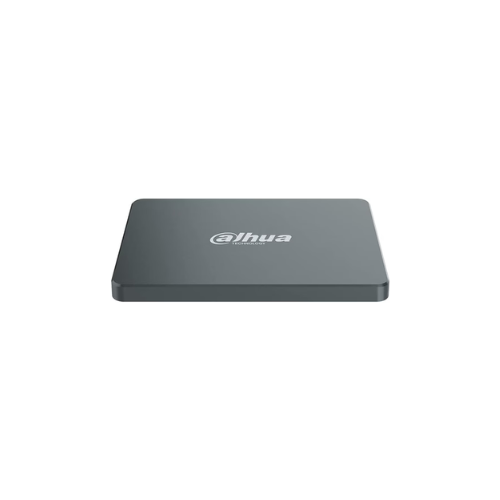

Dahua 2TB 2.5 inch SATA Solid State Drive SSD- DHI-SSD-C800AS2
Key Features
Brand: Dahua
Up to 540 MB/s Sequential reads and Up to 460 MB/s Sequential write
Adopts high-quality wafer level chip
Supports SATA III protocol with transmission speed up to 550 MB/s
View information through S.M.A.R.T
Provides better read and write performance with TRIM and NCQ
Low power consumption management
1 Year Warranty
Dahua 2TB 2.5-inch SATA SSD (DHI-SSD-C800AS2T): Ultimate High-Speed Professional Guide
The Dahua 2TB 2.5-inch SATA SSD (DHI-SSD-C800AS2T) is a powerhouse in the professional storage, system upgrade, and data security market . This high-efficiency solid-state drive eliminates mechanical spinning bottlenecks while delivering crisp, clean file transfer speeds for legacy notebooks, desktop workstations, and network-attached surveillance recording frameworks. It serves as a reliable, heavy-duty solution designed to streamline massive data analysis, high-resolution media caching, and rapid operating system boot sequences for systems of all sizes. By utilizing advanced NAND flash engineering, this flexible machine helps users boost daily computing productivity, reduce application loading downtime, and maintain a highly reliable workspace infrastructure. Modern creators, enterprise IT managers, and security professionals rely on this hardware to eliminate data access latencies and automate high-volume read/write processes without performance drops. Its robust solid-state build quality ensures it handles intense computing cycles without overheating or experiencing failure rates common with traditional hard drives. Power users looking to scale their processing framework find this device to be an indispensable asset for daily computing production
This comprehensive guide covers everything you need to optimize this storage device for your workflow.
Key Technical Specifications
Understanding the hardware capabilities helps you maximize your storage investment. The drive balances raw SATA performance with long-term data safety protocols.
- Form Factor : Standardized 2.5-inch internal drive configuration with a slim 7mm casing profile
- Interface Link : High-speed SATA III protocol operating at maximum 6 Gbps bus bandwidth speeds
- Storage Capacity : Massive 2TB utilizing advanced high-density 3D TLC NAND flash memory cells
- Read Performance : Sequential read velocities reaching up to 550 MB/s for rapid file indexing
- Write Performance : Sequential write mechanics processing up to 500 MB/s for quick data ingestion
- Reliability Metrics : High Total Bytes Written (TBW) metrics paired with an integrated S.M.A.R.T. monitoring matrix
Top Features and Business Benefits
High-Density 3D NAND Flash Architecture
The advanced multi-layer cellular arrangement technology means you never experience the processing bottlenecks common with aging mechanical storage. It compiles complex operating system tasks and loads software development suites at lightning speeds, keeping your business or design pipeline moving without delays.
Universal 2.5-inch Ultra-Slim Form Factor
The built-in slim 7mm structural casing allows you to drop the drive directly into modern thin laptops, desktop enclosures, and surveillance arrays. You can refresh old computing configurations easily without being tethered to bulky external adapters or wasting physical desktop real estate.
Low Power Consumption and Silent Operations
Integrate the machine seamlessly into any home or business workstation environment. Because the solid-state architecture features zero moving parts, it operates completely silently, generates negligible thermal dissipation, and reduces device battery draw to maximize mobile computing lifespans.
Advanced Data Security and Health Tracking
Using specific system management firmware, the drive automatically executes bad block management and error-correcting code algorithms. This is ideal for highlighting critical data protection, safeguarding proprietary commercial databases, and predicting hardware health metrics before any data failures can occur.
Simple Step-by-Step Setup Guide
Follow these steps to get your internal solid-state drive installed and configured quickly.
Step 1: Unpack and Prepare the System
Turn off your computer workstation completely, disconnect the main AC power cord, and remove the chassis side panel or laptop bottom cover access plate safely.
Step 2: Establish the Physical Hardware Connections
Slide the SSD flat into an open 2.5-inch drive bay. Align the internal slots and insert the standardized SATA data interface cable and the wide SATA power delivery plug deep into the drive terminals.
Step 3: Secure the Drive Chassis
Use the included structural mounting screws to fix the drive casing firmly to your computer structural tray frame to prevent any accidental physical displacement during device transport.
Step 4: Initialize and Format the Storage Volumizing
Boot your computer operating system and launch the native disk management control panel utility application dashboard. Initialize the newly detected unallocated partition space and execute a quick format using your preferred file layout structure to complete the device recognition process.