Brother Printers
 WhiteBoard
 IP PBXs





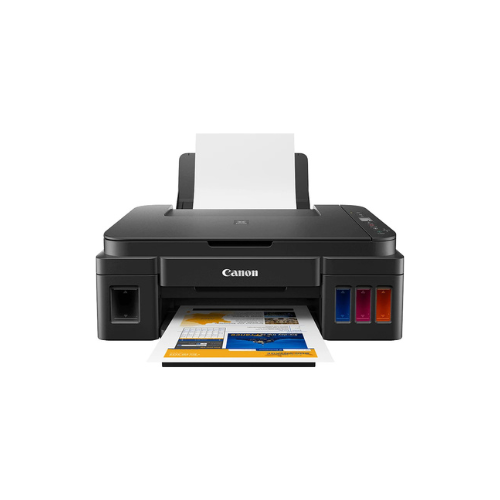

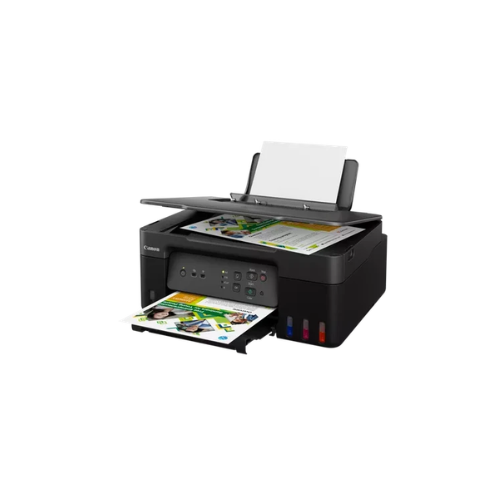
Canon PIXMA G3410 A4 WI FI Printer
Key Features
Brand: Canon
Scanner Type: Flatbed
Scan Resolution: Up to 600 x 1200 dpi
Scan Speed: Approx. 19 seconds for A4/Letter at 300 dpi
Max Document Size: A4/Letter (8.5″ x 11.7″)
Copy Speed: Approx. 2.5 ipm (Color)
Copy Features: Standard Copy, Borderless Copy, 2-on-1 Copy, 4-on-1 Copy, ID Card Copy
Display: 2-Line LCD
Connectivity: wifi USB 2.0 Hi-Speed
1 Year Warranty
Canon PIXMA G3410 A4 Wi Fi Printer Technical Product Information
Core Product Identification
- Manufacturer : Canon
- Series : PIXMA Megatank
- Model Number : G3410
- Device Type : All in One Refillable Ink Tank Printer
- Core Functions : Wireless Print, Scan, Copy, Cloud Link
High Volume Wireless Document and Photo Printing
The Canon PIXMA G3410 is a high yield wireless Megatank printer engineered for demanding home offices and small business environments. This multi function system replaces traditional ink cartridges with integrated front facing fluid reservoirs. This design allows operators to monitor ink levels instantly while dramatically lowering the overall cost per page.
The hardware utilizes an advanced hybrid ink system to deliver professional print quality across various media types. It employs a dedicated pigment black ink to produce sharp smudge resistant text documents that resist highlighter bleeding. Simultaneously, dye based color inks generate rich vibrant graphics and borderless photos on glossy media up to standard A4 dimensions.
With built in Wi Fi connectivity, this model eliminates the need for restrictive desktop cabling. Users can send print jobs securely from multiple workstations, laptops, smartphones, and tablets. The robust internal architecture is built to handle heavy print cycles without experiencing the frequent maintenance downtime common with standard cartridge printers.
Key Technical Specifications
- Print Resolution : Up to 4800 by 1200 dots per inch
- Mono Print Speed : Approximately 8.8 images per minute
- Color Print Speed : Approximately 5.0 images per minute
- Borderless Photo Speed : 10 by 15 centimeter photo in 60 seconds
- Scanner Type : CIS Flatbed Photo and Document Scanner
- Optical Scan Resolution : 600 by 1200 dots per inch
- Wireless Connectivity : Wi Fi IEEE 802.11 b g n
- Interface Type : High Speed USB Port
- Display Screen : 1.2 Inch Segment Monochrome LCD
Consumable Ink Compatibility and Yields
This printer utilizes high capacity Canon GI 490 ink bottles. The bottles feature specialized squeeze mechanics and custom nozzles to ensure clean spill free replenishment of the internal reservoirs.
Genuine Ink Bottles
- Canon GI 490 Black Ink Bottle
- Canon GI 490 Cyan Ink Bottle
- Canon GI 490 Magenta Ink Bottle
- Canon GI 490 Yellow Ink Bottle
Standard Document Page Yields
- Black Ink Reservoir : Prints up to 6000 pages from a single bottle
- Color Ink Reservoirs : Prints up to 7000 pages from a full set of color bottles
Professional Connectivity and Productivity Benefits
Comprehensive Wireless Freedom
Integrated Wi Fi supports seamless network printing across local infrastructure. Operators can print directly from mobile devices using the Canon PRINT app, Mopria for Android, or Pixma Cloud Link services.
Cost Efficient Megatank Design
The built in front facing ink tanks provide a massive ink supply upfront. This significantly reduces running costs and eliminates the hassle of purchasing frequent cartridge replacements.
High Copy and Scan Precision
The flatbed scanner captures intricate document details with sharp color accuracy. The onboard LCD screen allows users to configure copy quantities and monitor wireless signal strength without opening a computer interface.
Durable Media Flexibility
The rear paper feeding tray reliably handles various media weights. This includes standard plain A4 paper, high resolution office sheets, glossy photo paper, and professional envelopes.
Step by Step Mobile Connectivity Setup
Connecting via Canon PRINT App
- Download the free Canon PRINT application from the official mobile app store
- Power on the printer and verify that the wireless icon flashes on the LCD screen
- Press and hold the Direct button on the printer operation panel for three seconds
- Open the mobile app and select the add printer option to detect the machine
- Follow the on screen instructions to link the printer to the local Wi Fi password
Frequently Asked Questions
Can this printer function without a wireless network
Yes, the machine retains a physical High Speed USB port for direct cable connections to single computers. It also features Wireless Direct mode to link mobile devices directly to the printer without a local router.
What should be done if the printer is not used for long periods
To prevent the ink delivery tubes from drying out, run a standard nozzle check pattern once every two weeks. Keep the hardware stored in a climate controlled room away from extreme temperature shifts.
Are the internal printheads user replaceable
Yes, the device uses modular FINE printheads that can be easily swapped out by the operator if physical wear occurs over years of heavy volume operation.