Brother Printers
 WhiteBoard
 IP PBXs





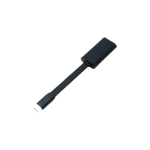
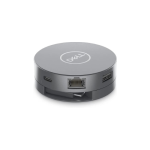
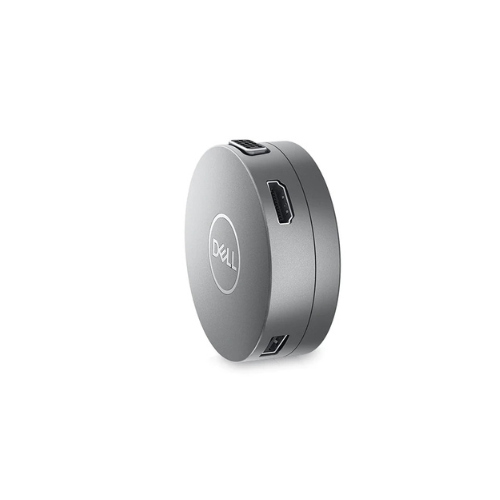

Dell DA310 7-in-1 USB-C Multiport Adapter
Key Features
Brand: Dell
Widest variety of ports
Two USB-A and one USB-C downstream ports let you connect to other supported peripherals and enjoy fast file transfers up to 10 Gbps SuperSpeed
Crisp 4K resolution at 60Hz: Connect to high-resolution displays without compromising on performance, as the adapter supports 4K resolution at 60Hz
1 Year Warranty
Dell DA310 USB-C Mobile Adapter: The Ultimate 7-in-1 Multiport Ecosystem
The Dell DA310 USB-C mobile adapter delivers an elite, compact connectivity hub designed for modern enterprise professionals . Engineered as a comprehensive 7-in-1 multiport solution, this puck-shaped adapter bridges the gap between ultra-thin laptops and essential workspace peripherals. Choosing this professional hardware ensures seamless video outputs, high-speed data transfers, and absolute driver stability across your entire corporate device deployment.
Key Specifications and Features
- Form Factor: Compact puck design with an integrated retractable USB-C cable
- Video Interfaces: 1 x HDMI 2.0 (Up to 4K at 60Hz), 1 x DisplayPort 1.4 (Up to 4K at 60Hz), 1 x VGA, 1 x USB-C (With DisplayPort Alt Mode)
- Data Interfaces: 2 x USB-A 3.2 Gen 2 (Up to 10 Gbps), 1 x USB-C 3.2 Gen 2 (Up to 10 Gbps)
- Network Interface: 1 x RJ45 Gigabit Ethernet port (10/100/1000 Mbps)
- Power Delivery: Supports up to 90W USB-C power pass-through
- System Management: Supports Fast Role Swap, PXE Boot, Wake-on-LAN, and MAC Address Pass-Through
- Host Requirement: Data-enabled USB-C or Thunderbolt port supporting DisplayPort Alt Mode
Enterprise Benefits of the Dell DA310 Adapter
Industry-Leading 4K Video Performance
Unlike standard travel hubs that cap refresh rates at 30Hz, the DA310 supports crisp 4K resolution at 60Hz via its HDMI 2.0 and DisplayPort 1.4 outputs. This ensures smooth visual transitions, high fidelity during executive presentations, and reduced eye strain during extended monitor usage.
Ultra-Fast 10 Gbps Data Infrastructure
Equipped with USB-A and USB-C SuperSpeed 10 Gbps ports, this adapter allows professionals to transfer massive files, database back-ups, and high-resolution video assets in seconds. This architecture operates twice as fast as legacy USB 3.0 hubs.
Intelligent Power Pass-Through Architecture
The adapter features a dedicated power-routing matrix. When connected to an external USB-C power source, it passes up to 90W of electrical current to the host laptop while retaining uninterrupted power for connected external hard drives and mice.
Advanced Enterprise Management Tools
Built specifically to integrate with corporate IT structures, the internal chipsets support advanced remote management. Network administrators can execute PXE Boot network installations, wake machines via Wake-on-LAN, and maintain hardware auditing using MAC Address Pass-Through.
Target Industries and Use Cases
Hybrid Corporate Workforces and Hot-Desking
Organizations deploy the DA310 to give remote employees a single, portable solution that opens immediate access to monitors, wired network connections, and keyboard setups at any corporate hot-desk.
Executive Presentations and Business Travel
Mobile executives carry this lightweight puck to guarantee compatibility with legacy VGA projectors or modern 4K conference room screens without packing a confusing assortment of individual video dongles.
Financial and Public Sector Data Environments
Secured facilities requiring reliable wired pipelines utilize the integrated RJ45 Gigabit Ethernet port to maintain high-speed, secure server connections while working on ultra-thin laptops lacking native network ports.
Hardware Configuration and Deployment Setup
- Cable Extension: Rotate the top cover of the puck adapter to extend the integrated USB-C cable, and plug it directly into an active laptop port.
- Peripheral Mapping: Connect your chosen display monitor to a single video port; the adapter serves one video output stream at a time.
- Retraction Protocol: Twist the top cover counter-clockwise when your session ends to retract the cable safely back inside the protective core casing.
Frequently Asked Questions
Can I connect multiple monitors to the DA310 simultaneously?
No. While the DA310 offers four different video port options (HDMI, DisplayPort, VGA, and USB-C), it is designed to support only one active display monitor at a time.
Does this adapter require a separate software installation?
No. The hub features standard plug-and-play architecture. It is immediately recognized by modern Windows, macOS, ChromeOS, and Ubuntu Linux operating systems without manual driver searches
What happens to the network connection if the power cable is pulled out?
The DA310 includes Fast Role Swap technology. If the external power supply is suddenly disconnected, the adapter maintains a continuous data and network link with the laptop without dropping your active cloud sessions.
Will the DA310 charge my laptop if no power brick is attached?
No. The adapter does not contain an internal battery. To charge your laptop through the adapter, you must plug your laptop original USB-C power brick directly into the adapter pass-through port.
Is the integrated USB-C cable replaceable if it gets damaged?
No. The retractable cable is built directly into the core mechanical frame of the puck chassis to maintain its compact structural design and protect the internal data wiring lines.