Power Banks


 Brother Printers


 IP PBXs



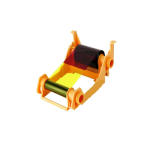
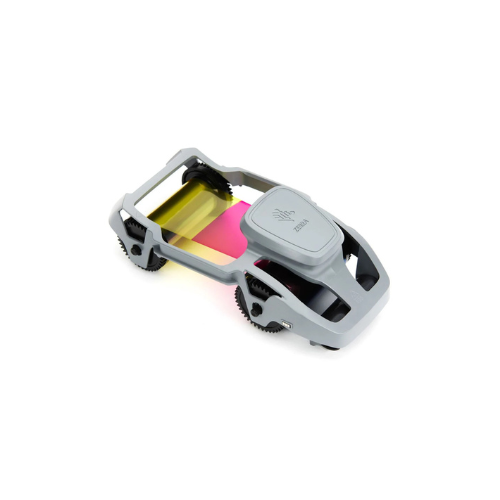

Zebra Ribbon; Color-YMCKO; 58mmx99m(2.28inx324ft); 200 Images; ZC100/ZC300
Key Features
Brand: ZEBRA
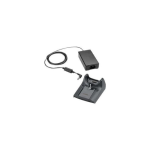
1-Slot USB Cradle
Single Slot Charging and Sync
1 Year Warranty
Zebra ZC Color YMCKO Ribbon 200 Images: Premium Full-Color ID Card Printing
The Zebra YMCKO color ribbon for ZC series card printers delivers an elite, professional solution for vibrant, photo-quality identification cards. Engineered for maximum precision, this ribbon configuration is designed specifically for the Zebra ZC100 and ZC300 card printer models. Choosing genuine Zebra consumables ensures lifelike skin tones, razor-sharp corporate logos, flawless barcode scannability, and long-lasting fade protection for your credentials.
Key Specifications and Features
-
- Ribbon Type: Full-color YMCKO (Yellow, Magenta, Cyan, Black, and Overlay panels)
- Ribbon Dimensions: 58mm width by 99 meters length (2.28 inches by 324 feet)
- Total Print Yield: 200 images or single-sided full-color cards per roll
- Compatible Printers: Zebra ZC100 and ZC300 card printers
- Ribbon Cartridge Type: Load-and-go integrated cartridge with smart RFID chip
- Print Technology: Dye-sublimation color and thermal transfer monochrome printing
- Cleaning Roller: Integrated cleaning roller included with every ribbon package
Enterprise Benefits of Zebra ZC YMCKO Ribbons
Photo-Realistic Full-Color Imaging
The dye-sublimation formulation utilizing Yellow, Magenta, and Cyan panels blends seamlessly to reproduce millions of distinct colors. This capability yields sharp, photo-realistic employee portraits, high-fidelity brand graphics, and multi-colored tier backgrounds.
High-Contrast Text and Barcodes
The dedicated resin Black (K) panel transfers crisp text, fine serial numbers, and complex 1D or 2D barcodes over printed color backgrounds. This crisp definition ensures perfect automated scannability by security gates and access readers.
Built-In Wear and UV Protection
The clear Overlay (O) panel applies a transparent, protective topcoat over the entire surface of the card. This built-in layer shields the printed image against daily abrasion, finger oils, moisture, and UV-induced fading, extending badge lifespan.
Smart Load-and-Go Cartridge Setup
The ZC series cartridge features an integrated design that drops into the printer effortlessly. The built-in RFID chip automatically communicates with the Zebra printer firmware, instantly calibrating printer settings and providing real-time ribbon capacity tracking
Target Industries and Use Cases
Corporate Security and Facility Access
Security teams utilize this color ribbon to print employee photo ID badges, high-security clearance passes, and contractor credentials that require clear visual verification.
Education and Campus Identification
K-12 schools, colleges, and university registration departments deploy color printing to create distinct student IDs, faculty badges, and campus meal plan credentials separated by grade or department colors.
Retail, Membership, and Loyalty Programs
Retailers, gym facilities, and entertainment clubs design and distribute high-quality, branded customer loyalty cards, gift cards, and VIP member verification badges featuring custom graphics.
Printer Calibration and Ribbon Optimization Setup
-
- Cartridge Replacement: Turn off the printer or open the top cover, drop the cartridge into the guide slots, and lock the lid down to trigger automatic initialization.
- Cleaning Roller Maintenance: Always replace the included adhesive cleaning roller when installing a new ribbon roll to remove fine airborne dust from incoming blank car
- Driver Color Profile Alignment: Use the native Zebra Windows driver control panel to adjust print darkness, contrast, and color balance settings to fine-tune photo vibrancy.
Frequently Asked Questions
What does the YMCKO panel configuration mean?
YMCKO stands for Yellow, Magenta, Cyan, Black, and Overlay. The first three panels create the full-color image, the black panel prints crisp text or barcodes, and the overlay panel seals the card with a protective clear layer.
Can I print double-sided color cards with this ribbon?
Yes, if you use a dual-sided ZC300 printer. However, printing color on both sides of a card will consume two full sets of YMCKO panels per card, reducing the total roll yield from 200 cards down to 100 cards.
What is the purpose of the included cleaning roller?
The cleaning roller catches micro-dust and debris on blank PVC cards before they reach the printhead. This prevents white spots on your printed cards and extends the lifespan of the thermal printhead.
Will this ribbon fit older Zebra printers like the ZXP Series 3?
No. This ribbon is engineered with a specialized cartridge chassis built exclusively for the modern Zebra ZC100 and ZC300 printer loading slot architecture.
How do I know when the ribbon roll is running low?
The built-in smart RFID chip sends data directly to the printer dashboard software on your desktop screen, giving you real-time percentage tracking of remaining prints