Brother Printers
 WhiteBoard
 IP PBXs





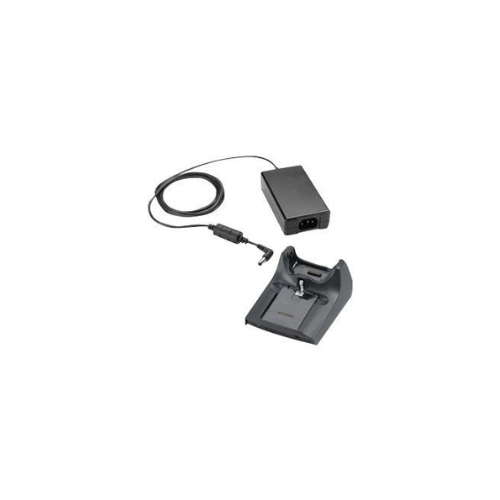

ZEBRA Kit:MC55 Symbol Desktop Cradle Kit
Key Features
Brand: ZEBRA
1-Slot USB Cradle
Single Slot Charging and Sync
1 Year Warranty
Zebra MC55 Symbol Desktop Cradle Kit: Enterprise Charging and Synchronization
The Zebra MC55 Symbol desktop cradle kit delivers an industrial-grade charging and data synchronization station for the MC55 mobile computer series . Built to support heavy daily enterprise use, this kit provides a secure docking platform that simultaneously charges the mobile computer battery and a standalone spare battery. Investing in this genuine kit ensures consistent hardware uptime and reliable data connectivity for field and retail teams.
Key Specifications and Features
- Compatibility: Zebra and Symbol MC55, MC55A0, MC55N0, and MC65 mobile computers
- Charging Slots: One primary device dock and one auxiliary spare battery slot
- Data Connectivity: Integrated USB communication port for PC synchronization
- Power Supply: Included enterprise-grade power brick and country-specific AC line cord
- Form Factor: Compact desktop footprint with weighted slip-resistant base
- Indicator Lights: Built-in LED status lights for independent battery charging tracking
- Rugged Connection: Heavy-duty guide pins ensure secure mechanical and electrical seating
Enterprise Benefits of the MC55 Desktop Cradle Kit
Single-Station Dual Charging
The cradle architecture optimizes worker productivity by charging a docked MC55 mobile computer alongside a standalone spare battery at the same time. This layout guarantees that field workers can grab a fresh, fully charged battery at the start of every shift, eliminating operational downtime.
Secure Data Synchronization
Equipped with an integrated USB data interface, the cradle facilitates fast data transfers between the mobile computer and host computer networks. IT administrators can seamlessly deploy software updates, sync database logs, and manage device configurations while the unit charges.
Industrial Build Quality
Unlike standard consumer charging docks, this Symbol enterprise kit is designed to withstand the physical stress of constant insertion cycles. The heavy base prevents tipping, and the robust alignment pins reduce the risk of bent connectors or charging failures.
Smart LED Status Monitoring
The dedicated LED indicators provide clear visual updates on the battery status. The system displays separate color indicators for standby, active charging, and full charge status, allowing warehouse staff to manage battery health at a quick glance.
Target Industries and Use Cases
Retail Store Operations
Store associates use the desktop cradle at checkout counters or back-room offices to charge inventory devices, update pricing data, and synchronize product databases between store shifts.
Field Service and Utilities
Field technicians dock their rugged handhelds at regional service hubs overnight to upload daily service records, download tomorrow’s service routes, and charge batteries for outdoor tasks.
Healthcare and Clinical Administration
Hospital staff utilize the compact desktop footprint at nursing stations to charge devices used for patient tracking and medication verification, keeping hardware sterile and ready.
Hardware Installation and Calibration Setup
- Cable Management: Connect the power brick to the rear power port and plug the USB synchronization cable directly into a dedicated computer motherboard port rather than an unpowered hub.
- Device Seating: Slide the mobile computer straight down into the cradle orientation guides until a firm mechanical click confirms complete contact.
- Driver Integration: Install the matching Zebra or Microsoft ActiveSync communication drivers on your desktop PC before docking the device to ensure instant data communication.
Frequently Asked Questions
Does this cradle kit include the required power supply components?
Yes. The complete kit includes the desktop cradle base, the matching power supply module, and the necessary AC wall plug cord required for immediate deployment.
Can I charge an extended capacity battery in the spare slot?
Yes. The auxiliary spare battery charging slot is engineered to accept both standard capacity batteries and extended-life heavy-duty batteries without requiring special adapters.
Is this cradle compatible with the older Symbol MC55 models?
Yes. This cradle fully supports the legacy Symbol MC55 series along with the updated Zebra MC55A0, MC55N0, and MC65 mobile computers, preserving your accessories across hardware updates
Can the device sync data while charging a spare battery?
Yes. The charging and data synchronization circuits operate independently, meaning a spare battery can charge continuously while the docked mobile computer updates its software.
What should I do if the charging LED flashes red?
A flashing red LED indicates a charging fault, which typically means the battery is either too hot, too cold, or failing. Remove the battery, let it return to room temperature, and re-insert it to reset.