Power Banks


 Brother Printers


 IP PBXs



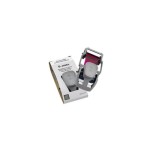
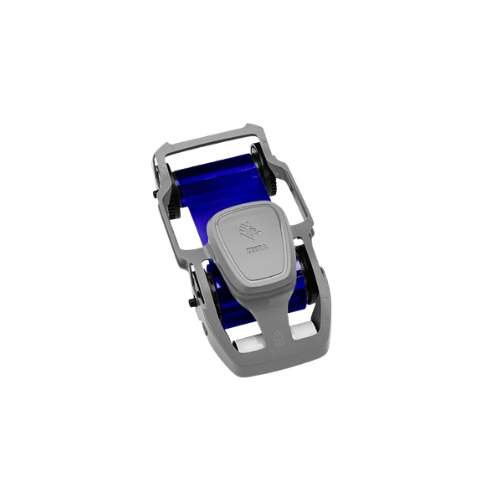

ZEBRA ZC Monochrome Blue Ribbon 1500 Images, ZC100/ZC300
Key Features
Brand: ZEBRA
Zebra ZC Series Card Printer
Blue monochrome ribbon
1500 Prints per Ribbon
Includes Cleaning Roller
Zebra 800300-304 monochrome red ribbons are compatible with;
ZC100 (ZC 100)
ZC300 (ZC 300)
ZC350 (ZC 350)
1 Year Warranty
Zebra ZC Monochrome Blue Ribbon 1500 Images: Professional Branding and Visual Control
The Zebra monochrome blue ribbon for ZC series card printers provides a distinct, professional printing solution for high-visibility text, company logos, and color-coded identification. Engineered for absolute precision, this ribbon is built specifically for the Zebra ZC100 and ZC300 card printer models. Choosing genuine Zebra consumables guarantees crisp character definition, professional aesthetic contrast, and optimal hardware reliability throughout your printing operations.
Key Specifications and Features
-
- Ribbon Color: Monochrome blue
- Total Print Yield: 1500 images or single-sided cards per roll
- Compatible Printers: Zebra ZC100 and ZC300 card printers
- Ribbon Cartridge Type: Load-and-go integrated cartridge with smart RFID chip
- Print Technology: Thermal transfer monochrome printing
- Media Matching: Optimized for standard 100 percent white PVC or composite cards
- Cleaning Roller: Integrated cleaning roller included with every ribbon package
Enterprise Benefits of Zebra ZC Monochrome Blue Ribbons
Distinct Brand and Visual Control
The specialized blue ink formulation provides a clean, executive look that aligns perfectly with corporate branding. It serves as an instant visual indicator to differentiate departments, access clearance zones, membership tiers, or contractor groups without the cost of full-color ribbon printing.
Smart Load-and-Go Cartridge Setup
The ZC series cartridge features an integrated design that drops into the printer effortlessly, eliminating complex ribbon threading. The built-in RFID chip automatically communicates with the Zebra printer firmware, instantly calibrating printer settings and providing real-time ribbon capacity tracking.
Essential Printhead Protection
Zebra embeds a proprietary anti-static backing layer on the ribbon film. This coating reduces friction as the media passes under the printhead, protecting the delicate heating elements from premature burnout and reducing maintenance overhead.
Optimized Value and Reliability
With a capacity of 1500 single-sided prints per roll, this ribbon balances high-yield production with cost-efficient personalization, minimizing downtime and physical intervention in fast-paced card issuance environments.
Target Industries and Use Cases
Corporate Security and Department Identification
Security teams deploy monochrome blue printing to identify specific internal groups, highlight temporary vendor passes, or mark distinct facility access permissions on standard white employee ID badges.
Membership and Loyalty Programs
Gyms, retail clubs, and loyalty programs utilize blue ribbons to personalize blank cards with member names, account numbers, and barcodes, providing a clean look that matches their corporate colors.
Hospitality and Event Management
Venues and event organizers print eye-catching VIP credentials, press passes, event staff identifiers, and single-day admission badges that security personnel can easily verify at a distance
Printer Calibration and Ribbon Optimization Setup
-
- Cartridge Replacement: Turn off the printer or open the top cover, drop the cartridge into the guide slots, and lock the lid down to trigger automatic initialization.
- Cleaning Roller Maintenance: Always replace the included adhesive cleaning roller when installing a new ribbon roll to remove fine airborne dust from incoming blank cards.
- Driver Darkness Settings: Use the native Zebra Windows driver control panel to adjust print darkness and speed settings to fine-tune monochrome blue contrast.
Frequently Asked Questions
Can I print color photos with this ribbon?
No. This is a monochrome ribbon that only prints solid blue images, text, and graphics. For full-color photos and complex designs, you must use a YMCKO color ribbon.
What is the purpose of the included cleaning roller?
The cleaning roller catches micro-dust and debris on blank PVC cards before they reach the printhead. This prevents white spots on your printed cards and extends the lifespan of the thermal printhead.
Will this ribbon fit older Zebra printers like the ZXP Series 3?
No. This ribbon is engineered with a specialized cartridge chassis built exclusively for the modern ZC100 and ZC300 printer loading slot architecture.
Does this ribbon include a clear protective overlay panel?
No. This is a pure monochrome ribbon (blue panel only). It does not include a clear protective overlay (O panel). If your cards will face heavy friction or outdoor abrasion, a color ribbon with an overlay is recommended.
How do I know when the ribbon roll is running low?
The built-in smart RFID chip sends data directly to the printer dashboard software on your desktop screen, giving you real-time percentage tracking of remaining print