Power Banks


 Brother Printers


 IP PBXs



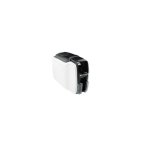
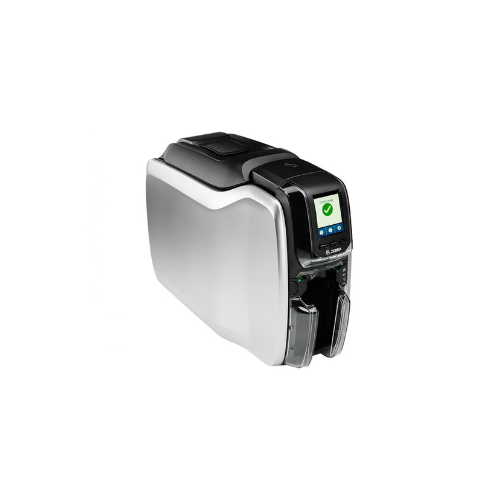

ZEBRA ZC300 Dual Sided Printer Card Printer
Key Features
Brand: ZEBRA
Supported Card Sizes: CR-79, CR-80
Card Thickness : 10 to 40 mil / 0.25 to 1.02 mm
Supported Card Type: Adhesive Back, Rewritable
Print Speed: Double-Sided, Monochrome: 450 Cards per Hour (0.1 Secs per Card)
Single-Sided, YMCKO: 140 Cards per Hour (0.4 Secs per Card)
Maximum Resolution: 300 dpi
Printing Technology : Dye, Thermal
Printing Capability: Edge-to-Edge
Memory: 2000 MB
Operating System Support: Linux, Windows, Windows Server, iOS
Security Lock Support: Kensington Lock Slot
1 Year Warranty
Ultimate Guide to Zebra ZC300 Dual-Sided Plastic ID Card Printer
The Zebra ZC300 Dual-Sided Card Printer (Model: ZC32-000C000EM00) is an advanced, high-velocity plastic card printing system engineered for corporate offices, educational institutions, retail chains, and event spaces. Featuring an integrated mechanical card-flipping core, this system prints both sides of a card automatically in a single pass. It provides a highly automated, low-maintenance hardware ecosystem designed to print secure employee badges, student IDs, membership credentials, and customer loyalty profiles instantly.
Key Features and Specifications
This commercial-grade card printer balances automated double-sided flipping with a highly compact, front-loading chassis frame.
-
- Dual-Sided Direct-to-Card Printing: Employs dye-sublimation thermal transfer technology to print crisp text and rich graphics edge-to-edge on both sides of standard CR80 PVC cards.
- Integrated Card Flipper: Rotates cards automatically inside the chassis to handle double-sided badge production without manual user intervention.
- Auto-Adjusting Card Hopper: Features a revolutionary gate mechanism that adjusts to card thicknesses from 10 mil to 40 mil automatically, completely eliminating manual calibration errors.
- High-Velocity Throughput: Processes up to 140 dual-sided full-color (YMCKOK) cards per hour or a hyper-fast 450 monochromatic dual-sided cards per hour.
- Vibrant Graphical LCD Screen: Uses a highly intuitive front display panel showing real-time status animations, error prompts, and text readouts in your preferred language.
- Instant Ribbon Cartridge Changing: Features an easy-open top latch and an integrated smart-chip tracking core that reports real-time ribbon use.
- Secure Host Communication: Implements government-grade AES encryption rules to block data interception during network transmission.
Double-Sided Automation and Mechanical Freedom
The Zebra ZC300 Dual-Sided printer solves the frustrating problems of manual flipping, card contamination, and alignment errors encountered on standard entry-level badge machines. Manual double-sided printing forces users to guess the correct card orientation when re-inserting media, frequently causing fingerprints, upside-down tracking, or printhead damage.
This model features an internal smart card-handling system that measures, feeds, prints, and flips card blanks automatically. Its advanced thermal printhead applies uniform, calibrated heat to flash dye layers directly into the porous surface of standard PVC cards. This creates crisp, professional imagery that resists handling friction, humidity, and UV fading over time.
Simple Plug-and-Play Network Setup Steps
Deploying your double-sided plastic card printer into your active workspace takes only a few quick moments.
Physical Ribbon and Card Media Loading
-
- Lift the top translucent black access hatch upwards to open the internal mechanical printer tray.
- Lower the smart dye ribbon cartridge into the bay, pushing straight down until the structural retention clips snap locked.
- Pull the front input hopper door open and drop in up to 100 blank CR80 PVC cards, ensuring they are free of dirt and fingerprints.
- Close the front access panel gate and connect the external power brick cable to a standard grounded electrical wall outlet.
Host Software Matching
-
- Download and install the official Zebra Card Printer Driver package onto your Windows desktop computer.
- Connect the packaged high-speed USB data cable into the rear interface slot of the printer and an open port on your computer tower, or connect via RJ45 Ethernet.
- Flip the primary power button located on the front control panel face; the graphical LCD screen will illuminate as it runs a brief self-test.
- Open your preferred badge design application or the Zebra CardStudio suite to automatically recognize the printer driver, configure your media footprint, and print a double-sided test card layout.
Software Customization and Diagnostics
The system features useful software tuning options to streamline enterprise-wide card printing.
-
- Interactive Driver Settings Panel: Use the visual graphical interface inside your computer’s print properties menu to adjust card orientation, fine-tune color vibrancy, and set custom monochrome printing thresholds.
- One-Touch Firmware Calibration: Monitor real-time printer status, track total prints on the ribbon counter, and initiate automated cleaning cycles over a local network or USB connection.
Frequently Asked Questions
What is the primary operational difference between the Zebra ZC100 and the ZC300?
The ZC100 is built strictly as a single-sided card printer without internal flipping mechanics. The upgraded ZC300 includes a native dual-sided card flipper, a full-color graphical LCD interface screen, faster printing speeds, and compatibility with specialized, high-security ribbon varieties like metallic or color-shifting specialty ribbons.
What is the purpose of the cleaning roller inside the ribbon package?
Plastic card blanks collect microscopic dust particles and static electricity during storage, which can block ink transfer and cause white spots or printhead damage. Each new Zebra ribbon kit includes a sticky cleaning roller that strips debris from blank cards before they reach the printhead to maintain crisp, artifact-free image quality.
Does this printer support encoding magnetic stripe loyalty cards?
The base retail model focuses strictly on standard visual card printing. However, the ZC300 architecture is built to support factory-installed or field-upgradable magnetic stripe and smart card encoder modules. This upgrade lets you print employee names and write automated swipe or RFID data onto tracking chips in a single, fluid pass.
Can I share this printer across multiple computers in my office?
Yes, unlike entry-level single-sided models, the ZC300 comes standard with built-in high-speed USB and a 10/100 wired Ethernet network port out of the box. This allows your administrative or security team to link the device directly to your office router and share badge-printing duties across multiple workstations.