Brother Printers
 WhiteBoard
 IP PBXs





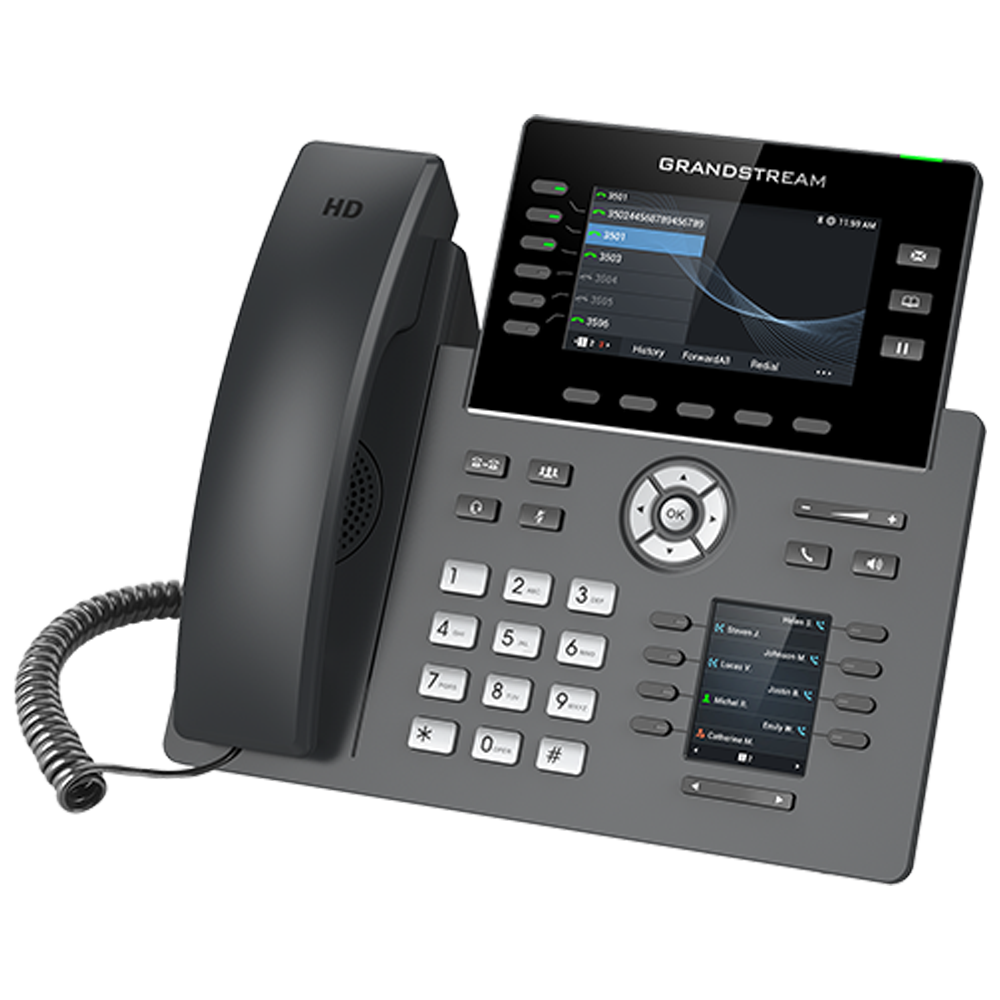

Grandstream GRP2616 IP Phone
Key Features
Brand: Grandstream
HD audio, handset and speakerphone with support for wide-band audio
6 line keys with up to 16 SIP accounts
Dual LCD screens with digital BLF Keys
Enterprise-level protection including secure boot, dual firmware images, and encrypted data storage
Integrated dual-band 802.11 a/b/g/n/ac Wi-Fi
Dual switched auto-sensing 10/100/1000 Mbps Gigabit Ethernet ports with integrated PoE
Swappable face plates to allow for easy logo customization
Integrated Bluetooth
1 Year Warranty
Grandstream GRP2616 IP Phone Review and Technical Overview
The Grandstream GRP2616 is a high-end carrier-class IP phone engineered with dual switching screens to maximize call efficiency for busy executives, receptionists, and enterprise managers . Featuring integrated dual-band Wi-Fi, built-in Bluetooth, and universal cloud management provisioning, this professional multi-line device streamlines complex corporate communications. This comprehensive guide covers key product features, hardware specifications, and system installation steps.
Premium Design and Key Features
Revolutionary Dual Screen Interfac
The phone features an innovative dual-display architectural layout designed to eliminate manual page scrolling. The primary 4.3 inch liquid crystal color display handles active caller identification, system menus, and primary line monitoring. Below the main screen, a secondary dedicated color display houses dedicated multi-purpose digital keys for fast speed dials, extensions, and busy lamp field tracking.
Enterprise Level Line and Account Capacity
Built for high-volume communication environments, the hardware supports six physical line keys alongside up to six distinct Session Initiation Protocol accounts. The dual screens accommodate a total of twenty-four programmable multi-purpose digital keys. This setup allows users to supervise multiple office extensions and routing channels simultaneously without adding external side car modules.
Wireless Freedom with Wi-Fi and Bluetoot
This phone includes built-in wireless networking hardware to eliminate the need for strict Ethernet wall cabling. The integrated dual-band Wi-Fi chip hooks into enterprise wireless routers seamlessly. Integrated Bluetooth technology enables users to pair corporate wireless headsets and sync mobile phone contact logs directly to the desk console.
Next Generation Audio Clarity and Security
The desktop phone incorporates a full high-definition speakerphone and handset system utilizing advanced wideband audio codecs. Integrated noise shield technology dynamically suppresses distracting background office chatter and computer keyboard clicks during live calls. Enterprise security protocols include secure boot, encrypted data storage, and random default passwords
Technical Specifications
Primary Display: 4.3 Inch Color Liquid Crystal Screen
Secondary Display: Dedicated Multi Purpose Digital Key Color Screen
Line Keys: 6 Physical Keys with up to 24 Programmable Digital Keys
SIP Accounts: 6 Session Initiation Protocol Accounts
Wireless Protocols: Integrated Dual Band Wi-Fi and Bluetooth 5.0
Network Interfaces: Dual Switched Auto Sensing Gigabit Ethernet Ports
Power Delivery: Integrated Power over Ethernet Support
Audio Codecs: Wideband G.722, Opus, Narrowband G.711, G.729AB
Management Suite: Grandstream Device Management System Cloud Provisioning
Secondary Display: Dedicated Multi Purpose Digital Key Color Screen
Line Keys: 6 Physical Keys with up to 24 Programmable Digital Keys
SIP Accounts: 6 Session Initiation Protocol Accounts
Wireless Protocols: Integrated Dual Band Wi-Fi and Bluetooth 5.0
Network Interfaces: Dual Switched Auto Sensing Gigabit Ethernet Ports
Power Delivery: Integrated Power over Ethernet Support
Audio Codecs: Wideband G.722, Opus, Narrowband G.711, G.729AB
Management Suite: Grandstream Device Management System Cloud Provisioning
Step-by-Step Installation Guide
Physical Assembly and Stand Mounting
- Align the structural phone stand with the dedicated slots on the bottom of the device casing.
- Snap the stand legs into place, choosing either the high or low angle tilt configuration slot.
- Plug the long end of the coiled handset cord into the RJ9 jack marked with a physical handset icon.
- Insert the remaining end of the coiled cable firmly into the base socket of the handset piece.