Power Banks


 Brother Printers


 IP PBXs



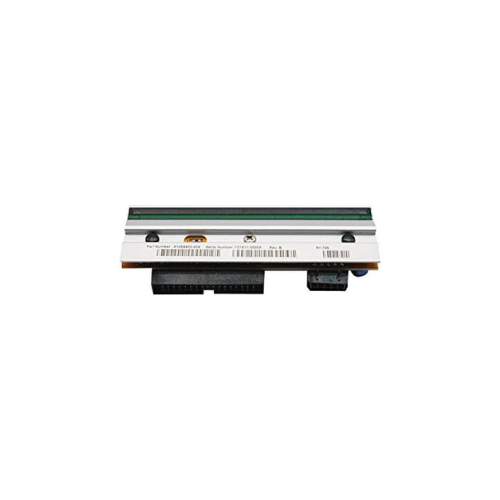

ZEBRA P1058930-009 ZT410 203 dpi Printhead
Key Features
Brand: ZEBRA
Connectivity Technology USB
Printing Technology Thermal
Special Feature Portable
Model Name ZT410
Printer Output Monochrome
Controller Type Push Button
Maximum Media Size 4×6 inches
Print media Labels
Max Input Sheet Capacity 10
1 Year Warranty
Zebra P1058930-009 ZT410 203 DPI Printhead: Industrial Component Replacement
The Zebra P1058930-009 replacement thermal printhead delivers industrial-grade performance for high-volume manufacturing and logistics labeling operations. Engineered specifically for the heavy-duty Zebra ZT410 industrial printer model, this printhead provides a standard resolution of 203 DPI (dots per inch). Selecting a genuine Zebra replacement component ensures perfect electrical alignment, crisp barcode definition, and maximum hardware longevity across your printing infrastructure.
Key Specifications and Features
-
- Part Number: P1058930-009
- Printer Compatibility: Zebra ZT410 industrial barcode printers
- Print Resolution: 203 DPI or 8 dots per mm
- Print Technology: Direct thermal and thermal transfer printing systems
- Maximum Print Width: 4.09 inches or 104mm
- Hardware Material: High-durability thin-film ceramic array
- Connection Type: Plug-and-play wiring harness integration
Enterprise Benefits of the P1058930-009 Printhead
Standard High-Speed Printing Efficiency
The 203 DPI resolution configuration optimizes printhead heating and cooling cycles, allowing the ZT410 printer to achieve its maximum rated print speeds of up to 14 inches per second. This makes it ideal for rapid shipping label generation and packaging line workflows.
Seamless Plug-and-Play Maintenance
IT technicians can replace the printhead assembly in minutes using standard tools without requiring extensive printer disassembly. The precise drop-in design aligns automatically with the mechanical pressure bars, minimizing operational downtime.
Flawless Barcode Scannability
The precision element alignment prevents pixel dropouts and print lines. This consistency yields sharp, high-contrast edges on high-density 1D and 2D barcodes, eliminating supply chain scan failures and automated sorting bottlenecks.
Dual Technology Optimization
The thin-film ceramic formulation adapts instantly to both direct thermal media and thermal transfer workflows using wax, wax-resin, or pure resin ribbons, providing extreme operational versatility.
Target Industries and Use Cases
Warehouse and Distribution Logistics
Logistics managers deploy these replacement printheads to maintain uninterrupted printing of standard 4×6 inch compliance shipping labels, pallet routing slips, and inventory storage tags.
Manufacturing and Work-in-Process Tracking
Production lines utilize the 203 DPI format to print high-volume component labels, serialized asset tags, and product packaging identification stickers that survive factory environments.
Retail Supply Chain and Distribution
Central distribution hubs print high-density retail barcode labels, pricing tags, and cross-docking identification markers across multi-shift labeling operations.
Hardware Installation and Maintenance Optimization
-
- Power Safety: Always turn off the printer and disconnect the main AC power cord before disconnecting the printhead wiring harnesses.
- Cleaning Protocols: Wipe the new printhead heating elements with a lint-free cloth saturated with 99 percent isopropyl alcohol immediately after installation to remove manufacturing residues or finger oils
- Pressure Balance: Adjust the dual printhead toggle pressure knobs evenly according to the thickness of your media to prevent uneven wear across the ceramic surface.
Frequently Asked Questions
Can I upgrade my ZT410 printer from 203 DPI to 300 DPI using this part?
No. To change the resolution of a Zebra ZT410 printer, you must change the printhead, the main drive belt, and the drive pulley assembly as part of a complete resolution conversion kit.
What are the main signs that my current printhead needs replacement?
The most common indicators are permanent thin white lines running vertically through your printed labels or faded sections that do not improve after cleaning, signaling burned-out heating elements.
How often should I clean the P1058930-009 printhead?
For thermal transfer printing, clean the printhead with a specialized cleaning pen or isopropyl alcohol swab every time you change the ribbon roll. For direct thermal setups, clean after every roll of labels.
Does this part number fit the newer Zebra ZT411 printer?
No. The P1058930-009 assembly is engineered exclusively for the locking mechanism and wiring configurations of the legacy ZT410 series. The ZT411 utilizes a different printhead design.
What causes a printhead to wear out prematurely?
Accumulated paper dust, using poor-quality non-Zebra ribbons, excessive printhead darkness settings, and uneven toggle pressure are the primary causes of premature element failure.