Brother Printers
 WhiteBoard
 IP PBXs





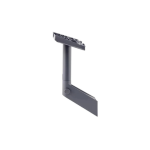
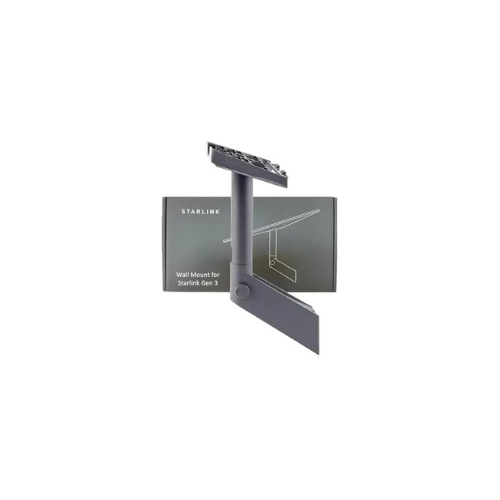

Starlink V3 Wall Mount
Key Features
Brand: Starlink
Compatibility: Designed for use with the Starlink Gen 3 (V3 Standard Dish)
Coverage: Supports up to 4″ roof overhang installations on vertical surfaces
Construction: Durable, weather-resistant materials built to withstand harsh conditions
Adjustability: Rotates 360° horizontally, with locking mechanism to stabilize dish once aimed
Installation Kit Includes: Mast, adapter bracket, 2 lag screws, silicone sealant, 20 cable clips, and installation guide
Cable Management: Built-in cable routing channels for neat and safe cable run
Warranty: Typically 1-Year Parts Warranty for installation kits
Weight & Dimensions: Approx. 1.6 kg (3.5 lbs); mount arm approx. 18.5″ length with ~10.7″ mast
1 Year Warranty
Starlink V3 Wall Mount
The Starlink V3 Wall Mount provides high structural stability, aerodynamic wind-load resistance, and long-term exterior placement tailored for residential homes, commercial outbuildings, remote cabins, and industrial facilities. Built from weather-treated materials, the mounting framework fastens securely onto concrete, brick, siding, or timber structures using specialized heavy-duty anchor bolts. By holding the large Gen 3 flat phased array antenna at an optimal distance and elevation, it creates a stable, permanent internet station while keeping the hardware protected from ground-level hazards, deep snow accumulation, or flooding.
Key Features
- Quick-Connect Pipe Adapter : Features a custom-molded latching mechanism that allows the Starlink Gen 3 kickstand socket to slide and click firmly into place without tools. [
- Heavy-Duty Weatherproof Armor : The structural steel or cast-aluminum support arm is treated with industrial powder coating to resist rust, oxidation, and sun damage
- Extended Obstruction Clearance : Keeps the dish extended away from the wall surface to prevent the roofline, gutters, or architectural trim from blocking the antenna’s wide viewing window.
- Precision Manual Tilt Hinge : Built with an adjustable mechanical pivot that allows installers to tilt and lock the dish at the exact alignment angle requested by the Starlink setup app.
- Hollow Core Cable Management : Outfitted with an internal routing path that passes the Gen 3 network line completely through the inside of the metal arm, shielding the plug from wind strain and environmental exposure.
- Multi-Surface Anchor Configuration : Package sets include a universal heavy-duty mounting plate compatible with wood lag screws, expansion masonry shields, and hollow-wall anchors.
Technical Specifications
| Feature | Engineering Specification |
|---|---|
| Product Model | Starlink Standard Gen 3 Wall / Pivot Mount |
| Structural Arm Material | Powder-Coated Galvanized Steel or Marine-Grade Die-Cast Aluminum |
| Maximum Wind Weight Capacity | Engineered to withstand continuous wind loads up to 120+ mph (190+ km/h) |
| Wall Extension Distance | Typically extends 250 mm to 400 mm (~10″ to 16″) off the vertical surface |
| Chassis Tilt Configuration | Adjustable mechanical swivel joint with integrated locking bolts |
| Hardware Attachment Style | Proprietary Gen 3 quick-release retention latch (No modifications required) |
| Environmental Protection | Salt-spray tested, rust-proof, and fully UV-stabilized |
| Mounting Plate Footprint | Heavy-duty 4-hole or multi-slot plate matching standard structural studs |
| Gross Hardware Weight | 1.8 kg to 3.2 kg (Depending on exact structural arm extension length) |
High-Utility Operation Capabilities
1. Integrated Internal Cable Armor
Unlike older mounting setups that require securing the network cable to the outside of the bracket with zip ties, the Gen 3 wall mount features a completely hollow core. The pre-terminated Gen 3 cable passes smoothly through the base plate and inside the support arm, plugging into the dish internally. This design completely eliminates wind flutter and protects the cable jacket from UV degradation and weathering.
2. High-Load Aerodynamic Wind Resistance
The Starlink Gen 3 dish features a larger surface area than previous generations, which increases wind drag during storms. This mount counteracts high-wind load strain by deploying heavy-gauge metal wall plates and thick-walled support tubes. The entire assembly absorbs structural vibrations, preventing the microscopic movements that can cause data packet dropouts or temporary satellite disconnections.
3. Strategic Eave and Overhang Bypass
By utilizing an elongated and pre-curved extension arm, the mount shifts the physical position of the flat phased array outwards and upwards from the building line. This clearance allows the wide field of view of the tracking antenna to look past structural gutters, downspouts, and low roof edges. This flexibility allows for low-profile mounting on side walls while maintaining a clear view of the sky overhead.
Frequently Asked Questions
- Can I mount this heavy bracket onto a vinyl or wood siding exterior wall?
Yes. However, you should ensure the long mounting screws pass completely through the cosmetic exterior siding panels and bite directly into the solid wood wall studs behind them. Fastening the heavy bracket solely into thin siding can cause it to pull loose during high winds or heavy storms. - Is this V3 wall mount compatible with the older Rectangular Actuated V2 or Starlink Mini dishes?
No. This accessory features a specialized quick-connect latch mechanism built exclusively to interface with the kickstand connection slot on the back of the Starlink Standard Gen 3 (V3) Dish. The V2 dish relies on a narrower round pole stem, and the Starlink Mini uses a much smaller sheet-of-paper scale framework. [1] - How do I properly align the dish once it is locked onto the wall mount?
Before tightening the main pivot locking bolts on the bracket hinge, open the Starlink smartphone app and select the Alignment tool. Slowing adjust the physical angle and direction of the dish by hand until the application confirms optimal alignment with the overhead LEO satellite array, then torqued down the bolts to lock it in place. - How should I protect the network cable where it enters the building wall?
When routing the network cable from the outdoor mount into a room, drill your entry hole at a slight upward angle and install a waterproof feed-through bushing. Loop the cable slightly downward before it enters the wall to form a “drip loop,” which prevents rainwater from running down the line and seeping into the building structure