Brother Printers
 WhiteBoard
 IP PBXs





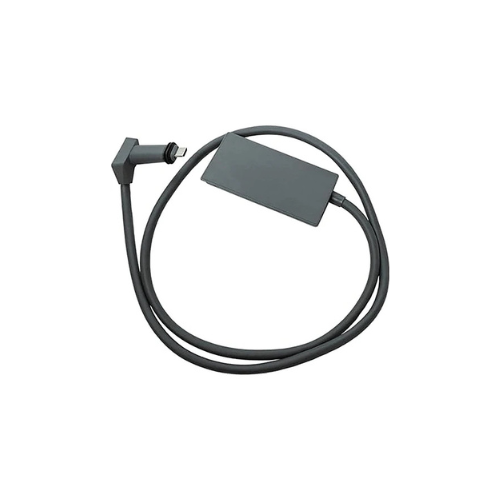
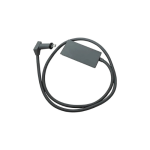

Starlink Ethernet Adapter
Key Features
Brand: Starlink
Compatible with Starlink Satellite Internet Systems
Allows hardwired connection to base Wi-Fi router or additional Mesh router units
Can be used with one adapter for each router
Plugs in line with the Dish cable or directly into Additional Mesh units
Enables hardwired Ethernet connection for Smart TVs, computers, or other network-connected devices
Compact design for easy installation and use
1 Year Warranty
Starlink Ethernet Adapter
The Starlink Ethernet Adapter provides stable gigabit data streaming, physical asset routing, and local infrastructure expansion tailored for smart home automation, office desktop networks, high-definition security camera links, and competitive online gaming stations. Designed for indoor installation setups, it compensates for the lack of built-in physical LAN interfaces on the factory Gen 2 rectangular router base. By nesting directly into the factory line paths, the adapter extracts parallel internet feeds and creates a direct, interference-free gateway to local enterprise networks.
Starlink Ethernet Adapter
- Gigabit RJ45 Interface : Establishes a standard local network connection capable of handling high-capacity broadband feeds.
- Inline Insertion Design : Slides seamlessly into existing wiring configurations without requiring external wall power bricks or separate outlets.
- Power Over Ethernet (PoE) Pass-Through : Maintains continuous power delivery to the outdoor satellite dish while extracting data streams.
- Bypass Operational Support : Allows network managers to disable the factory wireless radio to route the connection directly into corporate hardware firewalls.
- Zero-Configuration Setup : Features an automated plug-and-play architecture that does not require local IP configuration or driver installations.
- Compact Footprint Enclosure : Housed inside a low-profile, lightweight plastic casing that fits easily behind entertainment hubs or inside media enclosures.
Starlink Ethernet Adapter
| Feature | Engineering Specification |
|---|---|
| Product SKU / Code | Gen 2 Ethernet Adapter (01560575-001) |
| Input Interface Connection | Proprietary Starlink Router V2 Connector Intercept |
| Output Output Ports | 1 x RJ45 Gigabit Ethernet LAN Port |
| Data Signaling Rate | 10 / 100 / 1000 Mbps (Gigabit Capability) |
| Power Distribution | Passive Pass-Through (Supplied entirely by the base router) |
| Network Protocols | IEEE 802.3, Ethernet Signaling Array |
| Operational Temperature | 0°C to 40°C (32°F to 104°F) |
| Environmental Ingress | Indoor Configuration Only (Protected dry environment) |
| Physical Housing Profile | 71 mm × 53 mm × 18 mm (Inline Extension Segment) |
| Gross Component Weight | Approximately 45 grams (1.6 oz) |
| Cable Extension Span | ~3 Feet attached leading wire |
Starlink Ethernet Adapter
1. Integration of Third-Party Routing Equipment (Bypass Mode)
The primary utility of the adapter is its support for Bypass Mode via the Starlink mobile application. Enabling this setting completely shuts down the internal Wi-Fi transmitter inside the Gen 2 router and converts the RJ45 port into a pure WAN bridge. This setup allows network administrators to connect the satellite link directly into enterprise hardware firewalls, dual-WAN balancing systems, or long-range multi-node mesh networks.
2. Local Area Network Expansion via Switches
While the hardware features only a single RJ45 output port, its gigabit data signaling chip allows for extensive hardware scaling. Users can plug the output line directly into a standard 8-port, 16-port, or 24-port unmanaged network switch. This expansion enables an entire office workspace, server farm, or storage backup bank to access the satellite network through a shared physical link.
3. High-Wattage PoE Pass-Through Continuity
The adapter intercepts the high-voltage lines that supply power to the outdoor dish. Its internal circuitry handles this heavy Power over Ethernet pass-through safely, keeping the lines clear of data corruption or voltage dropouts. The dish retains access to its full power supply, allowing it to run automated motor adjustments and active snow-melting elements without disrupting local network performance.
Frequently Asked Questions
- Do I need to buy this adapter if I own the latest Starlink Standard Gen 3 (V3) Kit?
No. The newer Starlink Standard Gen 3 (V3) Router features two built-in RJ45 Ethernet ports on its rear panel under a rubber protective cover. This adapter is built specifically for the Gen 2 Standard Actuated router, which lacks built-in physical ports. - Does this accessory require a separate power cord plugged into the wall?
No. The device operates entirely on passive power. It draws its operational current directly from the main Starlink router base through the proprietary inline connectors, keeping your setup clean and free of extra power cords. - Can I plug this adapter directly into the outdoor satellite dish cable?
No. The adapter is an indoor accessory designed to connect directly into the base port on the bottom of the Gen 2 Wi-Fi router. The long cable leading from the outdoor dish then plugs into the receptor base on the adapter body. - What is the correct sequence to install this hardware without risking a short circuit?
First, disconnect the router’s main AC power cord from the wall. Unplug the outdoor dish cable from the bottom of the router, and insert the adapter’s proprietary plug into that vacant slot. Connect the outdoor dish cable to the adapter’s port, and then plug the router’s power cord back into the wal