Brother Printers
 WhiteBoard
 IP PBXs





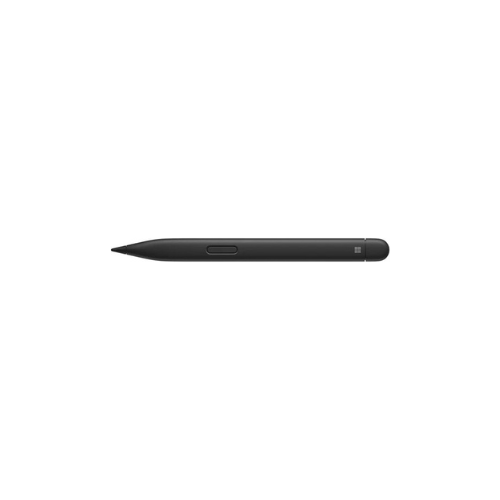

Microsoft Surface Slim Pen 2
Key Features
Brand: Microsoft
Model: 8WV-00001
Product Type: Premium digital stylus pen
Design: Slim, flat ergonomic pen design for Surface devices
Pressure Sensitivity: 4096 levels
Tilt Support: Up to 77° tilt detection
Battery: Rechargeable built-in battery
Battery Life: Up to ~15 hours depending on usage
Charging: Magnetic wireless charging (on compatible Surface devices/accessories)
Buttons: Side button + top button with eraser function
Color: Charcoal Black
1 Year Warranty
Ultimate Guide to the Microsoft Surface Slim Pen 2
The Microsoft Surface Slim Pen 2 represents the pinnacle of digital input engineering, delivering a natural on-screen writing and drawing experience . Designed to companion modern hybrid workflows, this premium stylus offers exceptional precision, ultra-low latency, and tactile feedback that mimics the feel of pen on paper.
With its sleek, carpenter-style profile and advanced pressure sensitivity, this tool transforms your tablet into an elite digital canvas or productivity notebook
Technical Specifications and Architecture
Understanding the precise physical and wireless metrics ensures this tracking companion integrates perfectly with your current hardware setup.
- Product Type: High-Precision Digital Stylus
- Color Finish: Matte Commercial Black
- Connectivity Type: Bluetooth Low Energy 5.0 Wireless Technology
- Pressure Sensitivity: 4096 Levels of Pressure with Tilt Functionality
- Tactile Signals: Built-in Haptic Motor for Realistic Writing Feedback
- Power Source: Rechargeable Lithium-Ion Battery
- Storage and Charging: Magnetic Secure Attachment with Wireless Charging Support
- Physical Features: Front Sharp Tip and Rear Functional Eraser Button
Key Features of the Surface Slim Pen 2
Immersive Tactile Signals and Haptic Feedback
The standout innovation is the built-in haptic motor that generates micro-vibrations as you write or draw. These tactile signals recreate the natural friction of physical graphite moving across paper, giving digital artists and notes-takers greater control, precision, and confidence on smooth glass screens
Zero-Force Inking and Pinpoint Precision
The redesigned sharp pen tip features exceptional responsiveness, initiating ink flow the instant it makes contact with the screen. With virtually zero latency and precise tilt tracking, shadow shading and intricate line work feel completely natural and instantaneous.
Ergonomic Slim Profile
Moving away from traditional round stylus barrels, the flat, carpenter-style silhouette provides a highly ergonomic grip. This unique shape prevents finger fatigue during long multi-hour editing sessions, while naturally keeping the stylus from rolling off angled desks or conference tables.
Dual Functional Input Buttons
The stylus houses an intuitive side button for quick contextual right-click actions and a responsive top button. The top button acts as a traditional pencil eraser to quickly rub out mistakes, and doubles as a wireless remote to advance presentation slides or launch custom note applications
Workspace Advantages in Professional Environments
Secure Storage and Wireless Charging
Eliminate the hassle of loose cables, physical charging docks, or disposable AAAA batteries. The stylus snaps magnetically into compatible keyboard decks, laptop bases, or device charging cradles, keeping it securely stored and topped up with wireless power automatically.
Accelerated Digital Signature Workflows
Streamline enterprise operations by transitioning to fully digital document handling. The extreme responsiveness of the tip accurately captures your natural handwriting cadence and pressure variations, making it ideal for legally binding digital signatures and PDF asset annotations.
Seamless Application Integration
The hardware pairs directly with professional creative and productivity software. Enjoy native optimization across design tools, vector canvas suites, digital whiteboard platforms, and office documentation packages for fluid navigation
Frequently Asked Questions
Which Surface models support the tactile haptic feedback feature?
While the stylus provides exceptional precision across all compatible Surface devices, the immersive tactile haptic signals are specifically optimized for advanced screen architectures, such as those found on the Surface Pro 8, Pro 9, Pro 10, Laptop Studio, and subsequent flagship models running Windows 11
How do you charge the Surface Slim Pen 2 if you do not own a matching keyboard?
If your primary device layout does not include a built-in keyboard storage slot, you can easily top up the stylus using a dedicated Surface Slim Pen Charger accessory, which connects via a standard universal USB-C cable.
Are the plastic stylus tips replaceable when they wear down?
Yes, Microsoft provides replacement pen tip bundles. If your stylus tip becomes worn or damaged over extended periods of heavy field deployment, you can quickly slide the old tip out and insert a fresh replacement without needing specialty tools