Brother Printers
 WhiteBoard
 IP PBXs





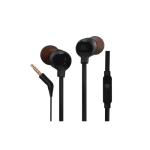
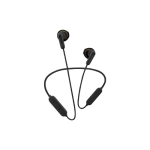
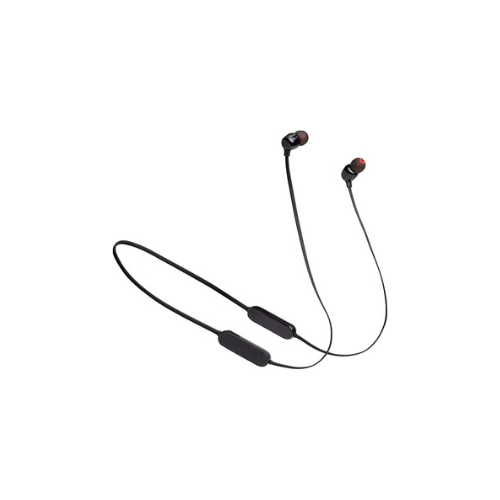
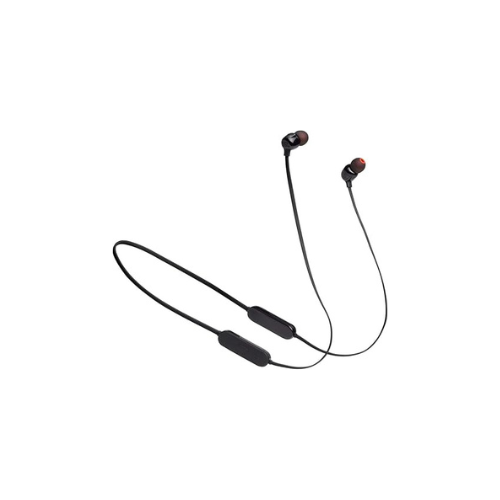

JBL TUNE 125BT Wireless In-ear Headphones
Key Features
Brand: JBL
Sound: JBL Pure Bass | 8.6 mm Drivers
Connectivity: Bluetooth 5.0
Battery: Up to 16 H | Quick Charge
Mic & Controls: Built-in Mic | 3‑Button Remote
Design: In‑Ear Neckband | Magnetic Earbuds
Voice Assistant: Siri & Google
Multipoint: Connects to 2 Devices
Charging: USB‑C | ~2 H Full Charge
Compatibility: Smartphones & Tablets
1 Year Warranty
JBL Tune 125BT Wireless Earphones: Ultimate High-Speed Professional Guide
The JBL Tune 125BT Wireless Earphones are a powerhouse in the professional portable audio, remote workspace communication, and active daily commuting market . This high-efficiency neckband system eliminates the risk of dropping standalone earbuds while delivering crisp, clean audio for virtual meetings, field operations, and computing pipelines. It serves as a reliable, heavy-duty solution designed to streamline digital communication data, mobile audio tracking, and real-time voice monitoring for organizations of all sizes. By utilizing advanced signature acoustic engineering and lightweight ergonomics, this flexible machine helps users boost daily productivity, reduce administrative downtime, and maintain a highly mobile workflow. Modern professionals and remote operators rely on this hardware to eliminate communication bottlenecks and automate daily media categorization tasks. Its robust build quality ensures it handles high-volume processing cycles without clipping or experiencing performance drops. Mobile workers looking to scale their digital infrastructure find this device to be an indispensable asset for daily computing production.
This comprehensive guide covers everything you need to optimize this device for your business workflow.
Key Technical Specifications
Understanding the hardware capabilities helps you maximize your investment. The device balances long battery lifespans with convenient physical storage features.
- Acoustic Driver Set : 8.6mm high-performance dynamic drivers processing a broad frequency spectrum
- Sound Architecture : Integrated JBL Pure Bass performance technology for deep low-end delivery
- Wireless Protocol : Advanced Bluetooth connection framework featuring multi-point dual-device pairing
- Power Cell Capacity : High-efficiency lithium core yielding up to 16 hours of continuous system playback
- Charging Technology : Speed Charge system utilizing a high-efficiency USB-C port connection
- Cable Management : Magnetic earbud housing structure preventing dangling or tangling when not in use
Top Features and Business Benefits
Renowned JBL Pure Bass Sound
The advanced 8.6mm driver technology means you never experience the thin, muddy audio distortion common with unbranded budget earphones. It translates complex digital audio signals and processes master tracking files at lightning speeds, keeping your editing or corporate communication pipeline moving without delays.
Extended 16-Hour Battery Life
The built-in heavy-duty battery allows you to execute operations through multiple work weeks or long travel loops on a single charge. You can maximize your remote work activities comfortably without being tethered to constant wall socket power schedules or suffering battery-depletion downtime.
Multi-Point Dual Device Connections
Integrate the machine seamlessly into your workspace ecosystem. Operators can share the headset link across a laptop workstation and a personal phone line simultaneously. The system board automatically pauses media on one device to answer an incoming voice call on the other without manual toggling delay.
Integrated Magnetic Cable Layout
The built-in magnetic array inside each earbud tip allows you to secure the device around your neck when not actively listening. You can maximize your daily transport efficiency effortlessly without worrying about losing an independent earbud or dealing with tangled wires during fast field shifts.
Simple Step-by-Step Setup Guide
Follow these steps to get your professional wireless earphones running quickly.
Step 1: Unpack and Verify Power Status
Remove all protective packaging wraps and cardboard ties from the product box. Attach the included high-speed USB-C cord to the charging slot on the neckband controller rim to confirm the internal core holds an active base charge.
Step 2: Initialize Wireless Pairing Mode
Press and hold the central physical power button layout on the inline remote for several seconds to switch the system on. The internal transceiver card will immediately broadcast its open identification beacon, indicated by a flashing status light.
Step 3: Link Your Source Workstation
Open the connectivity utility panel on your laptop computer, smartphone, or tablet device. Search the active network tree, select the corresponding JBL Tune 125BT entry, and confirm the wireless pairing handshake.
Step 4: Position the Earbud Shells
Select the correct size of silicone tips (small, medium, large) to secure a tight acoustic seal. Position the neckband comfortably behind your collar area, insert the buds into your ears, and run an acoustic calibration check.
Effective Troubleshooting and Maintenance
Keep your machine operating at peak performance with basic maintenance habits.
Resolving Multi-Point Switching Jams
Turn off the power or restart the earphones immediately if the audio fails to hop cleanly between your computer and mobile line. Clear the saved peripheral history from your computer operating system and initiate a fresh device pairing handshake to clear the driver buffer.
Fixing Charging Interface Drops
If the internal battery fails to register incoming power, inspect the USB-C insertion channel. Clear away any accumulated sweat residue, pocket lint, or debris gently using a dry cotton swab to restore clean electrical connection lines.
Cleaning the Earphone Body
Poor acoustic performance, dust blocks, or smudges along the speaker mesh indicate a dirty outer frame. Disconnect the charging cord completely, and wipe down the neckband cord, inline buttons, and plastic ear pieces gently using a dry, lint-free microfiber cloth without applying liquid chemical sprays.