Brother Printers
 WhiteBoard
 IP PBXs





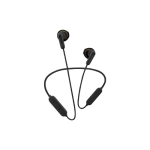
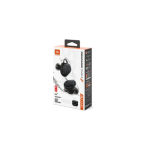
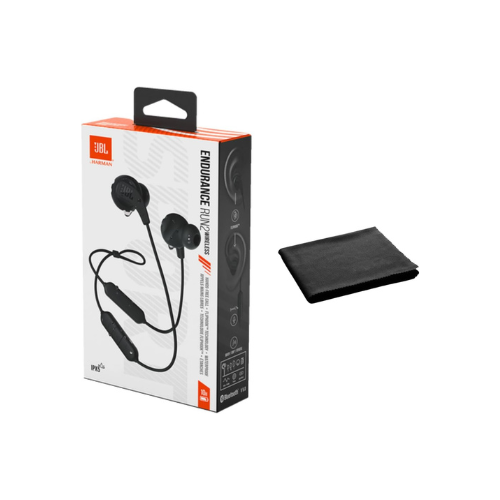

JBL Endurance RUN 2 wireless bluetooth earphones
Key Features
Brand: JBL
Fliphook
Twistlock
FlexSoft Technology design
IPX5 Waterproof/dustproof rating
Voice Assistant Support
Playback: 10 Hours
1 Year Warranty
JBL Endurance RUN 2 Wireless Bluetooth Earphones: Ultimate High-Speed Professional Guide
The JBL Endurance RUN 2 Wireless Bluetooth Earphones are a powerhouse in the professional athletic audio, remote industrial operation, and high-mobility multitasking market . This heavy-duty neckband earphone system eliminates the risk of dropping standalone independent earbuds while delivering crisp, clean audio for high-intensity training, field operations, and outdoor activities. It serves as a reliable, heavy-duty solution designed to streamline digital communication data, mobile soundtrack tracking, and real-time voice monitoring for organizations and athletes of all sizes. By utilizing an innovative FlipHook multi-directional mounting frame and sweatproof components, this flexible machine helps users boost daily physical productivity, reduce administrative equipment downtime, and maintain a highly active workflow. Modern fitness professionals and remote field operators rely on this hardware to eliminate audio signal dropouts and automate reliable sports data monitoring. Its robust build quality ensures it handles high-volume punch cycles without cracking or experiencing performance drops. Active workers looking to scale their mobile infrastructure find this device to be an indispensable asset for daily computing production.
This comprehensive guide covers everything you need to optimize this device for your business workflow.
Key Technical Specifications
Understanding the hardware capabilities helps you maximize your investment. The device balances long battery lifespans with diverse physical layout options.
- Acoustic Driver Set : 8.2mm high-performance dynamic drivers processing a broad frequency response spectrum
- Sound Architecture : Integrated JBL Pure Bass performance technology for deep low-end delivery
- Mounting Infrastructure : FlipHook flexible chassis supporting in-ear or behind-the-ear orientation
- Wireless Protocol : Advanced Bluetooth connection framework featuring stable automated pairing
- Environmental Rating : Certified IPX5 sweatproof and submersive splash-resistant frame construction
- Battery Longevity : High-performance core yielding up to 10 hours of continuous wireless playback
Top Features and Business Benefits
Versatile FlipHook Flexible Design
The advanced dual-orientation technology means you never experience earbud stability drops during fast physical movements. It translates physical mechanics seamlessly, allowing you to route the cable path directly into your ear canal or loops upward behind your ear layout, keeping your workout or industrial pipeline moving without delays.
TwistLock and FlexSoft Comfort Security
The built-in structural interlocking mechanics allow the ear tips to twist and lock securely inside your cartilage frame. You can maximize your intensive training hours comfortably without the earbuds falling out, while the ultra-lightweight, flexible polymer design prevents friction sores or physical pressure points over time.
Rugged IPX5 Sweatproof Protection
Integrate the machine seamlessly into extreme high-sweat training routines or harsh outdoor weather elements. The internal circuit boards are shielded with dense structural waterproofing material to handle rain, moisture, and sweat splashes safely, preventing internal electrical shorts during heavy assignments.
Practical Magnetic Storage Buds
Using specific magnetic internal nodes within each driver shell, the earbuds snap together securely around your neck when not actively in use. This is ideal for highlighting critical mobile efficiency, keeping your cables organized during administrative breaks, and reducing hardware loss risk.
Simple Step-by-Step Setup Guide
Follow these steps to get your professional wireless sport earphones running quickly.
Step 1: Unpack and Verify Power Status
Remove all protective packaging wraps and plastic cable ties from the product box. Attach a high-speed Type-C charging cable to the integrated remote module port to confirm the internal core holds an active base charge.
Step 2: Initialize Wireless Pairing Mode
Press and hold the primary physical center button layout on the inline remote capsule for several seconds to switch the system on. The internal wireless transceiver card will immediately broadcast its open pairing beacon.
Step 3: Link Your Source Workstation
Open the connectivity utility panel on your laptop computer, smartphone, or tablet device. Search the active network tree, select the corresponding JBL Endurance Run 2 Wireless entry, and confirm the wireless pairing handshake.
Step 4: Choose Your Mounting Orientation
Select your preferred structural fit (in-ear or behind-the-ear). Install the correct size of soft silicone ear tips to establish a tight acoustic sound seal and lock the chassis smoothly into your ear track to complete the configuration process.
Effective Troubleshooting and Maintenance
Keep your machine operating at peak performance with basic maintenance habits.
Resolving Signal Interruption Drops
Turn off the power immediately if your audio skips or clips during active training loops. Clear the saved device history from your smartphone operating system and prompt a fresh pairing handshake to flush out frozen communication driver blocks.
Fixing Charging Interface Drops
If the internal battery cell fails to register incoming power, inspect the inline remote port opening. Clear out any accumulated sweat residue, pocket lint, or moisture gently using a dry anti-static tool to ensure clean electrical connection lines.
Cleaning the Sport Ear Tips
Poor acoustic performance, dust blocks, or earwax smudges along the speaker mesh indicate a dirty outer frame. Peel the silicone ear tips off the plastic nozzles carefully, wash them with mild warm soap water, dry completely, and pop them back onto the driver modules