Power Banks


 Brother Printers


 IP PBXs



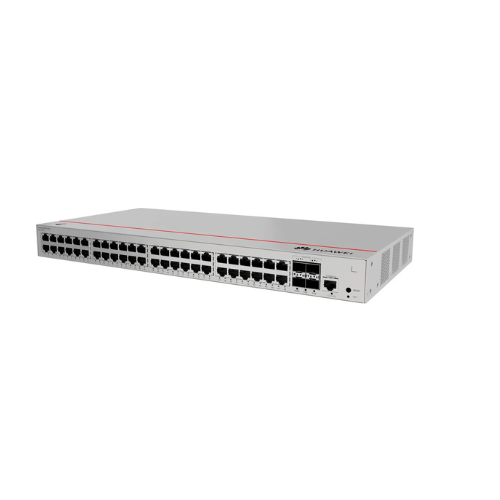

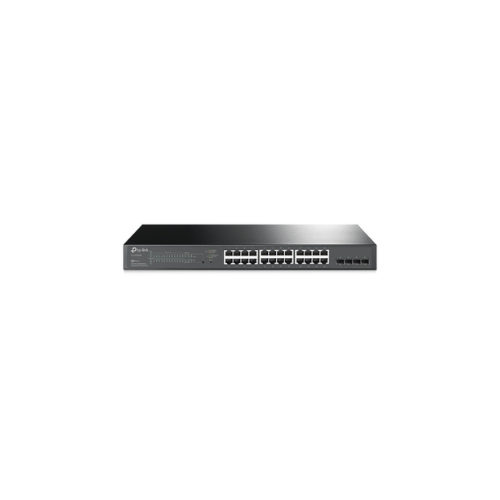
Huawei S220-48P4S Network Switch – 48-Port Gigabit PoE+ Layer 2 Managed Switch with 4 SFP Uplink Port
Key Features
Brand: Huawei
Model: Huawei eKitEngine S220-48P4S
Ports:
48 ? Gigabit Ethernet (10/100/1000 Mbps) Ports
4 ? Gigabit SFP uplink ports
PoE Support: Yes (for PoE-enabled models)
Switching Capacity: 176 Gbps
Packet Forwarding Rate: 130.95 Mpps
MAC Address Table: 16K entries
VLAN Support: 802.1Q VLAN, port-based VLAN, dynamic VLAN assignment
QoS Features: Traffic prioritization, packet scheduling, bandwidth control
Security Features: MAC filtering, ACLs, DHCP snooping, port isolation
Management Options: Web GUI, SNMP, Command Line Interface (CLI), remote management
Cooling System: Active fan cooling
Mounting: Rack-mountable (1U design)
Power Supply: Built-in
Operating Temperature: 0?C to 45?C
Weight & Dimensions: Compact and durable metal enclosure
1 Year Warranty
Huawei S220-48P4S Managed Switch Overview
The Huawei S220-48P4S is a high-density, enterprise-grade Gigabit Layer 2 managed switch engineered to deliver resilient infrastructure connectivity for small and medium enterprises. Combining a massive deployment of Power over Ethernet plus ports with dedicated fiber uplinks, this switch serves as a reliable core or access layer solution for modern offices, education campuses, and high-definition IP surveillance environments.
Premium Architecture and Technical Specifications
-
- High-Density Access Ports: 48 x 10 100 1000BASE-T RJ45 ports delivering dedicated wire-speed gigabit performance to every connected network endpoint.
- Gigabit Fiber Uplinks: 4 x 1 Gigabit SFP optical slots providing dedicated high-bandwidth backbone connectivity to central core networks.
- Advanced PoE Infrastructure: Comprehensive Power over Ethernet plus support delivering automated electrical distribution across all 48 access ports.
- Robust Core Performance: Dedicated hardware switching architecture ensuring full wire-speed forwarding across all ports simultaneously without packet loss.
- Professional Form Factor: Standard 1U rack-mountable chassis designed for seamless integration into standard enterprise server enclosures and network racks.
Enterprise Power over Ethernet plus Engineering
The 48 integrated PoE plus ports on the S220-48P4S streamline physical infrastructure deployment by delivering both high-speed data transmission and clean electrical power through a single Ethernet cable. This unified architecture entirely removes the dependency on local electrical outlets at endpoint locations, cutting installation costs and simplifying messy cable layouts.
Compliance with PoE plus standards allows the switch to effortlessly drive a wide range of power-hungry business peripherals, including high-capacity Wi-Fi access points, pan-tilt-zoom IP security cameras, and advanced video-capable Voice over IP communication terminals. Intelligent power management protocols continually monitor hardware consumption, ensuring efficient power allocation and protecting internal circuitry from overloads.
Dedicated Gigabit Fiber Uplinks
To handle the cumulative data traffic generated by 48 individual gigabit devices, the S220-48P4S incorporates four dedicated SFP uplink ports. These slots accommodate optical fiber transceivers, enabling high-speed, long-distance uplink connections to primary corporate core switches, local servers, or network-attached storage arrays.
This dedicated uplink design ensures that standard client access ports remain entirely uncompromised, maintaining peak data rates across the network. By separating local workstation traffic from core backhaul traffic, businesses can avoid network bottlenecks during bandwidth-intensive activities like high-definition video streaming, central database access, and scheduled data backups.
Comprehensive Layer 2 Management and Control
As a fully managed Layer 2 hardware platform, the S220-48P4S provides network administrators with deep visibility and total control over their local network environments.
Through an intuitive web-based interface or standard command-line configuration, IT teams can precisely tune network performance. The switch supports advanced traffic management features including Virtual Local Area Networks for client segmentation, Quality of Service prioritization for critical voice and video traffic, and Link Aggregation to combine multiple ports for increased backbone bandwidth.
Multi-Layer Security and Network Resilience
Securing corporate data and maintaining maximum network uptime are central functions of the S220-48P4S architecture. The switch integrates a comprehensive suite of security protocols to safeguard the network perimeter against unauthorized entry and internal disruption.
-
- Network Access Control: Implements rigorous 802.1X authentication and MAC address binding to ensure only verified enterprise hardware can connect to the internal network.
- Intelligent Network Defenses: Integrated loop prevention mechanisms, such as Spanning Tree Protocol, automatically detect and neutralize accidental cabling loops to prevent network-wide outages.
- Traffic Isolation and Protection: Advanced access control lists isolate sensitive department traffic, while integrated broadcast storm suppression and DHCP snooping protect the switch from malicious attacks and user misconfigurations.
Frequently Asked Questions
What is the difference between the SFP ports and the standard RJ45 ports on this switch
The 48 RJ45 ports use copper cabling for standard local connections up to 100 meters. The 4 SFP ports are dedicated uplink slots that utilize fiber optic cables, allowing the switch to connect to other network hardware over much greater distances with total resistance to electromagnetic interference.
Does this switch support the newer PoE plus standard on all 48 ports
Yes, the access ports support PoE plus capabilities, allowing the switch to deliver higher wattage to demanding devices compared to older legacy PoE standards. The power budget is automatically distributed based on the real-time requirements of each connected device.
How does Quality of Service benefit an enterprise office environment
Quality of Service allows administrators to prioritize specific types of network traffic. For example, voice data from VoIP phones or video data from conference systems can be given higher priority over standard web browsing traffic, ensuring crystal-clear communication even during peak network utilization.
Can this managed switch be configured without deep command line knowledge
Yes, the switch features a user-friendly, responsive built-in web management interface. This graphic interface allows IT administrators to easily configure VLANs, monitor port speeds, view traffic analytics, and manage security settings through a standard web browser without using complex text commands.
How does loop prevention keep the corporate network running smoothly
If a user accidentally plugs both ends of an Ethernet cable into wall jacks connected to the same switch, it creates a data loop that can crash the network. The integrated loop prevention technology instantly detects this condition and disables the specific problematic port, keeping the rest of the business operational.