Brother Printers
 WhiteBoard
 IP PBXs





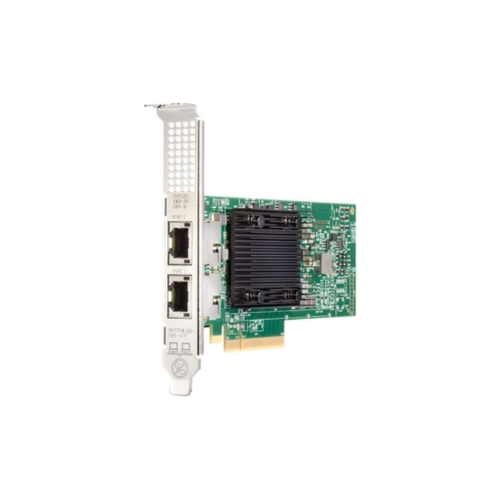

HPE Ethernet 10Gb 2-port 535T Adapter
Key Features
Brand: HPE
Wired
>
PCI Express Ethernet
>
10 Gigabit Ethernet 10 Mbit/s
>
Internal Component for: Server Chipset: Broadcom BCM57416
1 Year Warranty
HPE Ethernet 10Gb 2-Port 535T Adapter Review: High-Velocity Networking
The HPE Ethernet 10Gb 2-Port 535T Adapter delivers ultra-high-speed network connectivity, reduced line latency, and enhanced hardware virtualization efficiency. Engineered specifically for enterprise ProLiant infrastructure, this stand-up PCI Express network adapter modernizes corporate server clusters by implementing standard 10GBASE-T copper pipelines to accelerate large packet routing across high-availability datacenters.
Executive Overview and Premium Design Philosophy
The HPE 535T adapter represents an elite standard in high-density network fabric transformation for corporate computing environments. It transitions server nodes away from legacy, congested 1Gb Ethernet links into a scalable, high-bandwidth 10Gb network layer. Designed for direct deployment in high-frequency database arrays, dense virtualization hypervisor nodes, and corporate private clouds, this premium component protects core business communications against traffic bottlenecks.
Engineered for Elite Professional Workflows
Modern virtualization infrastructures, high-volume storage arrays, and real-time transaction processing networks require robust, non-blocking data pathways. This adapter satisfies this requirement by integrating a high-performance Broadcom BCM57416 controller across two independent RJ45 copper ports. IT administrators can execute intense parallel user requests and transfer massive daily data backups simultaneously without experiencing network lag or packet drops, sustaining maximum platform efficiency.
Structural Integrity and Advanced Thermal Management
Constructed on a high-grade low-profile printed circuit board with an integrated passive cooling heatsink, this adapter installs smoothly into standard server slots. Unlike desktop network cards that risk overheating under non-stop enterprise transfers, the 535T features a low-power architectural framework that optimizes internal chassis cooling paths. This industrial design manages airflow channels efficiently, keeping your central equipment closet running coolly and cleanly.
Key Technical Specifications
-
- Product Type: PCI Express Dual Port 10 Gigabit Network Interface Adapter Card
- Central Controller Chipset: Broadcom BCM57416 enterprise network processor
- Primary Port Interface Layout: 2 RJ45 copper ports running at 1Gb, 2.5Gb, 5Gb, and 10Gb per second
- Bus Interface Type: PCI Express 3.0 running at an x8 data pathway width
- Combined Maximum Throughput: Up to 40 Gigabits per second full-duplex combined bandwidth
- Wiring Interface Compatibility: Standard Category 6A or better twisted-pair copper cabling (Cat6 supported up to 55 meters)
- Compatible HPE Kit Configurations: 813661-B21, 813659-001, and 851167-001
- Virtualization Acceleration Protocols: Single Root I/O Virtualization (SR-IOV) and Tunnel Offloading (VxLAN/NVGRE
Top Benefits of the HPE 535T 10Gb Adapter
Simplified 10GBASE-T Copper Line Migration
The adapter utilizes standard RJ45 copper port connectors, allowing it to interface directly with existing Category 6A corporate network lines. This structural design choice eliminates the high infrastructure cost of deploying specialized optical transceivers or custom direct-attach SFP+ cabling systems, simplifying datacenter infrastructure scaling.
Advanced Hardware Offload Engine Processing
Built around advanced offloading microchips, the adapter processes heavy networking tasks—such as TCP/IP checksum calculations, Large Send Offload (LSO), and Receive Side Scaling (RSS)—independently on the card. Offloading these packet management tasks away from the main server CPUs lowers system processing lag and frees up primary resources to run application engines.
SR-IOV Virtualization Path Acceleration
Featuring hardware-level Single Root I/O Virtualization (SR-IOV) support, the card permits the physical network channels to split into multiple virtual functions cleanly. Bypassing the primary hypervisor software translation layer paths data packets directly to individual virtual machines, minimizing host processor clock cycle utilization and drastically lowering platform signal latency.
Secure Tunneling Offloads for Cloud Architectures
The adapter features dedicated internal acceleration logic for processing virtualized overlay network protocols like VxLAN and NVGRE. It compresses and handles tunneled frame headers directly at the hardware layer, enabling flexible, software-defined multi-tenant multi-cloud networking without triggering the severe throughput penalties common on older interface cards.
Network Connection Port Allocation Matrix
| Interface Connection Style | Available Port Count | Interface Speed Profiles | Primary Hardware Purpose |
|---|---|---|---|
| Stand-up RJ45 Copper | 2 Ports | 1Gb / 10Gb Auto-Negotiation | Connecting Core Hypervisors, High-Speed Core Switches, and Storage Nodes |
| Combined Network Pool | 1 Virtual Team | 20000 Megabits Per Second | Aggregating Line Pipelines to Clear Congestion for Dense Client Connections |
Step-by-Step Initial Deployment and Mounting Instructions
-
- Power Down System Safely: Shut down the server operating system completely, disconnect all active rear AC power cords, and slide the server forward.
- Mount the Physical Bracket: Select the low-profile or full-height metallic bracket matching your expansion slot size and screw it tightly onto the card.
- Install Card Into Mainboard: Insert the adapter card firmly into an open x8 or larger PCI Express expansion slot path on your server motherboard layout.
- Connect Copper Network Lines: Insert your Category 6A data wires straight into the external ports, checking for a firm mechanical click lock.
- Verify Hardware Detection: Boot your operating system, log into the HPE Integrated Lights-Out dashboard, and check the network manager directory map to confirm full hardware registration.
Frequently Asked Questions
Can this 10Gb network adapter connect to older 1Gb switches?
Yes. The 535T adapter features backward-compatible auto-negotiation circuitry. It can step down its line communication speed dynamically to connect with standard legacy 1Gb copper network switches, allowing you to deploy the server card immediately and upgrade your core switch architecture later
What happens if I use standard Category 6 cabling instead of Category 6A?
Standard Category 6 cables can carry 10Gb network traffic, but their maximum reliable run distance is restricted to approximately 37 to 55 meters depending on nearby electrical interference. For long corporate datacenter runs up to the full 100-meter limit, you must deploy Category 6A or better shielded cabling to maintain link stability.
Does this adapter card support standard network teaming or bonding?
Yes. This adapter fully supports standard link aggregation control protocols (LACP) and advanced server network teaming routines out of the box. Technicians can pool both physical lines into a single virtual highway to maximize throughput, or configure active-backup failover pathways that preserve user application streams if a line or network switch port unexpectedly fails.