Power Banks


 Brother Printers


 IP PBXs



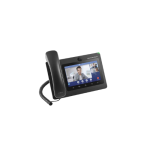
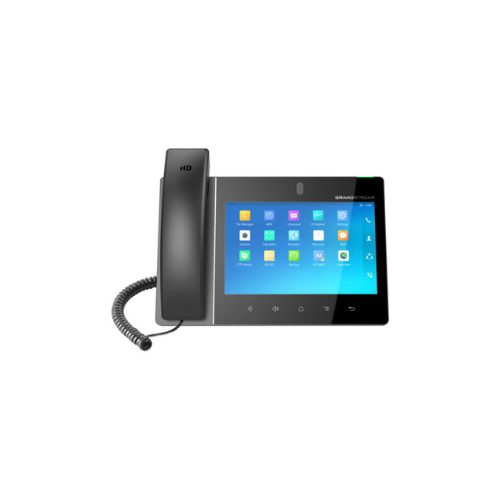

Grandstream GXV3380 IP Video Phone
Key Features
Brand: Grandstream
Android Version 7.X
Built-in 2 megapixel camera for video calling with privacy shutter
Integrated dualband Wi-Fi (2.4GHz & 5GHz)
Colour IPS LCD with TP
7-way HD audio conferencing and 3-way 1080p 30fps HD video capability
Built-in Wi-Fi, Bluetooth
1x HDMI output, 1x HDMI input
Sharing wireless technology Miracast
16 SIP accounts / lines
Built-in PoE/PoE+
HAC, security developed by Kensington
1 Year Warranty
Grandstream GXV3380 IP Video Phone Review and Technical Overview
The Grandstream GXV3380 is a high-end Android IP video phone engineered for executive offices, boardroom video conferencing, and desktop unified communications. Combining an advanced smart tablet interface with a professional multi-line desk phone, this flagship device integrates a high-definition capacitive touchscreen, an adjustable megapixel camera, and extensive physical connection hubs. This comprehensive guide covers key product features, hardware specifications, and system installation steps.
Premium Design and Key Features
Premium Touchscreen and Android Operating System
The phone features a massive 8.0 inch capacitive multi-touch display screen with a crisp 1280 by 800 pixel resolution. Running an open Android platform, the desktop station gives users direct access to the Google Play Store and corporate workflow applications. The Grandstream interface supports smooth scrolling, complex window layout configurations, and rapid swipe-to-navigate command inputs
Flagship Video Collaboration and Privacy Guard
An integrated 2-megapixel camera sits at the apex of the screen bezel frame to enable real-time video conferencing. The camera assembly decodes up to 1080P high-definition video at thirty frames per second, ensuring clear face-to-face visual tracking. A physical tilt wheel allows users to align the camera angle, while a built-in privacy shutter mechanically covers the lens when not in use.
Powerful Multi Network Integration and Core Hub
The Grandstream phone operates as an advanced communications node, supporting up to sixteen lines and sixteen distinct Session Initiation Protocol accounts. It includes built-in dual-band Wi-Fi to create clean desktop setups without long physical network drops. Integrated Bluetooth hardware allows for rapid data syncing with corporate headsets, expansion keypads, and personal mobile smartphones.
Industry Grade Audio Shielding and Infrastructure
Both the ergonomic handset and the full-duplex speakerphone leverage advanced wideband audio processing for realistic vocal tone. The internal circuitry uses dual-microphone array technology with advanced echo cancellation and noise shield algorithms. These filters isolate the speaker voice while suppressing distracting ambient room noise and keyboard typing clicks.
Technical Specifications
Operating System: Android Operating System Architecture
Primary Display: 8.0 Inch Ten Point Touch Capacitive Screen
Camera Hardware: Integrated 2 Megapixel Sensor with Privacy Shutter
Line Capacity: Supports up to 16 Session Initiation Protocol Accounts
Wireless Modules: Integrated Dual Band Wi-Fi and Bluetooth 4.2
Network Interfaces: Dual Switched Auto Sensing Gigabit Ethernet Ports
Power Hardware: Integrated Power over Ethernet Plus Support
Physical Interfaces: HDMI Output, HDMI Input, Two USB Ports, Micro SD Slot
Security Engine: Secure Boot, Random Passwords, Dual Image Firmware
Primary Display: 8.0 Inch Ten Point Touch Capacitive Screen
Camera Hardware: Integrated 2 Megapixel Sensor with Privacy Shutter
Line Capacity: Supports up to 16 Session Initiation Protocol Accounts
Wireless Modules: Integrated Dual Band Wi-Fi and Bluetooth 4.2
Network Interfaces: Dual Switched Auto Sensing Gigabit Ethernet Ports
Power Hardware: Integrated Power over Ethernet Plus Support
Physical Interfaces: HDMI Output, HDMI Input, Two USB Ports, Micro SD Slot
Security Engine: Secure Boot, Random Passwords, Dual Image Firmware
Step-by-Step Installation Guide
Hardware Assembly and Placement
-
- Match the structural phone stand with the connection slots on the underside of the phone body.
- Snap the stand legs inward, choosing either the steep or flat angle slot position to control screen glare.
- Plug the long straight end of the coiled handset cord into the phone jack marked with a handset emblem.
- Insert the opposite end of the coiled cord deep into the base socket of the handset handle piece.
Power and Network Initialization
Method A: Wired Network with Power over Ethernet Plus
-
- Connect a standard Ethernet network cable from an active office wall jack to the LAN port on the phone back.
- The phone hardware will draw operating electrical power directly from the data cable if your network utilizes a Power over Ethernet Plus switch.
- The display screen will light up and begin loading the Android operating system core files immediately.
- Pass your local wired network signal through to a desktop computer terminal by linking a second Ethernet cable from the phone PC port to your computer tower.