Brother Printers
 WhiteBoard
 IP PBXs





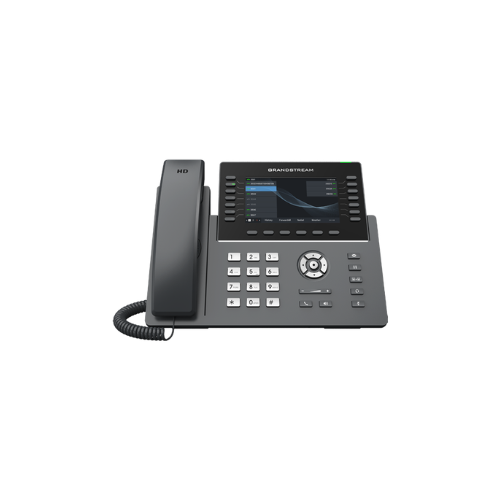

Grandstream GRP2650 IP Phone
Key Features
Brand: Grandstream
14 lines, 6 SIP accounts
Supported by GDMS which provides a centralized interface to configure, provision, manage and monitor Grandstream devices
RJ9 headset jack allowing EHS with Plantronics headsets, and integrated USB Headset support
Full-duplex speakerphone with HD audio to maximize audio quality and clarity
Equipped with noise shield technology to minimize background noise
Dual switched autosensing 10/100/1000 Mbps Gigabit Ethernet ports with integrated PoE
Supports 5-way audio conferencing for easy conference calls
Enterprise-level security protection including secure boot, dual firmware images, and encrypted data storage
Swappable faceplate to allow for easy logo customization
Integrated dual-band Wi-Fi 802.11 a/b/g/n/ac (2.4Ghz & 5Ghz)
1 Year Warranty
Grandstream GRP2650 IP Phone Review and Technical Overview
Line Keys: 14 Physical Keys with up to 56 Programmable Keys
SIP Accounts: 5 Session Initiation Protocol Accounts
Wireless Modules: Integrated Dual Band Wi-Fi and Bluetooth 5.0
Network Interfaces: Dual Switched Auto Sensing 10/100/1000 Mbps Gigabit Ports
Power Hardware: Integrated Power over Ethernet Support
Audio Quality: Full HD Wideband Audio with Noise Shield Technology
Chassis Design: Dynamic Context Sensitive Soft Keys Panel Layout
Management Suite: Grandstream Device Management System Cloud Provisioning
- Match the physical phone stand with the connection slots on the underside of the phone body.
- Snap the stand legs in, selecting either the steep or flat angle slot position to control screen tilt.
- Plug the long straight end of the coiled handset cord into the phone jack marked with a handset emblem.
- Insert the opposite end of the coiled cord deep into the base socket of the handset piece.
- Connect a standard Ethernet network cable from an active office wall jack to the LAN port on the phone back.
- The phone hardware will draw electrical operating power straight through the data cable if your network utilizes a Power over Ethernet switch.
- The display screen will light up and begin loading the operational system automatically.
- Pass your local wired network signal through to a desktop computer terminal by linking a second Ethernet cable from the phone PC port to your computer towe