Brother Printers
 WhiteBoard
 IP PBXs





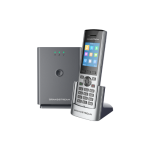
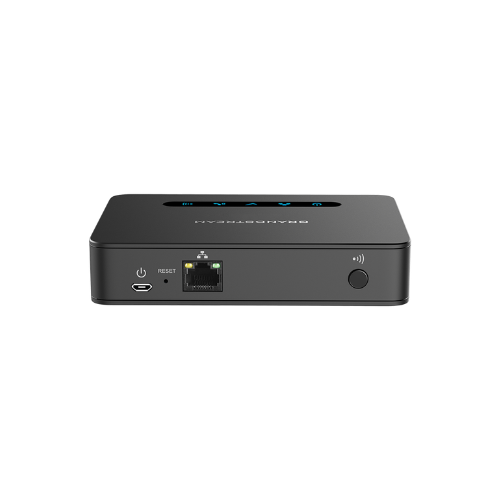
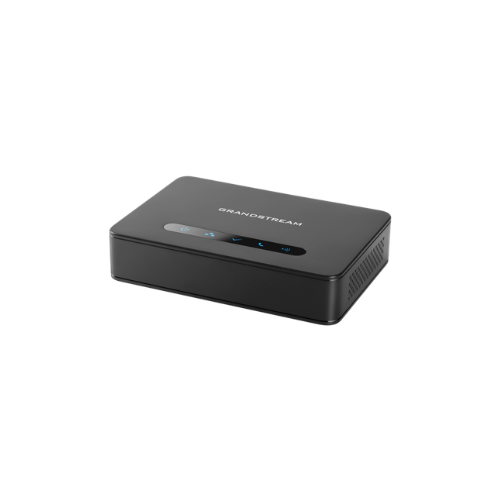

Grandstream DP760 (DECT Repeater)
Key Features
Brand:Grandstream
Up to 2 concurrent HD calls
Extends an additional range of 300 meters outdoors and 50 meters indoors for added mobility
Automatic or manual association to DP Series base stations for easy use
Supports Plug-n-Play features like auto association, auto region detection and seamless call handover
Automated provisioning options include XML config files
Ethernet connection provides PoE features
1 Year Warranty
Grandstream DP760 DECT Repeater: Ultimate High-Speed Professional Guide
The Grandstream DP760 DECT Repeater is a powerhouse in the professional enterprise telecommunications, hospitality, and large-scale warehouse market. This high-performance hardware signal extender eliminates physical range restrictions and wireless dead zones while delivering crisp, clean audio for corporate communication systems, logistics facilities, and administrative tracking setups . It serves as a reliable, heavy-duty solution designed to streamline digital communication data, multi-floor voice tracking, and high-frequency call pipelines for organizations of all sizes. By utilizing advanced enterprise-grade radio frequency engineering, this flexible machine helps companies boost daily productivity, reduce dropped call downtime, and maintain a highly integrated workspace. Modern workplaces rely on this hardware to eliminate signal communication bottlenecks and automate wireless range extension tasks. Its robust build quality ensures it handles high-volume communication cycles without dropping signals or experiencing performance drops. Businesses looking to scale their wireless communication infrastructure find this device to be an indispensable asset for daily processing production.
This Grandstream comprehensive guide covers everything you need to optimize this device for your business workflow.
Key Technical Specifications
Understanding the hardware capabilities helps you maximize your investment. The device balances expansive radio network coverage with intelligent power systems.
- Network Extension : Extends radio range up to 300 meters outdoors and 50 meters indoors
- Call Capacity : Supports up to 2 simultaneous high-definition voice calls per repeater unit
- Power Architecture : Integrated Power over Ethernet capability alongside a standard micro-USB power slot
- Radio Protocol : Automated association and seamless roaming features paired with secure DECT encryption
- Status Diagnostics : Five multi-color light-emitting diode indicators for real-time hardware tracking
- Compatibility Link : Dedicated pairing architecture for the Grandstream DP750, DP752, and DP755 base stations
Top Features and Business Benefits
Expanded Radio Network Range
The advanced Grandstream wireless repeating technology means you never experience weak signal degradation or audio dropouts at the edge of your facility. It translates digital radio frequencies and processes voice packets at lightning speeds, keeping your communication or warehouse pipeline moving without delays.
Seamless Voice Call Roaming
The Grandstream built-in intelligent handover configurations allow users to move freely between base stations and repeaters. You can complete mobile facility walk-throughs comfortably without being tethered to a single room or experiencing abrupt call disconnections when crossing physical zones.
Flexible Power over Ethernet Layout
Integrate the machine seamlessly into any structural architecture without requiring close proximity to standard electrical sockets. The integrated hardware supports raw data and power delivery through a single network cable, simplifying remote overhead wall and ceiling mounting setups.
Automated Association Setup
Using specific automated registration pathways, the hardware pairs directly to host systems without manual programming scripts. This is ideal for highlighting critical infrastructure efficiency, scaling wide-area networks quickly, and reducing technical deployment labor hours.
Simple Step-by-Step Setup Guide
Follow these steps to get your professional wireless DECT repeater running quickly.
Step 1: Unpack and Choose Placement
Remove all protective packaging wraps and bracket tapes from the device chassis. Choose a clean installation location that sits safely within the strong wireless coverage footprint of your primary host base station.
Step 2: Establish a Power Connection
Plug a Power over Ethernet network cable into the rear LAN interface, or connect the alternative micro-USB power brick to turn on the internal system board. Verify that the power indicator light activates securely.
Step 3: Initialize the Pairing Handshake
Access the web management dashboard of your host DECT base station and open the repeater pairing window. Press and hold the physical association button on the back of the repeater until the status indicator light flashes rapidly.
Step 4: Verify Device Recognition Status
Wait for the status indicator light array to turn solid green. Run a wireless voice call test on your paired mobile handset while walking deep into the newly extended radio zone to complete the system deployment verification.
Effective Troubleshooting and Maintenance
Keep your machine operating at peak performance with basic maintenance habits.
Resolving Device Pairing Jams
Turn off the power or cycle the network line immediately if your host base station fails to register the repeater connection. Move the repeater closer to the base station temporarily to clear frozen system driver blocks and establish the initial cryptographic handshake.
Fixing Handset Audio Cutout Drops
If your mobile handsets fail to transition smoothly between coverage areas, inspect your deployment layout. Ensure that your repeater maintains at least a 30 percent signal overlap with the base station footprint to prevent localized radio frequency dropouts.
Cleaning the Hardware Case
Poor physical cleanliness, heavy dust accumulation, or ventilation smudges indicate a dirty chassis shell. Disconnect the power line completely and wipe the smooth plastic surfaces gently using a dry microfiber cloth without applying abrasive chemical solvents or water.