Brother Printers
 WhiteBoard
 IP PBXs





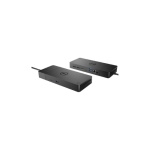
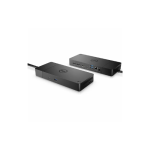
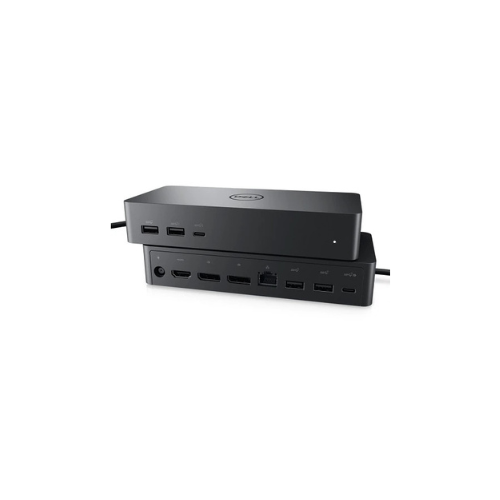

Dell Universal Dock UD22 USB-C Docking Station
Key Features
Brand: Dell
Connectivity: USB-C
Display Support: Up to 4x 4K @ 60Hz or 1x 5K @ 60Hz
Power Delivery: Up to 96W
Ports:
2 x DisplayPort 1.4
1 x HDMI 2.0
4 x USB-A 3.2 Gen 2
2 x USB-C 3.2 Gen 2
1 x Gigabit Ethernet (RJ-45)
1 x USB-C with DisplayPort support
Security: Kensington Nano Security Slot
Compatibility: Windows 10/11, macOS 12.21+, Ubuntu 20.04+, Chrome OS 100+
1 Year Warranty
Ultimate Guide to the Dell Universal Dock UD22 USB-C Docking Station
The Dell Universal Dock UD22 is a commercial-grade, multi-platform USB-C docking station designed for hybrid corporate environments and hot-desking workspaces . This premium connectivity hub integrates seamlessly with any laptop, regardless of the manufacturer or operating system. It delivers consistent power, high-speed data networking, and expansive video layouts to transform your portable computer into an efficient multi-monitor desktop workstation.
Why Choose the Dell Universal Dock UD22?
Modern businesses frequently deploy mixed-device fleets containing hardware from multiple different technology brands. Standard proprietary docking stations often cause compatibility failures, display issues, or restricted charging performance when paired with alternative brands. The UD22 resolves these common office challenges completely by using a universal chipset layout.
A single heavy-duty USB-C cable links your laptop to all desktop peripherals, network lines, and multiple displays instantly. By standardizing office setups with this universal hardware, IT departments reduce deployment complexity, simplify technical support troubleshooting, and optimize desk space utilization across the organization.
Technical Specifications and Performance Features
Universal Charging Capabilities
The unit ships with a high-output 130W external power adapter. Through standard USB Power Delivery protocols, the dock safely passes up to 96W of continuous, regulated energy directly to your connected laptop. This provides ample charging power for both thin-and-light business notebooks and intensive corporate workstations.
Advanced Four Display Support
Powered by an integrated DisplayLink controller chipset, the UD22 overcomes the display output limitations found on many entry-level laptops. The hardware layout features multiple digital video outputs, enabling professionals to drive up to four independent 4K monitors simultaneously at a smooth 60Hz refresh rate.
Complete Port Architecture Breakdown
- Front Ports: One high-speed USB-C data port and one standard USB-A charging port featuring integrated PowerShare technology to juice mobile devices.
- Rear Video Outputs: Two standard DisplayPort connections and two HDMI ports to allow flexible monitor wiring configurations without adapters.
- Rear Network and Accessory Ports: Two standard USB-A data slots, a dedicated Gigabit Ethernet RJ45 jack for secure wired internet, and the main power input.
Strategic Business and IT Benefits
- Cross Platform Integration : Functions flawlessly across diverse operating systems including Microsoft Windows, Apple macOS, Google ChromeOS, and Linux distributions.
- DisplayLink Driver Technology : Ensures multi-monitor functionality even on laptops that naturally support only a single external screen, such as standard base-tier Apple M-series chips.
- Corporate Device Management : Facilitates remote enterprise hardware deployment with built-in support for PXE Boot, Wake-on-LAN, and pass-through functionality for corporate MAC addresses.
Frequently Asked Questions
Do I need to install software drivers to use the Dell UD22?
Yes, because the dock uses DisplayLink technology to manage multiple video streams, you must install the official DisplayLink manager drivers on your operating system to enable all video output ports.
Can the Dell UD22 charge non Dell laptops?
Yes, the hardware utilizes standard open-source USB Power Delivery protocols to deliver up to 96W of power safely to compatible systems built by HP, Lenovo, Apple, and other manufacturers.
What is the difference between the Dell WD19S and the UD22?
The WD19S series relies on native USB-C Alt-Mode video transmission and is primarily optimized for Dell ecosystems. The UD22 uses DisplayLink compression technology to offer true universal compatibility and support for up to four 4K displays across all laptop brands.
Will the UD22 function if plugged into a Thunderbolt port?
Yes, the hardware is backward-compatible with Thunderbolt 3 and Thunderbolt 4 computer ports, operating smoothly at standard high-speed USB-C performance specifications.