Brother Printers
 WhiteBoard
 IP PBXs





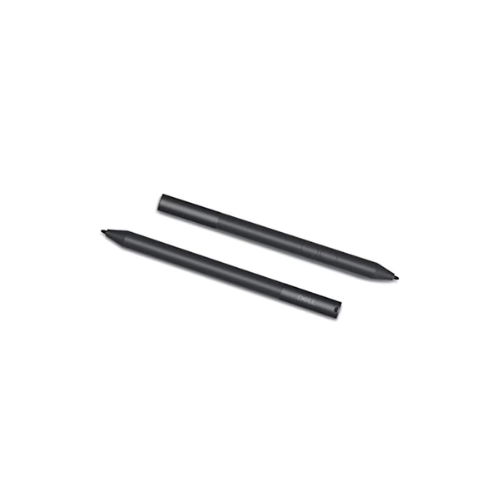

Dell PN350M Active Pen – Wireless Connectivity, Magnetic Snap, Pressure sensitivity
Key Features
Brand: Dell
Connectivity: Wireless
Features: Magnetic Snap, Pressure sensitivity
Stylus Type: Active
Height: 5.4″
Compatible Devices Tablets
Item Dimensions LxWxH 17.2 x 5.8 x 2 inches
1 Year Warranty
Dell PN350M Active Pen: Professional Precision for Inspiron 2-in-1 Laptops
The Dell PN350M Active Pen delivers a natural, paper-like writing and drawing experience for compatible Dell Inspiron convertible laptops . Engineered with advanced Microsoft Pen Protocol technology, this stylus provides smooth digital inking, precise palm rejection, and immediate system responsiveness. Choosing this professional enterprise active stylus allows mobile professionals, students, and creators to maximize productivity across spreadsheets, digital signatures, and design software.
Key Specifications and Features
- Wireless Protocol: Microsoft Pen Protocol (MPP 1.51)
- Pressure Sensitivity: 1024 distinct levels of pressure tracking
- Hardware Controls: Two configurable barrel side buttons (Eraser and Right-Click functionality)
- Battery Configuration: Powered by a single replaceable AAAA alkaline battery
- Battery Lifespan: Up to 18 months of typical daily workspace usage
- Tethering Option: Integrated magnetic attachment strip and structural lanyard hole
- Chassis Material: Premium anodized aluminum barrel construction
Enterprise Benefits of the Dell PN350M Pen
Flawless Microsoft Pen Protocol Integration
The native integration with MPP technology guarantees zero configuration pairing hurdles. The pen communicates instantly with the laptop digitizer display right out of the box, avoiding complex Bluetooth syncing sequences or wireless dropouts during critical presentations.
Smart Palm Rejection Infrastructure
The advanced hardware digitizer prioritizes the pen tip signal the moment it detects the stylus near the glass surface. This allows users to rest their hands naturally on the touchscreen while sketching, taking notes, or annotating PDFs, preventing accidental touch inputs.
Custom Workflow Acceleration Controls
Equipped with two tactile side barrel buttons, the pen allows workers to streamline digital tasks. Users can instantly trigger right-click menus or toggle eraser functions without moving the stylus tip away from their active document view.
Extended Low-Maintenance Lifespa
The ultra-low power consumption matrix yields an exceptional battery lifecycle of up to 18 months. This long operational window minimizes IT maintenance overhead and reduces supply expenses for replacement consumables in high-volume deployments.
Target Industries and Use Cases
Field Sales and Executive Document Signing
Account managers and corporate executives deploy the active pen to capture legally binding client signatures, review contracts, and fill out interactive digital forms directly on the sales floor.
Education and Interactive Remote Learning
Students and academic researchers utilize the precision stylus to take handwritten lecture notes, sketch complex chemical diagrams, highlight research papers, and solve mathematical formulas naturally
Creative Design and Corporate Brainstorming
Marketing teams and product designers leverage the 1024 pressure levels to create project wireframes, storyboard marketing concepts, adjust design elements, and lead whiteboarding sessions.
Hardware Synchronization and Maintenance Setup
- Battery Installation: Unscrew the top cap of the aluminum barrel counter-clockwise, insert the AAAA battery with the positive terminal facing downward, and screw the cap back on tightly.
- Instant Activation: Bring the tip within five millimeters of your compatible touchscreen display; the laptop internal digitizer will automatically activate and trace the pen cursor.
- Button Customization: Open the standard Windows Pen and Ink settings panel on your Dell laptop to remap the barrel button short-cut commands according to your daily application workflow.
Frequently Asked Questions
Which Dell laptop models are compatible with the PN350M pen?
The PN350M is explicitly engineered for select Inspiron 2-in-1 series laptops that feature active digitizer screens, such as the Inspiron 5400, 5406, 5410, 7300, 7405, 7415, and 7506. It does not support standard non-touch or passive touch displays
Does this active pen require a Bluetooth connection to function?
No. The pen relies purely on Microsoft Pen Protocol magnetic induction technology. It works immediately upon screen contact, requiring no wireless pairing steps or active Bluetooth radios.
Can the pen tip be replaced if it wears down over time?
Yes. If the stylus tip becomes blunt or scratched due to friction, it can be pulled straight out of the barrel tip using a standard tip removal tool or tweezers and swapped with a fresh replacement tip.
What should I do if the laptop stops tracking the stylus input?
The most common cause of tracking loss is a depleted battery. Unscrew the top cap, replace the AAAA cell with a fresh alkaline battery, ensure the contact springs are clean, and retest on the glass.
Is there a built-in method to attach the pen to my laptop?
Yes. The pen features an internal magnetic strip that allows it to snap securely onto the side of supported Inspiron chassis frames, alongside an integrated loop hole for attaching safety lanyards