Power Banks


 Brother Printers


 IP PBXs



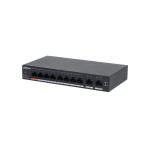
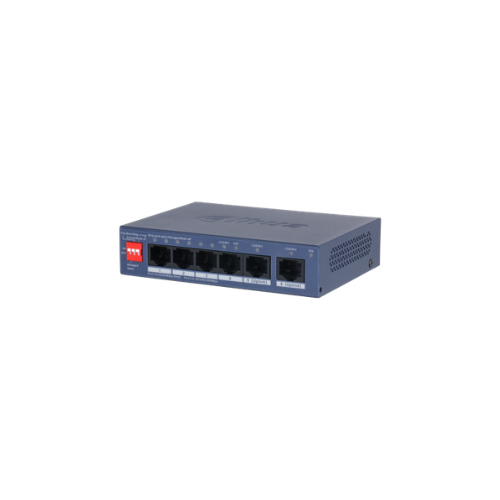

Dahua CS4006-4ET2GT-36 6-Port Cloud Managed Desktop Switch with 4-Port PoE
Key Features
Brand: Dahua
4 RJ-45 10/100 Mbps PoE ports, 2 x RJ-45 Gigabit ports.
36 W total PoE budget, 802.3af/at on all PoE ports.
DIP switch to fast turn on/off working mode of Cloud-Managed, PoE Watchdog, Long Distance PoE.
Wide operating temperature ranging from 10 C to 55 C. Supports VLAN and loop protection.
WEB-managed and centralized cloud management through the DoLynk App and performs real-time monitoring of the network.
Easy config to auto detect and set up network and security systems.
1 Year Warranty
Dahua CS4006-4ET2GT-36 6-Port Cloud Managed PoE Switch Technical Guide
The Dahua CS4006-4ET2GT-36 is a commercial-grade, cloud-managed desktop switch engineered specifically for IP security surveillance, small home offices, and smart automation networks. Combining robust Power over Ethernet capability, high-speed Gigabit uplink infrastructure, and intelligent cloud remote monitoring, this compact unit streamlines deployment and management for network engineers and system integrators. This comprehensive guide covers key product features, core technical specifications, and system installation steps.
The Dahua CS4006-4ET2GT-36 operates as a highly resilient power and data distribution node optimized for real-time video streaming, terminal power routing, and localized data switching. Utilizing advanced high-performance hardware, the switch eliminates packet dropping during peak surveillance loads, provides automated power cycling for frozen IP cameras, and offers robust lightning protection. It features full synchronization with the Dahua DoSecurity mobile app for remote network diagnostic management. For a comprehensive overview, technical performance specifications, and troubleshooting steps, review the full guide below.
Premium Design and Key Features
Intelligent DoSecurity Cloud Remote Management
The switch incorporates native cloud connectivity that hooks directly into the Dahua DoSecurity platform. Network administrators can download the mobile application or log in via a web browser to monitor active port speeds, view real-time PoE power consumption metrics, receive instant alerts for dropped links, and execute remote port reboots to restart unresponsive terminal equipment from anywhere.
Specialized 250 Meter Long Distance PoE Transmission
Equipped with an advanced Long Distance mode toggle switch, the device can extend its maximum signal reach far beyond standard network boundaries. When activated on a specific port, the switch throttles speed to a stable 10 Mbps while boosting voltage delivery, allowing installers to run a continuous Ethernet line up to 250 meters (820 feet) straight to a distant outdoor security camera without adding inline signal repeaters.
Red Port Hi-PoE Power Allocation and Watchdog
The primary power interface (Port ) is highlighted in red to designate high-power support. This port can deliver up to 30W of power independently, making it suitable for demanding enterprise devices like multi-axis pan-tilt-zoom (PTZ) cameras or dual-band wireless access points. This is backed by a built-in Intelligent PoE Watchdog script that continuously pings attached nodes; if a camera stops responding, the switch automatically cuts and restores power to that single port to force a hard hardware reboot.
Enterprise-Grade 6kV Surge and Static Shielding
Built to withstand challenging environments, the heavy-duty metal chassis features robust electrical insulation circuitry. The internal grounding rails are engineered to deflect high-voltage static discharges and lightning surges up to 6,000 volts (6kV) away from the sensitive data processors, preventing damage to the switch or connected terminal devices.
Technical Specifications
-
- Port Arrangement: 4 x 10/100 Mbps PoE Ports, 2 x 10/100/1000 Mbps RJ-45 Gigabit Uplink Ports
- Power over Ethernet Allocation: Ports 1-4 support IEEE 802.3af (PoE) and IEEE 802.3at (PoE+) standard compliance
- Total Energy Pool Budget: 36 Watts maximum simultaneous power consumption across all PoE ports
- Individual Port Power Output: Port 1 (Red) up to 30W, Ports 2-4 up to 30W (Subject to total 36W structural ceiling)
- Switching Architecture Fabric: 3.2 Gbps total internal bidirectional throughput path
- Packet Forwarding Rate: 1.19 Million Packets Per Second (Mpps) processing capability
- MAC Address Memory Capacity: 2K entries with automated learning and age-out cycle scripts
- Lightning Surge Ingress Protection: 6kV Common Mode / 4kV Differential Mode absolute shield rating
- Power Input Hardware: External 48V to 57V Direct Current (DC) power brick adapter assembly included
- Chassis Engineering Profile: Fanless silent desktop form factor encased in a durable ruggedized steel body
Step-by-Step Initial Setup Guide
Physical Placement and Hardware Interconnection
-
- Position the desktop switch onto a flat, stable table surface or mount it securely to an electrical backboard using the underside slots.
- Ensure at least 2 inches of open airspace clearance around the side ventilation slats to allow passive cooling.
- Connect an industrial-grade grounding copper wire from your building’s primary earth terminal to the brass screw marked with a ground icon on the rear panel.
- Plug an Ethernet line from your localized network router or core internet modem into Uplink Port 5 or 6.
- Insert your terminal IP security cameras or VoIP workplace desk phones into PoE Ports 1 through 4 using standard Cat5e or Cat6 cables.
- Plug the round barrel end of the included DC power adapter into the back input socket, and connect the main brick cord to a standard wall socket.