Brother Printers
 WhiteBoard
 IP PBXs





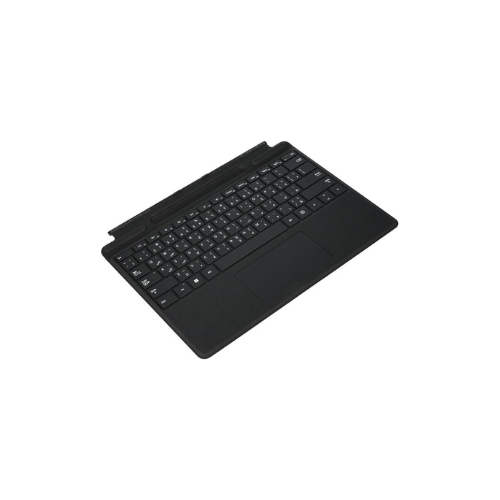

Microsoft Surface Pro keyboard 8/9/X/XI pen holder,Backlit,Black-8XA -00182
Key Features
Brand: Microsoft
Model: 8XA-00182
Product Type: Detachable Surface Pro keyboard with pen holder
Design: Slim premium keyboard with integrated pen storage slot
Connectivity and Compatibility: Magnetic Surface connector, compatible with Surface Pro 8, Surface Pro 9, Surface Pro X, and newer supported Surface Pro models
Backlighting: Yes, adjustable backlit keys
Touchpad: Precision multi-gesture glass touchpad
Material: Premium lightweight composite build
Color: Black
Ideal For: Productivity, office work, note-taking, travel, and Surface laptop conversion
1 Year Warranty
Optimize Your Workflow with the Microsoft Surface Pro Keyboard
The Microsoft Surface Pro Keyboard with pen holder is the essential accessory for professionals who demand high performance and mobility. Engineered for the 13-inch architecture of the Surface Pro 8, 9, X, and the latest 11th Edition (XI) , this keyboard transforms your tablet into a fully functional laptop without sacrificing the sleek profile of your mobile office.
Universal Compatibility and Versatile Design
Choosing the right accessory is critical for seamless hardware integration. This premium keyboard is specifically optimized for the newer generation of 13-inch Surface devices, including:
- Surface Pro 11th Edition (XI)
- Surface Pro 10 for Business
- Surface Pro 9 and Surface Pro 8
- Surface Pro X
Its ultra-slim and light design makes it travel-ready, slipping easily into any bag while protecting your screen during transit.
Integrated Storage and Power for Creativity
The innovative top section of the keyboard features a secure, built-in storage tray that cradles the Surface Slim Pen 2 . This dedicated holder does more than just store your stylus; it provides wireless induction charging, ensuring your creative tools are always powered for sketching, note-taking, or digital signatures. When the keyboard is closed, the pen remains completely hidden and protected against the screen.
Tactile Performance and Professional Navigation
Experience a desktop-class typing experience with a full mechanical keyset designed for speed and fluid movement.
- Adjustable Backlighting: Mechanical keys feature adjustable brightness levels, allowing for comfortable work in dim lecture halls or late-night office environments.
- Precision Navigation: A large glass trackpad supports multi-touch gestures and 12 intuitive movements for fluid scrolling and precise control.
- Premium Materials: Wrapped in durable Alcantara material, the keyboard offers a soft, sophisticated feel that resists stains and is easy to clean with mild soap and water.
Frequently Asked Questions
- Which Surface models work with this keyboard?
It is compatible with the Surface Pro 11th Edition (2024), Surface Pro 10 (2024), Pro 9, Pro 8, and Pro X. It is not compatible with the Pro 7 or earlier models due to different connector configurations. - How does the pen holder charge my stylus?
The integrated tray uses induction to charge the Surface Slim Pen 2 wirelessly while it is stored. If the pen is not charging, ensure it is aligned correctly and check the Surface app for any required firmware updates. - Can the keyboard be used while detached?
Standard Signature Keyboards require a physical magnetic connection to function. However, the Surface Pro Flex Keyboard variant supports both attached and detached use, remaining connected via Bluetooth up to 33 feet away. - How do I clean the Alcantara material?
Wipe the surface with a lint-free cloth dampened with a mild soap and water solution. For best results, clean the material once a week to prevent build-up.