Brother Printers
 WhiteBoard
 IP PBXs





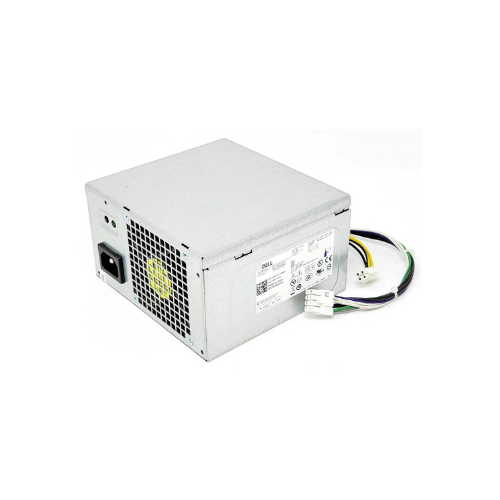
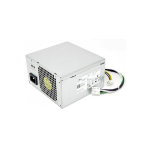

Dell Optiplex 3020 7020 9020 290W Replacement Power Supply Unit (0RVTHD)
Key Features
Brand: Dell
Part Number: 0RVTHD (also H290AM-00, L290AM-00, etc.)
Brand: Dell
Wattage: 290W Max Output
Compatibility:
Optiplex 3020 MT
Optiplex 7020 MT
Optiplex 9020 MT
Precision T1700 MT
Dell PowerEdge T20 Tower
1 Year Warranty
Dell OptiPlex 3020 7020 9020 290W Power Supply Unit Review: OEM Replacement
The Dell OptiPlex 290W Power Supply Unit delivers stable, energy-efficient operational power engineered specifically for standard desktop hardware configurations. This original equipment manufacturer replacement part restores system stability. It provides clean electrical voltage to protect internal components against unexpected power surges
Executive Overview and Premium Design Philosophy
The Dell 290W power supply represents a core standard in desktop hardware reliability for commercial computing infrastructure. It transitions organizations from generic, unreliable aftermarket power solutions to a tested corporate ecosystem. Designed for deployment in high-density office layouts, government service facilities, and school computer labs, this original equipment component safeguards critical office workstations against hardware failures.
Engineered for Elite Professional Workflows
Continuous system uptime is a priority for business operations. This power supply facilitates this necessity by delivering highly regulated electrical currents to the motherboard. Data processors can run long computational cycles without experiencing sudden system reboots or blue screen crashes. The specialized architecture maintains steady power efficiency, supporting long daily operations without performance degradation.
Structural Integrity and Premium Aesthetics
Constructed with a heavy-duty galvanized steel enclosure, this unit features a compact form factor that aligns perfectly with Dell OptiPlex internal chassis layouts. Unlike generic power bricks that use low-grade wiring harness paths, this premium replacement assembly features optimized heavy-duty gauge wiring and clean insulation wraps. The industrial design manages internal airflow paths efficiently, keeping the desktop operating quietly
Key Technical Specifications
- Maximum Output Wattage: 290 Watts continuous delivery capacity
- Compatible System Models: Dell OptiPlex 3020, 7020, and 9020 Small Desktop Series
- Compatible Part Numbers: HYV3H, 8H67X, RV2W2, N6N2V, and K43JV
- Input Voltage Range Profile: 100 to 240 Volts alternating current compatibility
- Input Frequency Threshold: 50 to 60 Hertz global power system support
- Motherboard Power Connections: Proprietary 8pin primary rail and 4pin CPU 12V connectors
- Cooling Fan Layout System: Integrated internal active cooling exhaust fan assembly
Top Benefits of the Dell 290W OptiPlex Power Supply
Proprietary 8Pin Motherboard Connection Design
This power supply utilizes the specialized Dell 8-pin power delivery connection architecture rather than generic 24-pin layouts. This design paths power delivery directly to the motherboard chipset. It optimizes voltage step-down regulation and minimizes standby energy consumption when the workstation enters sleep mode
Intelligent Thermal Cooling Management
The integrated internal cooling fan operates on a dynamic temperature sensor feedback loop. The fan speed self-adjusts based on active system processing loads. This keeps the desktop virtually silent during light office typing tasks while ramping up cooling airflow during heavy system virus scans or database compilations.
Strict Energy-Efficient Power Delivery
Engineered to satisfy demanding commercial environmental guidelines, the circuitry maintains high power factor correction metrics. Minimizing lost electrical energy as waste heat lowers office cooling costs in corporate environments deploying hundreds of active computer systems simultaneously.
Integrated Industrial Hardware Protection
The internal circuit board contains active safety switches to counter unpredictable electrical hazards. It features built-in protection mechanisms against over-voltage, over-current, short-circuits, and thermal overloads, shielding your internal hard drive storage and memory sticks from catastrophic failure. [1]
Core Desktop Form Factor Compatibility Matrix
| Form Factor Layout | Compatibility Validation | Installation Assessment |
|---|---|---|
| Mini Tower Configuration | Fully Compatible | Exact Screw Hole and Cable Alignment |
| Small Form Factor Layout | Not Compatible | Physical Dimensions Exceed Case Space |
| Ultra Small Form Factor | Not Compatible | Uses External Power Supply Adapter |
Step-by-Step Installation and Replacement Instructions
- Disconnect External Power Source: Shut down the computer system completely and remove the primary AC wall power cord.
- Open the Side Chassis Panel: Release the rear retaining thumbscrews and slide the metal side cover off the frame.
- Unplug Internal Power Harnesses: Disconnect the proprietary 8-pin and 4-pin plastic wire clips from the motherboard ports.
- Remove Original Hardware Screws: Unscrew the four mounting screws holding the power box onto the rear chassis wall.
- Slide and Seat the New Unit: Press the metal bottom release tab, slide the old unit out, and seat the new supply firmly
Frequently Asked Questions
Can this power supply run dedicated high-end gaming graphics cards?
No. This unit is built for standard office hardware configurations and integrated graphics. High-end dedicated graphics cards require more power than the 290-watt ceiling allows and need standard 6-pin or 8-pin PCIe power cables, which this OEM model does not include
How do I verify my specific OptiPlex model compatibility?
You must check the exact shape of your desktop computer housing. This specific 290W unit is shaped to fit the larger Mini Tower computer cases. If your system is a flat or skinny Small Form Factor computer, it will require a physically smaller power supply model
Is an aftermarket adapter needed to connect the 8-pin harness?
No. This is a genuine factory replacement component designed to connect directly into your compatible OptiPlex motherboard without modification. Using third-party 24-pin to 8-pin cable adapters is unnecessary and can void your hardware warranty protection