Power Banks


 Brother Printers


 IP PBXs



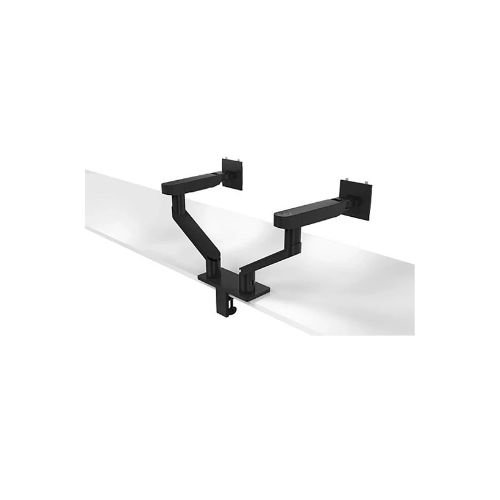


Dell Dual Monitor, Arm ACC-DMA-MDA20 (MDA20)
Key Features
Brand: Dell
Quick and Simple installation by snaping ?lets you snap on the Dell UltraSharp and P-Series monitors onto the arm without tools
Counterbalance indicator let you replicate identical tension settings across multiple units rapidly
Ample space in the cable management slot with cable clips keep up to 10 wires in place, offering a clean desk experience
Designed to optimize your viewing distance for everyday productivity
Height, tilt, pivot, depth and swivel adjustments
Compatible with 19 to 27-inch monitors weighing between 4.8 to 22.0 lbs. (2.2 to 10.0kg)
Box contents: Dell Dual Monitor Arm – MDA20, Dell VESA adapter plate, Allen key, Documentation
1 Year Warranty
Dell MDA20 Dual Monitor Arm Review: Ultimate Dual-Display Setup
The Dell Business Class ACC-DMA-MDA20 Dual Monitor Arm delivers the ultimate desk space optimization and ergonomic flexibility for modern professional workstations. This heavy-duty dual-monitor mounting solution allows you to position two displays independently. It helps eliminate desktop clutter while maximizing your daily work productivity.
Executive Overview and Premium Design Philosophy
The Dell ACC-DMA-MDA20 represents a significant advancement in commercial workspace engineering. It transitions users from restrictive static stands to a dynamic fluid workstation environment. Designed for high-density corporate offices and sophisticated home studios, this premium dual-arm system addresses the core challenges of modern multi-monitor workflows: physical discomfort, cable chaos, and lost desk real estate.
Engineered for Elite Professional Workflows
Modern professionals require rapid transitions between collaborative tasks and deep focus work. The MDA20 facilitates this agility by allowing instantaneous screen repositioning. Data analysts can instantly pivot a display to read long financial spreadsheets, while creative designers can pull a screen forward for detailed editing. This adaptable structure supports an organic workflow that matches your physical movement throughout the workday.
Structural Integrity and Premium Aesthetics
Constructed from high-grade aluminum alloys and reinforced steel components, the MDA20 features a refined matte black and silver finish that seamlessly complements professional IT hardware. Unlike generic alternatives that shake during heavy typing, this heavy-duty system dampens vibrations through its rigid core pillar and tight mechanical tolerances. The premium industrial design hides ugly hardware joints, presenting a clean architectural profile from the front and back.
Key Technical Specifications
-
- Product Type: Dual monitor desk mount arm
- Supported Screen Sizes: 19 inches to 27 inches
- Weight Capacity Range: 4.4 pounds to 22.0 pounds per arm
- VESA Mounting Interface: 100 x 100 mm with Dell Quick Release
- Tilt Range Adjustment: -35 degrees to +35 degrees
- Swivel Range Adjustment: 180 degrees
- Rotation Range Adjustment: 90 degrees (landscape to portrait)
Top Benefits of the Dell MDA20 Monitor Arm
Comprehensive Ergonomic Adjustability
This articulated arm offers effortless height, tilt, swivel, and pivot adjustments. Users can easily align their twin screens side-by-side or stack them vertically. The smooth mechanical articulation helps reduce neck strain, shoulder fatigue, and eye discomfort during long office hours.
Quick and Toolless Installation
Engineered specifically for corporate environments, this system features the Dell Quick Release mechanism. You can snap compatible Dell UltraSharp or P-Series monitors onto the bracket instantly without screws. A comprehensive manual installation kit is also included to support standard third-party VESA compliance displays.
Advanced Integrated Cable Management
The structural design features a hollow internal pathway routing system with discrete clips. This channel conceals all video signal lines and power cords. Keeping cables routed down the main support pillar frees valuable desk real estate and creates a clean aesthetic.
Dual Mounting Base Configurations
The heavy-duty desk clamp base supports two distinct installation methods out of the box. You can attach it directly to the outer desk edge using the standard C-clamp mechanism. Alternatively, you can utilize the included grommet mount hardware to install it securely through an existing desktop cable hole.
Performance Comparison: Single Base vs Individual Mounts
| Feature Comparison | Dell MDA20 Dual Arm System | Two Single Monitor Arms |
|---|---|---|
| Desk Space Required | Minimal (One Single Base) | Large (Two Separate Bases) |
| Cable Management | Unified Central Routing Channel | Scattered Separate Cable Routes |
| Display Realignment | Synchronized or Independent | Independent Alignment Only |
| Installation Complexity | Fast Single Base Assembly | Double Structural Alignment |
Step-by-Step Installation Instructions
-
- Secure the Base Attachment: Clamp the primary support bracket onto your desk edge or secure it tightly through your desktop grommet hole.
- Mount the Articulated Arms: Slide the lower dual-extension crossbar assembly over the central pillar and tighten the structural tension rings.
- Attach Your Monitor Displays: Click your Dell Quick Release monitors directly onto the plates or screw third-party screens onto the VESA brackets.
- Calibrate Internal Spring Tension: Use the hex tool to adjust the internal counterbalance tension until your monitors float weightlessly.
- Route All Connecting Cables: Open the integrated plastic management guide covers to route and conceal your power and display lines.
Frequently Asked Questions
Can this arm hold monitors larger than 27 inches?
The physical crossbar dimensions are optimized for standard screen sizes up to 27 inches. Mounting wider displays may restrict your total lateral panning range or prevent you from placing the screens perfectly flush side-by-side.
Does the system support portrait rotation?
Yes. Both mounting heads rotate a full 90 degrees independently. This allows you to view one screen in standard landscape mode while utilizing the secondary display vertically for coding, reading documents, or monitoring live data feeds.
Is this mount compatible with non-Dell displays?
Yes. The mounting bracket includes standard 100x100mm VESA configuration screw holes. You can mount any brand of display that matches the weight restrictions and layout pattern by using the provided traditional mounting screws.