Power Banks


 Brother Printers


 IP PBXs



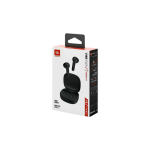
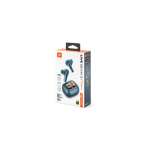
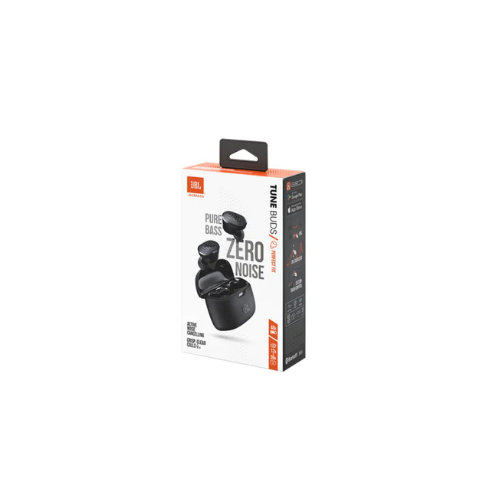
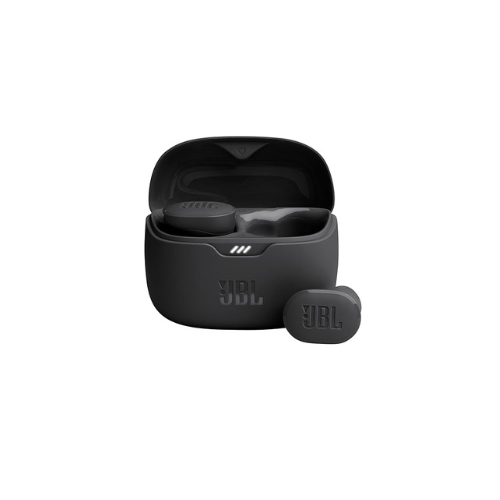

JBL TUNE Buds with noise cancelling
Key Features
Brand: JBL
Sound Quality: JBL Pure Bass | Clear Audio
Battery Life: Up to 48H (12H + 36H Case)
Connectivity: Bluetooth 5.3 | USB-C
Water Resistance: IP54 Rated
Design: True Wireless | In-Ear Fit
Extra Features: Active Noise Cancelling | Smart Ambient | 4 Mics
Compatibility: Smartphones, Tablets & Laptops
1 Year Warranty
JBL Tune Buds True Wireless Noise Cancelling Earbuds: Ultimate High-Speed Professional Guide
The JBL Tune Buds True Wireless Noise Cancelling Earbuds are a powerhouse in the professional compact audio, remote corporate communication, and high-mobility multitasking market. This high-efficiency earbud system eliminates bulky cord constraints while delivering crisp, clean audio for virtual meetings, field operations, and daily computing pipelines. It serves as a reliable, heavy-duty solution designed to streamline digital communication data, mobile audio tracking, and real-time voice monitoring for organizations of all sizes. By utilizing advanced signature acoustic engineering and pocket-sized mobility, this flexible machine helps users boost daily productivity, reduce administrative downtime, and maintain a highly mobile workflow. Modern professionals and remote operators rely on this hardware to eliminate communication bottlenecks and automate ambient noise management tasks. Its robust build quality ensures it handles high-volume processing cycles without clipping or experiencing performance drops. Mobile workers looking to scale their digital infrastructure find this device to be an indispensable asset for daily processing production.
This comprehensive guide covers everything you need to optimize this device for your business workflow.
Key Technical Specifications
Understanding the hardware capabilities helps you maximize your investment. The device balances long battery lifespans with rugged structural weatherproofing.
-
- Acoustic Driver Set: Smartly designed 10mm dynamic drivers processing a broad frequency spectrum
- Sound Architecture: Integrated JBL Pure Bass performance technology for deep low-end delivery
- Wireless Protocol: Advanced Bluetooth 5.3 framework supporting future LE Audio system configurations
- Power Cell Capacity: High-efficiency core yielding up to 48 total hours of system playback
- Environmental Rating: Certified IP54 water, sweat, and dust resistant earbud frame construction
- Microphone Profile: High-quality 4-microphone technology optimized for crystal-clear hands-free calling
Top Features and Business Benefits
Precision Active Noise Cancellation
The advanced active noise filtering technology means you never experience disruptive workspace murmurs, office distractions, or street roar. It isolates your audio signal and blocks out background interference at lightning speeds, keeping your concentration or corporate communication pipeline moving without delays.
Rich JBL Pure Bass Sound
The advanced 10mm driver technology means you never experience the thin, muddy audio distortion common with unbranded budget earbuds. It translates complex digital audio signals and processes master tracking files at lightning speeds, ensuring you feel every pulsing beat during media workflows.
Smart Ambient Transparency Modes
The built-in intelligent microphone configurations allow you to monitor surrounding environments directly from the earbud firmware. You can maximize your multi-tasking work hours safely without removing the hardware, as Ambient Aware and TalkThru modes pass external voices and critical safety alerts right into your audio mix.
Quad-Microphone Call Clarity
Integrate the machine seamlessly into high-frequency mobile communications. Operators can complete client calls using the 4-microphone array which handles stereo voice capture flawlessly, while VoiceAware side-tone loops let you track and balance your own vocal volume effortlessly.
Simple Step-by-Step Setup Guide
Follow these steps to get your professional true wireless buds running quickly.
Step 1: Unpack and Fully Charge the Case
Remove all protective packaging wraps and contact isolation stickers from the earbuds. Insert the charging case into a high-speed USB-C cable link to confirm the system board holds a complete active charge
Step 2: Initialize Wireless Pairing Mode
Extract both earbuds simultaneously from the charging case slot. The internal wireless transceiver card will instantly trigger a secure pairing broadcast mode, flashing the diagnostic indicator lights rapidly.
Step 3: Link Your Source Workstation
Open the connectivity utility panel on your laptop computer, smartphone, or tablet device. Search the active network tree, select the corresponding JBL Tune Buds entry, and confirm the wireless pairing handshake.
Step 4: Configure Advanced Software Controls
Download the official JBL Headphones mobile management application on your device operating system. Launch the calibration dashboard to complete device recognition, verify standalone battery percentages, toggle noise cancelling depth, and adjust custom equalizer curves.
Effective Troubleshooting and Maintenance
Keep your machine operating at peak performance with basic maintenance habits.
Resolving Single Earbud Pairing Jams
Turn off the power or return the hardware immediately to the charging slot if one earbud fails to sync or drops connection. Leave them inside the cradle for 10 seconds to clear the internal buffer and trigger a fresh automated sync routine.
Fixing Charging Interface Drops
If the internal charging contacts fail to register incoming power, inspect the underlying metallic pin receptors. Clear away any accumulated sweat residue, pocket lint, or earwax gently using a dry cotton swab to restore clean electrical connection lines