Power Banks


 Brother Printers


 IP PBXs



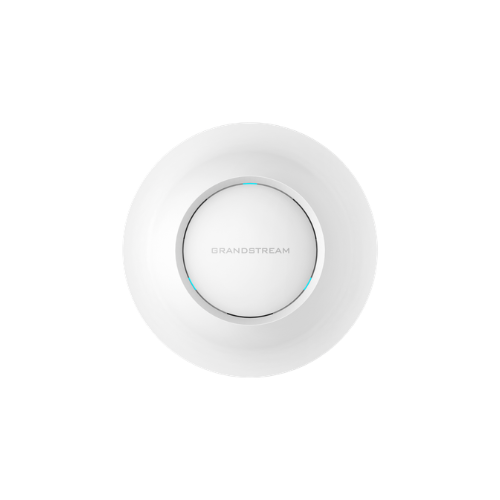

Grandstream GWN7605 Wireless Access Point
Key Features
Brand:Grandstream
1.27Gbps aggregate wireless throughput and 2xGigabit wireline ports
Dual-band 2×2:2 MU-MIMO with beamforming technology
Self power adaptation upon auto detection of PoE/PoE+
Supports 100+ concurrent Wi-Fi client devices
Up to 165-meter coverage range
Advanced QoS to ensure real-time performance of low-latency
1 Year Warranty
Grandstream GWN7605 Wireless Access Point: Ultimate High-Speed Professional Guide
The Grandstream GWN7605 Wireless Access Point is a powerhouse in the professional enterprise telecommunications, hospitality, education, and modern office network market. This high-performance indoor wireless gateway eliminates coverage dead zones while delivering crisp, clean data streaming for corporate operations, retail systems, and collaborative tasks. It serves as a reliable, heavy-duty solution designed to streamline digital communication data, multi-device traffic tracking, and high-frequency active networking for organizations of all sizes. By utilizing advanced enterprise-grade radio frequency engineering, this flexible machine helps companies boost daily productivity, reduce network connection downtime, and maintain a highly integrated workspace. Modern workplaces rely on this hardware to eliminate signal data bottlenecks and automate medium-density wireless deployment tasks. Grandstream robust build quality ensures it handles high-volume communication cycles without dropping signals or experiencing performance drops. Businesses looking to scale their wireless network infrastructure find this device to be an indispensable asset for daily processing production.
This comprehensive guide covers everything you need to optimize this device for your business workflow.
Key Technical Specifications
Understanding the hardware capabilities helps you maximize your investment. The Grandstream device balances expansive radio network coverage with intelligent wave data transmission.
-
- Wireless Standard: Dual-band 802.11ac Wave-2 Wi-Fi 5 operating architecture
- Data Throughput: Up to 1.27 Gbps aggregate wireless throughput capacities
- Antenna Engineering: Dual-band 2×2:2 MU-MIMO technology with beamforming precision
- Wired Interface: 2 autosensing Gigabit Ethernet ports supporting network routing
- Power Input: Integrated Power over Ethernet support for clean overhead cable runs
- Client Capacity: Supports up to 100 plus concurrent wireless devices within a 165-meter range
Top Features and Business Benefits
Wave-2 Dual-Band Wireless Speeds
The advanced 802.11ac wireless technology means you never experience stuttering bandwidth degradation or dropped connections during heavy data tasks. It translates digital radio frequencies and processes data packets at lightning speeds, keeping your communication or administrative pipeline moving without delays.
Advanced Beamforming Performance
The built-in smart antenna arrays automatically locate and focus signals directly toward connected hardware. You can maintain stable data streams comfortably without being tethered to low-performance legacy routers or losing range efficiency behind structural office partition barriers.
Embedded Controller Architecture
Integrate the machine seamlessly into expanding local networks without investing in extra management gear. The internal hardware controller auto-discovers and manages up to 50 local GWN series access points natively, simplifying structural administrative expansions.
Anti-Hacking Security Infrastructure
Using specific digitally signed firmware and a unique pre-installed random password profile per chassis, the hardware locks down unauthorized network entry. This is ideal for highlighting critical corporate data protection, enforcing secure wireless encryption compliance, and guarding physical local area networks.
Simple Step-by-Step Setup Guide
Follow these steps to get your professional wireless access point running quickly.
Step 1: Unpack and Attach Mount Bracket
Remove all protective packaging wraps and surface labels from the device box. Secure the plastic mounting plate flat against your ceiling tile grid or drywall path using the provided anchor kit.
Step 2: Connect the Power Ethernet Line
Plug an active Power over Ethernet network cable from your office switch into the designated back intake port slot. Verify that the center system diagnostic indicator light initializes to show incoming power.
Step 3: Secure Chassis to Mount Plates
Align the frame hook nodes with your standard surface mounting plate container array. Press the main access point chassis against the bracket and twist clockwise until the structural alignment latches click into place.
Step 4: Complete Centralized Cloud Provisioning
Open your Grandstream network browser panel or cloud management account screen. Input the unique hardware identification address to trigger zero-touch configuration profiles and complete the device recognition process.
Effective Troubleshooting and Maintenance
Keep your machine operating at peak performance with basic maintenance habits.
Resolving Connection Sync Jams
Turn off the power or cycle the main network switch line immediately if your cloud management tool fails to locate the access point. Refresh your network address server allocations to clear frozen data blocks within the system interface.
Fixing Framework Coverage Drops
If your client devices experience unexpected signal dropouts, inspect your facility layout map. Keep the access point isolated away from thick concrete support columns, unshielded mechanical transformers, or massive metal server enclosures that block radio bands.
Cleaning the Exterior Shell
Poor physical cleanliness, heavy dust accumulation, or ventilation smudges indicate a dirty outer frame. Disconnect the network link line completely and wipe the smooth plastic faceplate gently using a dry microfiber cloth without applying liquid solvents.