Power Banks


 Brother Printers


 IP PBXs



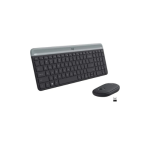
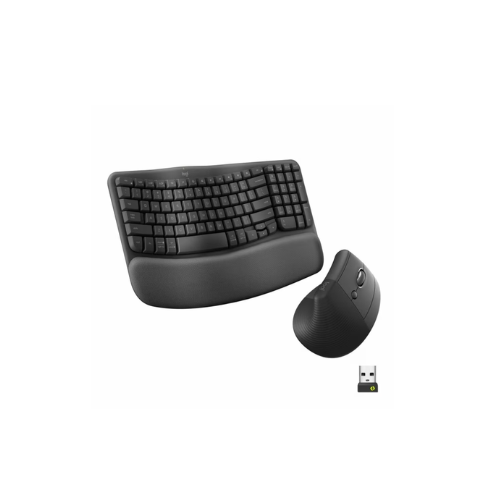


Logitech Wave Keys and Lift Combo Wireless and Bluetooth Keyboard and Mouse Combo
Key Features
Brand:Logitech
Ergonomic keyboard with curved layout
Lift ergonomic wireless mouse
Comfort-focused design for wrist and forearm health
Wireless USB receiver for easy setup
Precise control and quiet keys
Long battery life
Ideal for work, study, and productivity tasks
1 Year Warranty
Logitech Wave Keys and Lift Combo: Ultimate High-Speed Professional Guide
The Logitech Wave Keys and Lift Combo is a powerhouse in the professional corporate, home office, and health-focused workspace input market. This Logitech high-efficiency ergonomic peripheral set eliminates upper body tension while delivering crisp, clean tactile feedback for spreadsheet management, data entry, and intensive writing needs. It serves as a reliable, heavy-duty solution designed to streamline visual data input, multi-window multitasking, and daily digital navigation for businesses of all sizes. By utilizing advanced engineering, this flexible machine helps companies boost daily productivity, reduce administrative downtime, and maintain a highly organized workspace. Modern workplaces rely on this hardware to eliminate typing input bottlenecks and automate repetitive data entry tasks. Its robust build quality ensures it handles high-volume typing cycles without dropping inputs or experiencing performance drops. Businesses looking to scale their digital workstation infrastructure find this device to be an indispensable asset for daily computing production.
This Logitech comprehensive guide covers everything you need to optimize this device for your business workflow.
Key Technical Specifications
Understanding the hardware capabilities helps you maximize your investment. The device balances speed with diverse connectivity options.
-
- Keyboard Profile: Compact wave-shaped keyframe featuring a full numeric keypad layout
- Wrist Support: Integrated three-layer cushioned memory foam palm rest structure
- Mouse Ergonomics: 57-degree vertical handshake design tailored for small to medium hands
- Tracking Sensor: Advanced optical tracking ranging from 400 to 4000 dots per inch
- Wireless Connections: Dual protocol support via Bluetooth Low Energy and Logi Bolt USB
- Battery Lifespan: Up to 36 months for the keyboard and 24 months for the mouse
Top Features and Business Benefits
Natural Wave Alignment
The advanced curved keyframe technology means you never experience forced wrist extension or forearm twisting. It registers inputs and character keystrokes at lightning speeds, keeping your editing or corporate pipeline moving without delays.
Posture-Optimized Vertical Mouse
The built-in 57-degree angle allows you to place your arm in a natural handshake position. You can maximize your daily work hours comfortably without being tethered to flat mouse designs that compress the carpal tunnel nerve area.
Multi-Device Easy-Switch Control
Integrate the machine seamlessly into any office environment. Users can share the desktop combo across three unique operating systems simultaneously. Cross-platform navigation is fully supported through dedicated hardware toggling profiles
Whisper-Quiet Click Switches
Using specific dampened plunger key mechanisms and silent mouse buttons, the hardware eliminates disruptive acoustics entirely. This is ideal for highlighting critical focus, preserving workplace tranquility, and holding professional calls without clicking noises
Simple Step-by-Step Setup Guide
Follow these steps to get your professional wireless desktop combo running quickly.
Step 1: Unpack and Remove Battery Tabs
Remove all protective tapes and packaging wrap from the peripheral box. Flip both units over to expose the underlying battery doors and remove the protective plastic pull-tabs to complete circuit connectivity.
Step 2: Extract the Logi Bolt Receiver
Locate the secure Logi Bolt USB connector tucked inside the dedicated compartment within the vertical mouse shell. Pop the adapter out and close the magnetic battery housing cap securely.
Step 3: Establish a Wireless Connection
Insert the Logi Bolt connector into an open computer port or trigger your system Bluetooth pairing wizard. Press and hold an assigned channel button on the keyboard to establish a secure data stream link.
Step 4: Configure Advanced Software Controls
Download the official device management program on your computer operating system. Launch the calibration dashboard to map custom shortcut triggers and adjust cursor acceleration properties to complete the device recognition process.
Effective Troubleshooting and Maintenance
Keep your machine operating at peak performance with basic maintenance habits.
Resolving Input Lag Jams
Turn off the power immediately if your typing sequence skips or your tracking pointer jumps. Open your system device manager pane and ensure the USB receiver is isolated from dense wireless shielding barriers.
Fixing Multi-Device Switching Drops
If the wireless sync connection breaks down during machine hot-swapping, refresh the pairing properties inside your configuration dashboard. Verify that your device bluetooth protocols are fully updated to the latest standard.
Cleaning the Palm Rest Material
Poor structural hygiene, oil buildup, or smudges along the textile fabric indicate a dirty surface. Use a lightly damp cloth with mild soap to wipe down the memory foam support frame without saturating the base layer