Brother Printers
 WhiteBoard
 IP PBXs





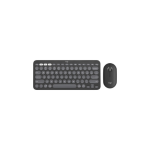
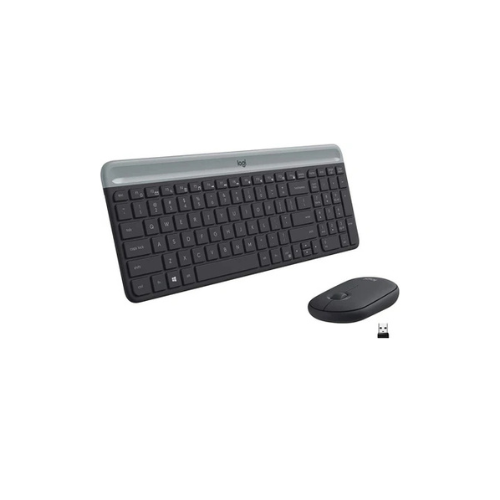

Logitech MK470 Slim Wireless Keyboard and Mouse Combo
Key Features
Brand:Logitech
Wireless 2.4 GHz Connectivity
Slim & Minimalistic Design
Quiet, Low-Profile Scissor Keys
Low-Profile, Ambidextrous Mouse
Long Battery Life
Plug-and-Play
1 Year Warranty
Logitech MK470 Slim Wireless Keyboard and Mouse Combo: Ultimate High-Speed Professional Guide
The Logitech MK470 Slim Wireless Keyboard and Mouse Combo is a powerhouse in the professional corporate, home office, and minimalist workspace input market . This Logitech high-efficiency peripheral set eliminates desktop clutter while delivering crisp, clean tactile feedback for spreadsheet management, data entry, and intensive writing needs. It serves as a reliable, heavy-duty solution designed to streamline visual data input, multi-window multitasking, and daily digital navigation for businesses of all sizes. By utilizing advanced engineering, this flexible machine helps companies boost daily productivity, reduce administrative downtime, and maintain a highly organized workspace. Modern workplaces rely on this hardware to eliminate typing input bottlenecks and automate repetitive data entry tasks. Its robust build quality ensures it handles high-volume typing cycles without dropping inputs or experiencing performance drops. Businesses looking to scale their digital workstation infrastructure find this device to be an indispensable asset for daily computing production.
This Logitech comprehensive guide covers everything you need to optimize this device for your business workflow.
Key Technical Specifications
Understanding the hardware capabilities helps you maximize your investment. The device balances speed with diverse connectivity options.
- Form Factor : Ultra-thin layout with a full-size numeric pad configuration
- Key Mechanism : Low-profile scissor switches for quiet, fluid laptop-style typing
- Mouse Sensor : High-precision optical tracking up to 1000 DPI sensitivity
- Connection Type : High-speed 2.4 GHz wireless USB nano-receiver technology
- Wireless Range : Secure connectivity spanning up to 33 feet or 10 meters
- Battery Longevity : Up to 36 months for the keyboard and 18 months for the mouse
Top Features and Business Benefits
Ultra-Quiet Tactile Typing
The advanced scissor switch technology means you never experience disruptive typing noise during deep concentration or phone calls. It registers inputs and character keystrokes at lightning speeds, keeping your editing or corporate pipeline moving without delays.
Space-Saving Minimalist Architecture
The built-in compact layout allows you to organize your desk layout directly for maximized physical workspace efficiency. You can maximize your daily work hours comfortably without being tethered to thick, heavy structural casings or cluttered cabling arrays.
Ambidextrous High-Precision Mouse
Integrate the machine seamlessly into any office environment. Left-handed and right-handed team members can share the optical mouse via its symmetrical, low-profile pebble-shape design. Fluid navigation is fully supported through the smooth rubber scroll wheel.
Automated Power-Saving Management
Using specific hardware auto-sleep triggers, the peripherals automatically enter a deep standby state when not actively in use. This is ideal for highlighting critical efficiency, preserving cell power for months at a time, and reducing hardware maintenance intervention cycles.
Simple Step-by-Step Setup Guide
Follow these steps to get your professional wireless keyboard and mouse running quickly.
Step 1: Unpack and Open Battery Covers
Remove all protective tapes and scratch-guard layers from the product shipping box. Slide the top accent panel of the keyboard upward and lift the top magnetic shell of the mouse to locate the battery chambers.
Step 2: Extract the USB Nano-Receiver
Pull the small USB wireless receiver out from its dedicated internal storage slot inside the mouse chassis. Pull out the protective plastic battery pull-tabs to activate the internal pre-installed power cells.
Step 3: Establish a Wireless Connection
Insert the USB nano-receiver directly into an open, high-speed USB port on your desktop computer, laptop station, or media hub. The internal firmware will initialize a secure pairing channel instantly.
Step 4: Configure Operating System Settings
Turn on your computer and wait for the automated plug-and-play installation sequence to finalize. Access your system peripheral menu to adjust pointer speeds and scrolling directions to complete the device recognition process.
Effective Troubleshooting and Maintenance
Keep your machine operating at peak performance with basic maintenance habits.
Resolving Input Lag Jams
Turn off the power immediately or reseat the receiver if your keystrokes skip or lag. Open your computer device driver panel and verify that the USB hub is not turning off power to the receiver to save energy.
Fixing Signal Interruption Drops
If the wireless pairing signal drops, relocate the USB receiver away from thick metal objects, shielding panels, or high-power wireless routers. Ensure your desk path remains clear of heavy wireless interference to maintain smooth tracking.